

笔记的整体结构依据视频编写,并随着学习的深入补充了很多知识
目录指引:
基本介绍
Netty 是一个异步事件驱动的网络应用程序框架,用于快速开发可维护、高性能的网络服务器和客户端
Netty 官网:https://netty.io/
Netty 的对 JDK 自带的 NIO 的 API 进行封装,解决上述问题,主要特点有:
- 设计优雅,适用于各种传输类型的统一 API, 阻塞和非阻塞 Socket 基于灵活且可扩展的事件模型
- 使用方便,详细记录的 Javadoc、用户指南和示例,没有其他依赖项
- 高性能,吞吐量更高,延迟更低,减少资源消耗,最小化不必要的内存复制
- 安全,完整的 SSL/TLS 和 StartTLS 支持
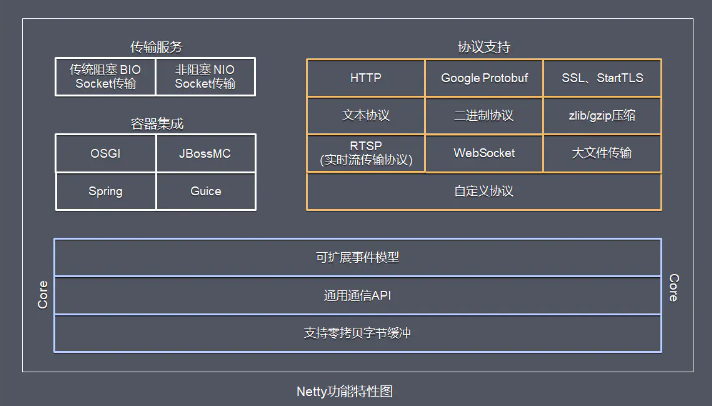
Netty 的功能特性:
- 传输服务:支持 BIO 和 NIO
- 容器集成:支持 OSGI、JBossMC、Spring、Guice 容器
- 协议支持:HTTP、Protobuf、二进制、文本、WebSocket 等一系列协议都支持,也支持通过实行编码解码逻辑来实现自定义协议
- Core 核心:可扩展事件模型、通用通信 API、支持零拷贝的 ByteBuf 缓冲对象
线程模型
阻塞模型
传统阻塞型 I/O 模式,每个连接都需要独立的线程完成数据的输入,业务处理,数据返回
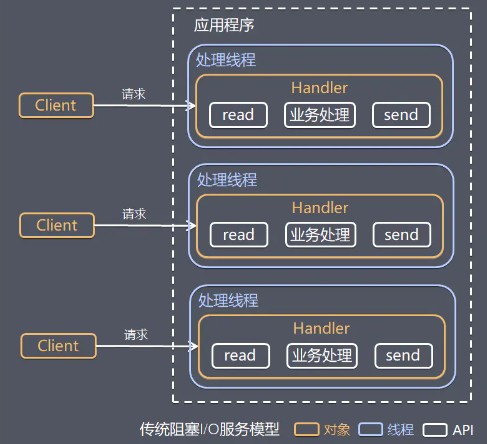
模型缺点:
- 当并发数较大时,需要创建大量线程来处理连接,系统资源占用较大
- 连接建立后,如果当前线程暂时没有数据可读,则线程就阻塞在 read 操作上,造成线程资源浪费
参考文章:https://www.jianshu.com/p/2965fca6bb8f
Reactor
设计思想
Reactor 模式,通过一个或多个输入同时传递给服务处理器的事件驱动处理模式。 服务端程序处理传入的多路请求,并将它们同步分派给对应的处理线程,Reactor 模式也叫 Dispatcher 模式,即 I/O 多路复用统一监听事件,收到事件后分发(Dispatch 给某线程)
I/O 复用结合线程池,就是 Reactor 模式基本设计思想:
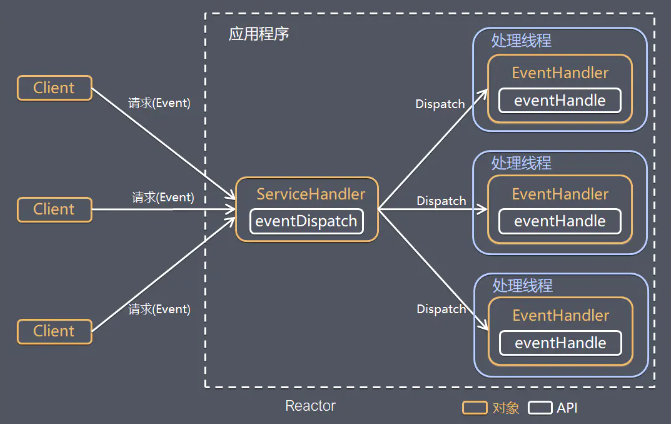
Reactor 模式关键组成:
- Reactor:在一个单独的线程中运行,负责监听和分发事件,分发给适当的处理程序来对 I/O 事件做出反应
- Handler:处理程序执行 I/O 要完成的实际事件,Reactor 通过调度适当的处理程序来响应 I/O 事件,处理程序执行非阻塞操作
Reactor 模式具有如下的优点:
- 响应快,不必为单个同步时间所阻塞,虽然 Reactor 本身依然是同步的
- 编程相对简单,可以最大程度的避免复杂的多线程及同步问题,并且避免了多线程/进程的切换开销
- 可扩展性,可以方便的通过增加 Reactor 实例个数来充分利用 CPU 资源
- 可复用性,Reactor 模型本身与具体事件处理逻辑无关,具有很高的复用性
根据 Reactor 的数量和处理资源池线程的数量不同,有三种典型的实现:
- 单 Reactor 单线程
- 单 Reactor 多线程
- 主从 Reactor 多线程
单R单线程
Reactor 对象通过 select 监控客户端请求事件,收到事件后通过 dispatch 进行分发:
如果是建立连接请求事件,则由 Acceptor 通过 accept 处理连接请求,然后创建一个 Handler 对象处理连接完成后的后续业务处理
如果不是建立连接事件,则 Reactor 会分发给连接对应的 Handler 来响应,Handler 会完成 read、业务处理、send 的完整流程
说明:Handler 和 Acceptor 属于同一个线程
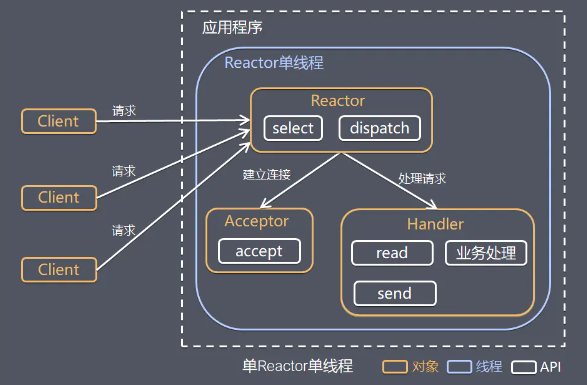
模型优点:模型简单,没有多线程、进程通信、竞争的问题,全部都在一个线程中完成
模型缺点:
- 性能问题:只有一个线程,无法发挥多核 CPU 的性能,Handler 在处理某个连接上的业务时,整个进程无法处理其他连接事件,很容易导致性能瓶颈
- 可靠性问题:线程意外跑飞,或者进入死循环,会导致整个系统通信模块不可用,不能接收和处理外部消息,造成节点故障
使用场景:客户端的数量有限,业务处理非常快速,比如 Redis,业务处理的时间复杂度 O(1)
单R多线程
执行流程通同单 Reactor 单线程,不同的是:
Handler 只负责响应事件,不做具体业务处理,通过 read 读取数据后,会分发给后面的 Worker 线程池进行业务处理
Worker 线程池会分配独立的线程完成真正的业务处理,将响应结果发给 Handler 进行处理,最后由 Handler 收到响应结果后通过 send 将响应结果返回给 Client
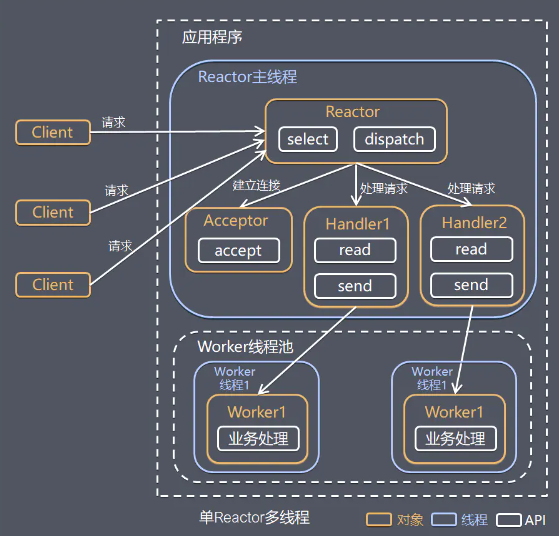
模型优点:可以充分利用多核 CPU 的处理能力
模型缺点:
- 多线程数据共享和访问比较复杂
- Reactor 承担所有事件的监听和响应,在单线程中运行,高并发场景下容易成为性能瓶颈
主从模型
采用多个 Reactor ,执行流程:
Reactor 主线程 MainReactor 通过 select 监控建立连接事件,收到事件后通过 Acceptor 接收,处理建立连接事件,处理完成后 MainReactor 会将连接分配给 Reactor 子线程的 SubReactor(有多个)处理
SubReactor 将连接加入连接队列进行监听其他事件,并创建一个 Handler 用于处理该连接的事件,当有新的事件发生时,SubReactor 会调用连接对应的 Handler 进行响应
Handler 通过 read 读取数据后,会分发给 Worker 线程池进行业务处理
Worker 线程池会分配独立的线程完成真正的业务处理,将响应结果发给 Handler 进行处理,最后由 Handler 收到响应结果后通过 send 将响应结果返回给 Client
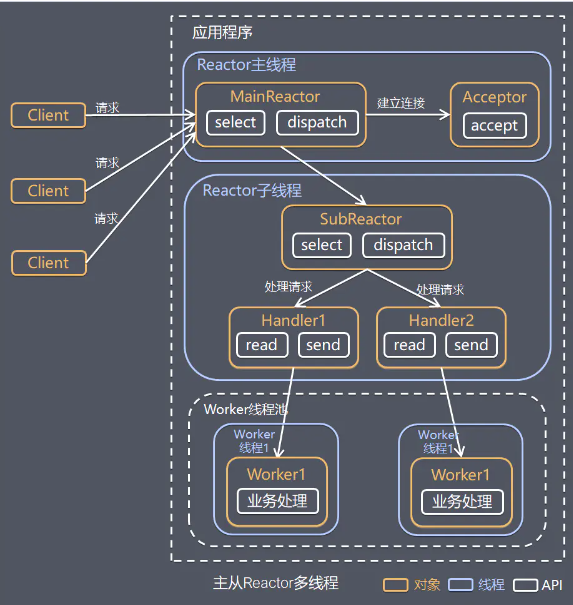
模型优点
- 父线程与子线程的数据交互简单职责明确,父线程只需要接收新连接,子线程完成后续的业务处理
- 父线程与子线程的数据交互简单,Reactor 主线程只需要把新连接传给子线程,子线程无需返回数据
使用场景:Nginx 主从 Reactor 多进程模型,Memcached 主从多线程,Netty 主从多线程模型的支持
Proactor
Reactor 模式中,Reactor 等待某个事件的操作状态发生变化(文件描述符可读写,socket 可读写),然后把事件传递给事先注册的 Handler 来做实际的读写操作,其中的读写操作都需要应用程序同步操作,所以 Reactor 是非阻塞同步网络模型(NIO)
把 I/O 操作改为异步,交给操作系统来完成就能进一步提升性能,这就是异步网络模型 Proactor(AIO):
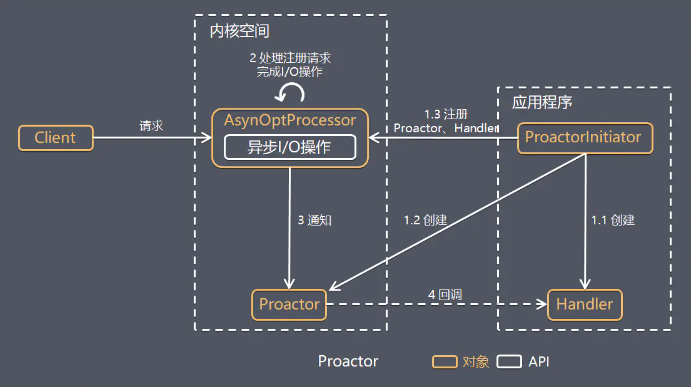
工作流程:
- ProactorInitiator 创建 Proactor 和 Handler 对象,并将 Proactor 和 Handler 通过 Asynchronous Operation Processor(AsyOptProcessor)注册到内核
- AsyOptProcessor 处理注册请求,并处理 I/O 操作,完成I/O后通知 Proactor
- Proactor 根据不同的事件类型回调不同的 Handler 进行业务处理,最后由 Handler 完成业务处理
对比:Reactor 在事件发生时就通知事先注册的处理器(读写在应用程序线程中处理完成);Proactor 是在事件发生时基于异步 I/O 完成读写操作(内核完成),I/O 完成后才回调应用程序的处理器进行业务处理
模式优点:异步 I/O 更加充分发挥 DMA(Direct Memory Access 直接内存存取)的优势
模式缺点:
- 编程复杂性,由于异步操作流程的事件的初始化和事件完成在时间和空间上都是相互分离的,因此开发异步应用程序更加复杂,应用程序还可能因为反向的流控而变得更加难以调试
- 内存使用,缓冲区在读或写操作的时间段内必须保持住,可能造成持续的不确定性,并且每个并发操作都要求有独立的缓存,Reactor 模式在 socket 准备好读或写之前是不要求开辟缓存的
- 操作系统支持,Windows 下通过 IOCP 实现了真正的异步 I/O,而在 Linux 系统下,Linux2.6 才引入异步 I/O,目前还不完善,所以在 Linux 下实现高并发网络编程都是以 Reactor 模型为主
Netty
Netty 主要基于主从 Reactors 多线程模型做了一定的改进,Netty 的工作架构图:
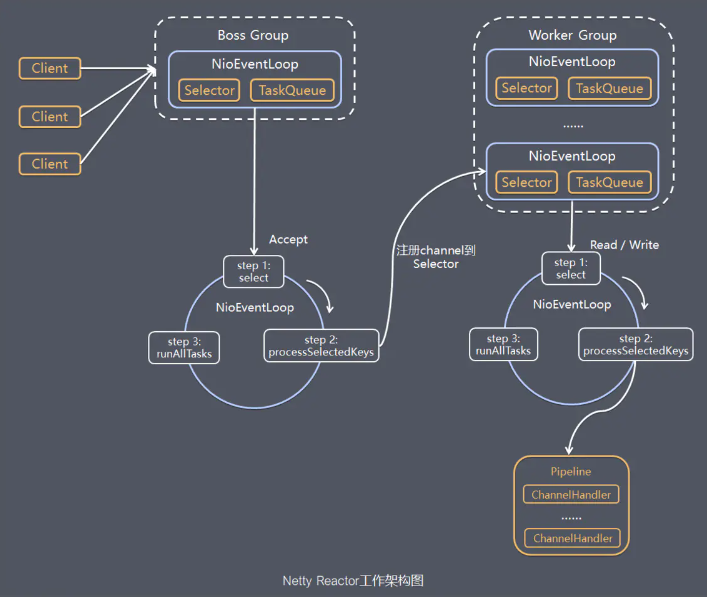
工作流程:
Netty 抽象出两组线程池 BossGroup 专门负责接收客户端的连接,WorkerGroup 专门负责网络的读写
BossGroup 和 WorkerGroup 类型都是 NioEventLoopGroup,该 Group 相当于一个事件循环组,含有多个事件循环,每一个事件循环是 NioEventLoop,所以可以有多个线程
NioEventLoop 表示一个循环处理任务的线程,每个 NioEventLoop 都有一个 Selector,用于监听绑定在其上的 Socket 的通讯
每个 Boss NioEventLoop 循环执行的步骤:
- 轮询 accept 事件
- 处理 accept 事件,与 client 建立连接,生成 NioScocketChannel,并将其注册到某个 Worker 中的某个 NioEventLoop 上的 Selector,连接就与 NioEventLoop 绑定
- 处理任务队列的任务,即 runAllTasks
每个 Worker NioEventLoop 循环执行的步骤:
- 轮询 read、write 事件
- 处理 I/O 事件,即 read,write 事件,在对应 NioSocketChannel 处理
- 处理任务队列的任务,即 runAllTasks
每个 Worker NioEventLoop 处理业务时,会使用 Pipeline(管道),Pipeline 中包含了 Channel,即通过 Pipeline 可以获取到对应通道,管道中维护了很多的处理器 Handler
基本实现
开发简单的服务器端和客户端,基本介绍:
- Channel 理解为数据的通道,把 msg 理解为流动的数据,最开始输入是 ByteBuf,但经过 Pipeline 的加工,会变成其它类型对象,最后输出又变成 ByteBuf
- Handler 理解为数据的处理工序,Pipeline 负责发布事件传播给每个 Handler,Handler 对自己感兴趣的事件进行处理(重写了相应事件处理方法),分 Inbound 和 Outbound 两类
- EventLoop 理解为处理数据的执行者,既可以执行 IO 操作,也可以进行任务处理。每个执行者有任务队列,队列里可以堆放多个 Channel 的待处理任务,任务分为普通任务、定时任务。按照 Pipeline 顺序,依次按照 Handler 的规划(代码)处理数据
代码实现:
pom.xml
xml<dependency> <groupId>io.netty</groupId> <artifactId>netty-all</artifactId> <version>4.1.20.Final</version> </dependency>Server.java
javapublic class HelloServer { public static void main(String[] args) { EventLoopGroup boss = new NioEventLoopGroup(); EventLoopGroup worker = new NioEventLoopGroup(2); // 1. 启动器,负责组装 netty 组件,启动服务器 new ServerBootstrap() // 2. 线程组,boss 只负责【处理 accept 事件】, worker 只【负责 channel 上的读写】 .group(boss, worker) //.option() // 给 ServerSocketChannel 配置参数 //.childOption() // 给 SocketChannel 配置参数 // 3. 选择服务器的 ServerSocketChannel 实现 .channel(NioServerSocketChannel.class) // 4. boss 负责处理连接,worker(child) 负责处理读写,决定了能执行哪些操作(handler) .childHandler(new ChannelInitializer<NioSocketChannel>() { // 5. channel 代表和客户端进行数据读写的通道 Initializer 初始化,负责添加别的 handler // 7. 连接建立后,执行初始化方法 @Override protected void initChannel(NioSocketChannel ch) throws Exception { // 添加具体的 handler ch.pipeline().addLast(new StringDecoder());// 将 ByteBuf 转成字符串 ch.pipeline().addLast(new ChannelInboundHandlerAdapter() { // 自定义 handler // 读事件 @Override public void channelRead(ChannelHandlerContext ctx, Object msg) { // 打印转换好的字符串 System.out.println(msg); } }); } }) // 6. 绑定监听端口 .bind(8080); } }Client.java
javapublic class HelloClient { public static void main(String[] args) throws InterruptedException { // 1. 创建启动器类 new Bootstrap() // 2. 添加 EventLoop .group(new NioEventLoopGroup()) //.option(),给 SocketChannel 配置参数 // 3. 选择客户端 channel 实现 .channel(NioSocketChannel.class) // 4. 添加处理器 .handler(new ChannelInitializer<NioSocketChannel>() { // 4.1 连接建立后被调用 @Override protected void initChannel(NioSocketChannel ch) throws Exception { // 将 Hello World 转为 ByteBuf ch.pipeline().addLast(new StringEncoder()); } }) // 5. 连接到服务器,然后调用 4.1 .connect(new InetSocketAddress("127.0.0.1",8080)) // 6. 阻塞方法,直到连接建立 .sync() // 7. 代表连接对象 .channel() // 8. 向服务器发送数据 .writeAndFlush("Hello World"); } }
参考视频:https://www.bilibili.com/video/BV1py4y1E7oA
组件介绍
EventLoop
基本介绍
事件循环对象 EventLoop,本质是一个单线程执行器同时维护了一个 Selector,有 run 方法处理 Channel 上源源不断的 IO 事件
事件循环组 EventLoopGroup 是一组 EventLoop,Channel 会调用 Boss EventLoopGroup 的 register 方法来绑定其中一个 Worker 的 EventLoop,后续这个 Channel 上的 IO 事件都由此 EventLoop 来处理,保证了事件处理时的线程安全
EventLoopGroup 类 API:
EventLoop next():获取集合中下一个 EventLoop,EventLoopGroup 实现了 Iterable 接口提供遍历 EventLoop 的能力Future<?> shutdownGracefully():优雅关闭的方法,会首先切换 EventLoopGroup 到关闭状态从而拒绝新的任务的加入,然后在任务队列的任务都处理完成后,停止线程的运行,从而确保整体应用是在正常有序的状态下退出的<T> Future<T> submit(Callable<T> task):提交任务ScheduledFuture<?> scheduleWithFixedDelay:提交定时任务
任务传递
把要调用的代码封装为一个任务对象,由下一个 handler 的线程来调用
public class EventLoopServer {
    public static void main(String[] args) {
        EventLoopGroup group = new DefaultEventLoopGroup();
        new ServerBootstrap()
                .group(new NioEventLoopGroup(), new NioEventLoopGroup(2))
                .channel(NioServerSocketChannel.class)
                .childHandler(new ChannelInitializer<NioSocketChannel>() {
                    @Override
                    protected void initChannel(NioSocketChannel ch) {
                        ch.pipeline().addLast("handler1", new ChannelInboundHandlerAdapter() {
                            @Override
                            public void channelRead(ChannelHandlerContext ctx, Object msg) {
                                ByteBuf buf = (ByteBuf) msg;
                                log.debug(buf.toString(Charset.defaultCharset()));
                                ctx.fireChannelRead(msg);   // 让消息【传递】给下一个 handler
                            }
                        }).addLast(group, "handler2", new ChannelInboundHandlerAdapter() {
                            @Override
                            public void channelRead(ChannelHandlerContext ctx, Object msg) {
                                ByteBuf buf = (ByteBuf) msg;
                                log.debug(buf.toString(Charset.defaultCharset()));
                            }
                        });
                    }
                })
                .bind(8080);
    }
}
源码分析:
public ChannelHandlerContext fireChannelRead(final Object msg) {
    invokeChannelRead(findContextInbound(MASK_CHANNEL_READ), msg);
    return this;
}
static void invokeChannelRead(final AbstractChannelHandlerContext next, Object msg) {
    final Object m = next.pipeline.touch(ObjectUtil.checkNotNull(msg, "msg"), next);
    EventExecutor executor = next.executor();
    // 下一个 handler 的事件循环是否与当前的事件循环是同一个线程
    if (executor.inEventLoop()) {
        // 是,直接调用
        next.invokeChannelRead(m);
    } else {
        // 不是,将要执行的代码作为任务提交给下一个 handler 处理
        executor.execute(new Runnable() {
            @Override
            public void run() {
                next.invokeChannelRead(m);
            }
        });
    }
}
Channel
连接操作
Channel 类 API:
ChannelFuture close():关闭通道ChannelPipeline pipeline():添加处理器ChannelFuture write(Object msg):数据写入缓冲区ChannelFuture writeAndFlush(Object msg):数据写入缓冲区并且刷出
ChannelFuture 类 API:
ChannelFuture sync():同步阻塞等待连接成功ChannelFuture addListener(GenericFutureListener listener):异步等待
代码实现:
- connect 方法是异步的,不等连接建立完成就返回,因此 channelFuture 对象中不能立刻获得到正确的 Channel 对象,需要等待
- 连接未建立 channel 打印为
[id: 0x2e1884dd];建立成功打印为[id: 0x2e1884dd, L:/127.0.0.1:57191 - R:/127.0.0.1:8080]
public class ChannelClient {
    public static void main(String[] args) throws InterruptedException {
        ChannelFuture channelFuture = new Bootstrap()
                .group(new NioEventLoopGroup())
                .channel(NioSocketChannel.class)
                .handler(new ChannelInitializer<NioSocketChannel>() {
                    @Override
                    protected void initChannel(NioSocketChannel ch) throws Exception {
                        ch.pipeline().addLast(new StringEncoder());
                    }
                })
                // 1. 连接服务器,【异步非阻塞】,main 调用 connect 方法,真正执行连接的是 nio 线程
                .connect(new InetSocketAddress("127.0.0.1", 8080));
        // 2.1 使用 sync 方法【同步】处理结果,阻塞当前线程,直到 nio 线程连接建立完毕
        channelFuture.sync();
        Channel channel = channelFuture.channel();
        System.out.println(channel); // 【打印】
        // 向服务器发送数据
        channel.writeAndFlush("hello world");

**************************************************************************************二选一
        // 2.2 使用 addListener 方法【异步】处理结果
        channelFuture.addListener(new ChannelFutureListener() {
            @Override
            // nio 线程连接建立好以后,回调该方法
            public void operationComplete(ChannelFuture future) throws Exception {
                if (future.isSuccess()) {
                    Channel channel = future.channel();
                	channel.writeAndFlush("hello, world");
                } else {
                    // 建立失败,需要关闭
                    future.channel().close();
                }
            }
        });
    }
}
关闭操作
关闭 EventLoopGroup 的运行,分为同步关闭和异步关闭
public class CloseFutureClient {
    public static void main(String[] args) throws InterruptedException {
        NioEventLoopGroup group = new NioEventLoopGroup();
        ChannelFuture channelFuture = new Bootstrap()
                // ....
                .connect(new InetSocketAddress("127.0.0.1", 8080));
        Channel channel = channelFuture.sync().channel();
        // 发送数据
        new Thread(() -> {
            Scanner sc = new Scanner(System.in);
            while (true) {
                String line = sc.nextLine();
                if (line.equals("q")) {
                    channel.close();
                    break;
                }
                channel.writeAndFlush(line);
            }
        }, "input").start();
        // 获取 CloseFuture 对象
        ChannelFuture closeFuture = channel.closeFuture();

        // 1. 同步处理关闭
        System.out.println("waiting close...");
        closeFuture.sync();
        System.out.println("处理关闭后的操作");
****************************************************
        // 2. 异步处理关闭
        closeFuture.addListener(new ChannelFutureListener() {
            @Override
            public void operationComplete(ChannelFuture future) throws Exception {
                System.out.println("处理关闭后的操作");
                group.shutdownGracefully();
            }
        });
    }
}
Future
基本介绍
Netty 中的 Future 与 JDK 中的 Future 同名,但是功能的实现不同
package io.netty.util.concurrent;
public interface Future<V> extends java.util.concurrent.Future<V>
Future 类 API:
V get():阻塞等待获取任务执行结果V getNow():非阻塞获取任务结果,还未产生结果时返回 nullThrowable cause():非阻塞获取失败信息,如果没有失败,返回 nullFuture<V> sync():等待任务结束,如果任务失败,抛出异常boolean cancel(boolean mayInterruptIfRunning):取消任务Future<V> addListener(GenericFutureListener listener):添加回调,异步接收结果boolean isSuccess():判断任务是否成功boolean isCancellable():判断任务是否取消
public class NettyFutureDemo {
    public static void main(String[] args) throws Exception {
        NioEventLoopGroup group = new NioEventLoopGroup();
        EventLoop eventLoop = group.next();
        Future<Integer> future = eventLoop.submit(new Callable<Integer>() {
            @Override
            public Integer call() throws Exception {
                System.out.println("执行计算");
                Thread.sleep(1000);
                return 70;
            }
        });
        future.getNow();
        System.out.println(new Date() + "等待结果");
        System.out.println(new Date() + "" + future.get());
    }
}
扩展子类
Promise 类是 Future 的子类,可以脱离任务独立存在,作为两个线程间传递结果的容器
public interface Promise<V> extends Future<V>Promise 类 API:
Promise<V> setSuccess(V result):设置成功结果Promise<V> setFailure(Throwable cause):设置失败结果
public class NettyPromiseDemo {
    public static void main(String[] args) throws Exception {
        // 1. 准备 EventLoop 对象
        EventLoop eventLoop = new NioEventLoopGroup().next();
        // 2. 主动创建 promise
        DefaultPromise<Integer> promise = new DefaultPromise<>(eventLoop);
        // 3. 任意一个线程执行计算,计算完毕后向 promise 填充结果
        new Thread(() -> {
            try {
                Thread.sleep(1000);
            } catch (InterruptedException e) {
                e.printStackTrace();
            }
            promise.setSuccess(200);
        }).start();

        // 4. 接受结果的线程
        System.out.println(new Date() + "等待结果");
        System.out.println(new Date() + "" + promise.get());
    }
}
Pipeline
ChannelHandler 用来处理 Channel 上的各种事件,分为入站出站两种,所有 ChannelHandler 连接成双向链表就是 Pipeline
- 入站处理器通常是 ChannelInboundHandlerAdapter 的子类,主要用来读取客户端数据,写回结果
- 出站处理器通常是 ChannelOutboundHandlerAdapter 的子类,主要对写回结果进行加工(入站和出站是对于服务端来说的)
public static void main(String[] args) {
    new ServerBootstrap()
        .group(new NioEventLoopGroup())
        .channel(NioServerSocketChannel.class)
        .childHandler(new ChannelInitializer<NioSocketChannel>() {
            @Override
            protected void initChannel(NioSocketChannel ch) throws Exception {
                // 1. 通过 channel 拿到 pipeline
                ChannelPipeline pipeline = ch.pipeline();
                // 2. 添加处理器 head -> h1 -> h2 -> h3 -> h4 -> tail
                pipeline.addLast("h1", new ChannelInboundHandlerAdapter() {
                    @Override
                    public void channelRead(ChannelHandlerContext ctx, Object msg) throws Exception {
                        log.debug("1");
                        ByteBuf buf = (ByteBuf) msg;
                        String s = buf.toString(Charset.defaultCharset());
                        // 将数据传递给下一个【入站】handler,如果不调用该方法则链会断开
                        super.channelRead(ctx, s);
                    }
                });
                pipeline.addLast("h2", new ChannelInboundHandlerAdapter() {
                    @Override
                    public void channelRead(ChannelHandlerContext ctx, Object msg) throws Exception {
                        log.debug("2");
                        // 从【尾部开始向前触发】出站处理器
                        ch.writeAndFlush(ctx.alloc().buffer().writeBytes("server".getBytes()));
                        // 该方法会让管道从【当前 handler 向前】寻找出站处理器
                        // ctx.writeAndFlush();
                    }
                });
                pipeline.addLast("h3", new ChannelOutboundHandlerAdapter() {
                    @Override
                    public void write(ChannelHandlerContext ctx, Object msg, ChannelPromise promise) throws Exception {
                        log.debug("3");
                        super.write(ctx, msg, promise);
                    }
                });
                pipeline.addLast("h4", new ChannelOutboundHandlerAdapter() {
                    @Override
                    public void write(ChannelHandlerContext ctx, Object msg, ChannelPromise promise) throws Exception {
                        log.debug("4");
                        super.write(ctx, msg, promise);
                    }
                });
            }
        })
        .bind(8080);
}
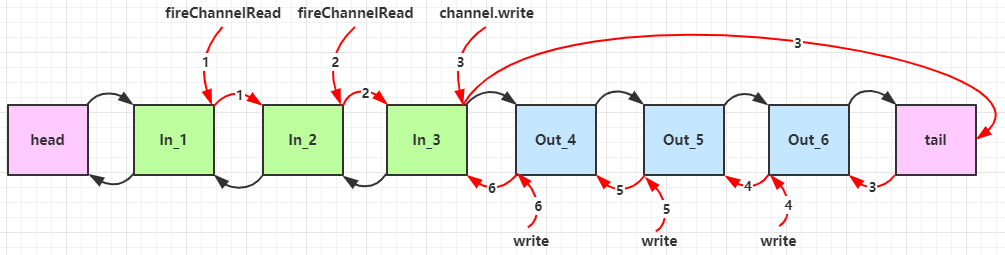
服务器端依次打印:1 2 4 3 ,所以入站是按照 addLast 的顺序执行的,出站是按照 addLast 的逆序执行
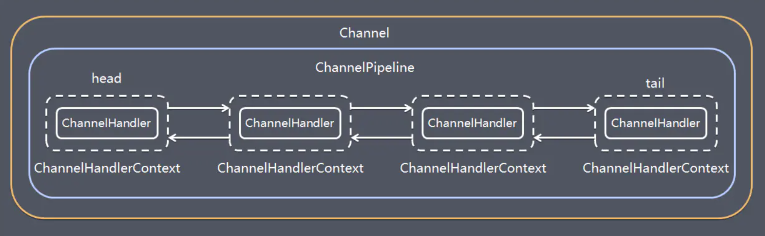
一个 Channel 包含了一个 ChannelPipeline,而 ChannelPipeline 中又维护了一个由 ChannelHandlerContext 组成的双向链表,并且每个 ChannelHandlerContext 中关联着一个 ChannelHandler
入站事件和出站事件在一个双向链表中,两种类型的 handler 互不干扰:
- 入站事件会从链表 head 往后传递到最后一个入站的 handler
- 出站事件会从链表 tail 往前传递到最前一个出站的 handler
ByteBuf
基本介绍
ByteBuf 是对字节数据的封装,优点:
- 池化,可以重用池中 ByteBuf 实例,更节约内存,减少内存溢出的可能
- 读写指针分离,不需要像 ByteBuffer 一样切换读写模式
- 可以自动扩容
- 支持链式调用,使用更流畅
- 零拷贝思想,例如 slice、duplicate、CompositeByteBuf
创建方法
创建方式
ByteBuf buffer = ByteBufAllocator.DEFAULT.buffer(10):创建了一个默认的 ByteBuf,初始容量是 10javapublic ByteBuf buffer() { if (directByDefault) { return directBuffer(); } return heapBuffer(); }ByteBuf buffer = ByteBufAllocator.DEFAULT.heapBuffer(10):创建池化基于堆的 ByteBufByteBuf buffer = ByteBufAllocator.DEFAULT.directBuffer(10):创建池化基于直接内存的 ByteBuf推荐的创建方式:在添加处理器的方法中
javapipeline.addLast(new ChannelInboundHandlerAdapter() { @Override public void channelRead(ChannelHandlerContext ctx, Object msg) throws Exception { ByteBuf buffer = ctx.alloc().buffer(); } });
直接内存对比堆内存:
- 直接内存创建和销毁的代价昂贵,但读写性能高(少一次内存复制),适合配合池化功能一起用
- 直接内存对 GC 压力小,因为这部分内存不受 JVM 垃圾回收的管理,但也要注意及时主动释放
池化的意义在于可以重用 ByteBuf,高并发时池化功能更节约内存,减少内存溢出的可能,与非池化对比:
- 非池化,每次都要创建新的 ByteBuf 实例,这个操作对直接内存代价昂贵,堆内存会增加 GC 压力
- 池化,可以重用池中 ByteBuf 实例,并且采用了与 jemalloc 类似的内存分配算法提升分配效率
池化功能的开启,可以通过下面的系统环境变量来设置:
-Dio.netty.allocator.type={unpooled|pooled} # VM 参数- 4.1 以后,非 Android 平台默认启用池化实现,Android 平台启用非池化实现
- 4.1 之前,池化功能还不成熟,默认是非池化实现
读写操作
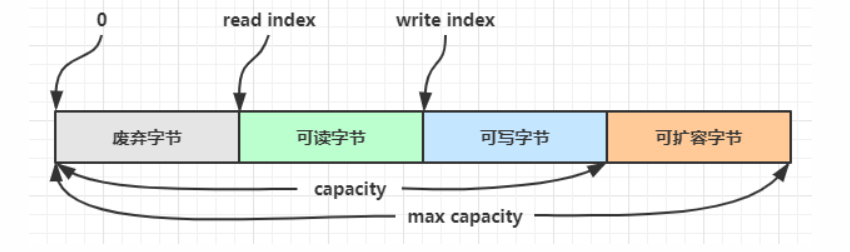
ByteBuf 由四部分组成,最开始读写指针(双指针)都在 0 位置
写入方法:
| 方法名 | 说明 | 备注 |
|---|---|---|
| writeBoolean(boolean value) | 写入 boolean 值 | 用一字节 01|00 代表 true|false |
| writeByte(int value) | 写入 byte 值 | |
| writeInt(int value) | 写入 int 值 | Big Endian,即 0x250,写入后 00 00 02 50 |
| writeIntLE(int value) | 写入 int 值 | Little Endian,即 0x250,写入后 50 02 00 00 |
| writeBytes(ByteBuf src) | 写入 ByteBuf | |
| writeBytes(byte[] src) | 写入 byte[] | |
| writeBytes(ByteBuffer src) | 写入 NIO 的 ByteBuffer | |
| int writeCharSequence(CharSequence s, Charset c) | 写入字符串 |
- 这些方法的未指明返回值的,其返回值都是 ByteBuf,意味着可以链式调用
- 写入几位写指针后移几位,指向可以写入的位置
- 网络传输,默认习惯是 Big Endian
扩容:写入数据时,容量不够了(初始容量是 10),这时会引发扩容
- 如果写入后数据大小未超过 512,则选择下一个 16 的整数倍,例如写入后大小为 12 ,则扩容后 capacity 是 16
- 如果写入后数据大小超过 512,则选择下一个 2^n,例如写入后大小为 513,则扩容后 capacity 是 2^10 = 1024(2^9=512 不够)
- 扩容不能超过 max capacity 会报错
读取方法:
byte readByte():读取一个字节,读指针后移byte getByte(int index):读取指定索引位置的字节,读指针不动ByteBuf markReaderIndex():标记读数据的位置ByteBuf resetReaderIndex():重置到标记位置,可以重复读取标记位置向后的数据
内存释放
Netty 中三种内存的回收:
- UnpooledHeapByteBuf 使用的是 JVM 内存,只需等 GC 回收内存
- UnpooledDirectByteBuf 使用的就是直接内存了,需要特殊的方法来回收内存
- PooledByteBuf 和子类使用了池化机制,需要更复杂的规则来回收内存
Netty 采用了引用计数法来控制回收内存,每个 ByteBuf 都实现了 ReferenceCounted 接口,回收的规则:
- 每个 ByteBuf 对象的初始计数为 1
- 调用 release 方法计数减 1,如果计数为 0,ByteBuf 内存被回收
- 调用 retain 方法计数加 1,表示调用者没用完之前,其它 handler 即使调用了 release 也不会造成回收
- 当计数为 0 时,底层内存会被回收,这时即使 ByteBuf 对象还在,其各个方法均无法正常使用
ByteBuf buf = .ByteBufAllocator.DEFAULT.buffer(10)
try {
    // 逻辑处理
} finally {
    buf.release();
}
Pipeline 的存在,需要将 ByteBuf 传递给下一个 ChannelHandler,如果在 finally 中 release 了,就失去了传递性,处理规则:
创建 ByteBuf 放入 Pipeline
入站 ByteBuf 处理原则
对原始 ByteBuf 不做处理,调用 ctx.fireChannelRead(msg) 向后传递,这时无须 release,反之不传递需要
将原始 ByteBuf 转换为其它类型的 Java 对象,这时 ByteBuf 就没用了,此时必须 release
如果出现异常,ByteBuf 没有成功传递到下一个 ChannelHandler,必须 release
假设消息一直向后传,那么 TailContext 会负责释放未处理消息(原始的 ByteBuf)
java// io.netty.channel.DefaultChannelPipeline#onUnhandledInboundMessage(java.lang.Object) protected void onUnhandledInboundMessage(Object msg) { try { logger.debug(); } finally { ReferenceCountUtil.release(msg); } } // io.netty.util.ReferenceCountUtil#release(java.lang.Object) public static boolean release(Object msg) { if (msg instanceof ReferenceCounted) { return ((ReferenceCounted) msg).release(); } return false; }
出站 ByteBuf 处理原则
- 出站消息最终都会转为 ByteBuf 输出,一直向前传,由 HeadContext flush 后 release
不确定 ByteBuf 被引用了多少次,但又必须彻底释放,可以循环调用 release 直到返回 true
拷贝操作
零拷贝方法:
ByteBuf slice(int index, int length):对原始 ByteBuf 进行切片成多个 ByteBuf,切片后的 ByteBuf 并没有发生内存复制,共用原始 ByteBuf 的内存,切片后的 ByteBuf 维护独立的 read,write 指针javapublic static void main(String[] args) { ByteBuf buf = ByteBufAllocator.DEFAULT.buffer(10); buf.writeBytes(new byte[]{'a', 'b', 'c', 'd', 'e', 'f', 'g', 'h', 'i', 'j'}); // 在切片过程中并没有发生数据复制 ByteBuf f1 = buf.slice(0, 5); f1.retain(); ByteBuf f2 = buf.slice(5, 5); f2.retain(); // 对 f1 进行相关的操作也会体现在 buf 上 }ByteBuf duplicate():截取原始 ByteBuf 所有内容,并且没有 max capacity 的限制,也是与原始 ByteBuf 使用同一块底层内存,只是读写指针是独立的CompositeByteBuf addComponents(boolean increaseWriterIndex, ByteBuf... buffers):合并多个 ByteBufjavapublic static void main(String[] args) { ByteBuf buf1 = ByteBufAllocator.DEFAULT.buffer(); buf1.writeBytes(new byte[]{1, 2, 3, 4, 5}); ByteBuf buf2 = ByteBufAllocator.DEFAULT.buffer(); buf1.writeBytes(new byte[]{6, 7, 8, 9, 10}); CompositeByteBuf buf = ByteBufAllocator.DEFAULT.compositeBuffer(); // true 表示增加新的 ByteBuf 自动递增 write index, 否则 write index 会始终为 0 buf.addComponents(true, buf1, buf2); }CompositeByteBuf 是一个组合的 ByteBuf,内部维护了一个 Component 数组,每个 Component 管理一个 ByteBuf,记录了这个 ByteBuf 相对于整体偏移量等信息,代表着整体中某一段的数据
- 优点:对外是一个虚拟视图,组合这些 ByteBuf 不会产生内存复制
- 缺点:复杂了很多,多次操作会带来性能的损耗
深拷贝:
ByteBuf copy():将底层内存数据进行深拷贝,因此无论读写,都与原始 ByteBuf 无关
池化相关:
Unpooled 是一个工具类,提供了非池化的 ByteBuf 创建、组合、复制等操作
javaByteBuf buf1 = ByteBufAllocator.DEFAULT.buffer(5); buf1.writeBytes(new byte[]{1, 2, 3, 4, 5}); ByteBuf buf2 = ByteBufAllocator.DEFAULT.buffer(5); buf2.writeBytes(new byte[]{6, 7, 8, 9, 10}); // 当包装 ByteBuf 个数超过一个时, 底层使用了 CompositeByteBuf,零拷贝思想 ByteBuf buf = Unpooled.wrappedBuffer(buf1, buf2);
粘包半包
现象演示
在 TCP 传输中,客户端发送消息时,实际上是将数据写入 TCP 的缓存,此时数据的大小和缓存的大小就会造成粘包和半包
当数据超过 TCP 缓存容量时,就会被拆分成多个包,通过 Socket 多次发送到服务端,服务端每次从缓存中取数据,产生半包问题
当数据小于 TCP 缓存容量时,缓存中可以存放多个包,客户端和服务端一次通信就可能传递多个包,这时候服务端就可能一次读取多个包,产生粘包的问题
代码演示:
客户端代码:
javapublic class HelloWorldClient { public static void main(String[] args) { send(); } private static void send() { NioEventLoopGroup worker = new NioEventLoopGroup(); try { Bootstrap bootstrap = new Bootstrap(); bootstrap.channel(NioSocketChannel.class); bootstrap.group(worker); bootstrap.handler(new ChannelInitializer<SocketChannel>() { @Override protected void initChannel(SocketChannel ch) throws Exception { ch.pipeline().addLast(new ChannelInboundHandlerAdapter() { // 【在连接 channel 建立成功后,会触发 active 方法】 @Override public void channelActive(ChannelHandlerContext ctx) throws Exception { // 发送内容随机的数据包 Random r = new Random(); char c = '0'; ByteBuf buf = ctx.alloc().buffer(); for (int i = 0; i < 10; i++) { byte[] bytes = new byte[10]; for (int j = 0; j < r.nextInt(9) + 1; j++) { bytes[j] = (byte) c; } c++; buf.writeBytes(bytes); } ctx.writeAndFlush(buf); } }); } }); ChannelFuture channelFuture = bootstrap.connect("127.0.0.1", 8080).sync(); channelFuture.channel().closeFuture().sync(); } catch (InterruptedException e) { log.error("client error", e); } finally { worker.shutdownGracefully(); } } }服务器代码:
javapublic class HelloWorldServer { public static void main(String[] args) { NioEventLoopGroup boss = new NioEventLoopGroup(1); NioEventLoopGroup worker = new NioEventLoopGroup(); try { ServerBootstrap serverBootstrap = new ServerBootstrap(); serverBootstrap.channel(NioServerSocketChannel.class); // 调整系统的接受缓冲区【滑动窗口】 //serverBootstrap.option(ChannelOption.SO_RCVBUF, 10); // 调整 netty 的接受缓冲区(ByteBuf) //serverBootstrap.childOption(ChannelOption.RCVBUF_ALLOCATOR, // new AdaptiveRecvByteBufAllocator(16, 16, 16)); serverBootstrap.group(boss, worker); serverBootstrap.childHandler(new ChannelInitializer<SocketChannel>() { @Override protected void initChannel(SocketChannel ch) throws Exception { // 【这里可以添加解码器】 // LoggingHandler 用来打印消息 ch.pipeline().addLast(new LoggingHandler(LogLevel.DEBUG)); } }); ChannelFuture channelFuture = serverBootstrap.bind(8080); channelFuture.sync(); channelFuture.channel().closeFuture().sync(); } catch (InterruptedException e) { log.error("server error", e); } finally { boss.shutdownGracefully(); worker.shutdownGracefully(); log.debug("stop"); } } }粘包效果展示:
java09:57:27.140 [nioEventLoopGroup-3-1] DEBUG io.netty.handler.logging.LoggingHandler - [id: 0xddbaaef6, L:/127.0.0.1:8080 - R:/127.0.0.1:8701] READ: 100B // 读了 100 字节,发生粘包 +-------------------------------------------------+ | 0 1 2 3 4 5 6 7 8 9 a b c d e f | +--------+-------------------------------------------------+----------------+ |00000000| 30 30 30 30 30 00 00 00 00 00 31 00 00 00 00 00 |00000.....1.....| |00000010| 00 00 00 00 32 32 32 32 00 00 00 00 00 00 33 00 |....2222......3.| |00000020| 00 00 00 00 00 00 00 00 34 34 00 00 00 00 00 00 |........44......| |00000030| 00 00 35 35 35 35 00 00 00 00 00 00 36 36 36 00 |..5555......666.| |00000040| 00 00 00 00 00 00 37 37 37 37 00 00 00 00 00 00 |......7777......| |00000050| 38 38 38 38 38 00 00 00 00 00 39 39 00 00 00 00 |88888.....99....| |00000060| 00 00 00 00 |.... | +--------+-------------------------------------------------+----------------+
解决方法:通过调整系统的接受缓冲区的滑动窗口和 Netty 的接受缓冲区保证每条包只含有一条数据,滑动窗口的大小仅决定了 Netty 读取的最小单位,实际每次读取的一般是它的整数倍
解决方案
短连接
发一个包建立一次连接,这样连接建立到连接断开之间就是消息的边界,缺点就是效率很低
客户端代码改造:
public class HelloWorldClient {
    public static void main(String[] args) {
        // 分 10 次发送
        for (int i = 0; i < 10; i++) {
            send();
        }
    }
}
固定长度
服务器端加入定长解码器,每一条消息采用固定长度。如果是半包消息,会缓存半包消息并等待下个包到达之后进行拼包合并,直到读取一个完整的消息包;如果是粘包消息,空余的位置会进行补 0,会浪费空间
serverBootstrap.childHandler(new ChannelInitializer<SocketChannel>() {
    @Override
    protected void initChannel(SocketChannel ch) throws Exception {
        ch.pipeline().addLast(new FixedLengthFrameDecoder(10));
        // LoggingHandler 用来打印消息
        ch.pipeline().addLast(new LoggingHandler(LogLevel.DEBUG));
    }
});10:29:06.522 [nioEventLoopGroup-3-1] DEBUG io.netty.handler.logging.LoggingHandler - [id: 0x38a70fbf, L:/127.0.0.1:8080 - R:/127.0.0.1:10144] READ: 10B
+-------------------------------------------------+
| 0 1 2 3 4 5 6 7 8 9 a b c d e f |
+--------+-------------------------------------------------+----------------+
|00000000| 31 31 00 00 00 00 00 00 00 00 |11........ |
+--------+-------------------------------------------------+----------------+
10:29:06.522 [nioEventLoopGroup-3-1] DEBUG io.netty.handler.logging.LoggingHandler - [id: 0x38a70fbf, L:/127.0.0.1:8080 - R:/127.0.0.1:10144] READ: 10B
+-------------------------------------------------+
| 0 1 2 3 4 5 6 7 8 9 a b c d e f |
+--------+-------------------------------------------------+----------------+
|00000000| 32 32 32 32 32 32 00 00 00 00 |222222.... |
+--------+-------------------------------------------------+----------------+分隔符
服务端加入行解码器,默认以 \n 或 \r\n 作为分隔符,如果超出指定长度仍未出现分隔符,则抛出异常:
serverBootstrap.childHandler(new ChannelInitializer<SocketChannel>() {
    @Override
    protected void initChannel(SocketChannel ch) throws Exception {
        ch.pipeline().addLast(new FixedLengthFrameDecoder(8));
        ch.pipeline().addLast(new LoggingHandler(LogLevel.DEBUG));
    }
});
客户端在每条消息之后,加入 \n 分隔符:
public void channelActive(ChannelHandlerContext ctx) throws Exception {
    Random r = new Random();
    char c = 'a';
    ByteBuf buffer = ctx.alloc().buffer();
    for (int i = 0; i < 10; i++) {
        for (int j = 1; j <= r.nextInt(16)+1; j++) {
            buffer.writeByte((byte) c);
        }
        // 10 代表 '\n'
        buffer.writeByte(10);
        c++;
    }
    ctx.writeAndFlush(buffer);
}
预设长度
LengthFieldBasedFrameDecoder 解码器自定义长度解决 TCP 粘包黏包问题
int maxFrameLength		// 数据最大长度
int lengthFieldOffset 	// 长度字段偏移量,从第几个字节开始是内容的长度字段
int lengthFieldLength	// 长度字段本身的长度
int lengthAdjustment 	// 长度字段为基准,几个字节后才是内容
int initialBytesToStrip // 从头开始剥离几个字节解码后显示lengthFieldOffset = 1 (= the length of HDR1)
lengthFieldLength = 2
lengthAdjustment = 1 (= the length of HDR2)
initialBytesToStrip = 3 (= the length of HDR1 + LEN)
BEFORE DECODE (16 bytes) AFTER DECODE (13 bytes)//解码
+------+--------+------+----------------+ +------+----------------+
| HDR1 | Length | HDR2 | Actual Content |----->| HDR2 | Actual Content |
| 0xCA | 0x000C | 0xFE | "HELLO, WORLD" | | 0xFE | "HELLO, WORLD" |
+------+--------+------+----------------+ +------+----------------+代码实现:
public class LengthFieldDecoderDemo {
    public static void main(String[] args) {
        EmbeddedChannel channel = new EmbeddedChannel(
                // int 占 4 字节,版本号一个字节
                new LengthFieldBasedFrameDecoder(1024, 0, 4, 1,5),
                new LoggingHandler(LogLevel.DEBUG)
        );

        // 4 个字节的内容长度, 实际内容
        ByteBuf buffer = ByteBufAllocator.DEFAULT.buffer();
        send(buffer, "Hello, world");
        send(buffer, "Hi!");
        // 写出缓存
        channel.writeInbound(buffer);
    }
    // 写入缓存
    private static void send(ByteBuf buffer, String content) {
        byte[] bytes = content.getBytes();  // 实际内容
        int length = bytes.length;          // 实际内容长度
        buffer.writeInt(length);
        buffer.writeByte(1);                // 表示版本号
        buffer.writeBytes(bytes);
    }
}10:49:59.344 [main] DEBUG io.netty.handler.logging.LoggingHandler - [id: 0xembedded, L:embedded - R:embedded] READ: 12B
+-------------------------------------------------+
| 0 1 2 3 4 5 6 7 8 9 a b c d e f |
+--------+-------------------------------------------------+----------------+
|00000000| 48 65 6c 6c 6f 2c 20 77 6f 72 6c 64 |Hello, world |
+--------+-------------------------------------------------+----------------+
10:49:59.344 [main] DEBUG io.netty.handler.logging.LoggingHandler - [id: 0xembedded, L:embedded - R:embedded] READ: 3B
+-------------------------------------------------+
| 0 1 2 3 4 5 6 7 8 9 a b c d e f |
+--------+-------------------------------------------------+----------------+
|00000000| 48 69 21 |Hi! |
+--------+-------------------------------------------------+----------------+协议设计
HTTP
访问 URL:http://localhost:8080/
public class HttpDemo {
    public static void main(String[] args) {
        NioEventLoopGroup boss = new NioEventLoopGroup();
        NioEventLoopGroup worker = new NioEventLoopGroup();
        try {
            ServerBootstrap serverBootstrap = new ServerBootstrap();
            serverBootstrap.channel(NioServerSocketChannel.class);
            serverBootstrap.group(boss, worker);
            serverBootstrap.childHandler(new ChannelInitializer<SocketChannel>() {
                @Override
                protected void initChannel(SocketChannel ch) throws Exception {
                    ch.pipeline().addLast(new LoggingHandler(LogLevel.DEBUG));
                    ch.pipeline().addLast(new HttpServerCodec());
                    // 只针对某一种类型的请求处理,此处针对 HttpRequest
                    ch.pipeline().addLast(new SimpleChannelInboundHandler<HttpRequest>() {
                        @Override
                        protected void channelRead0(ChannelHandlerContext ctx, HttpRequest msg) {
                            // 获取请求
                            log.debug(msg.uri());

                            // 返回响应
                            DefaultFullHttpResponse response = new DefaultFullHttpResponse(
                                msg.protocolVersion(), HttpResponseStatus.OK);

                            byte[] bytes = "<h1>Hello, world!</h1>".getBytes();

                            response.headers().setInt(CONTENT_LENGTH, bytes.length);
                            response.content().writeBytes(bytes);

                            // 写回响应
                            ctx.writeAndFlush(response);
                        }
                    });
                }
            });
            ChannelFuture channelFuture = serverBootstrap.bind(8080).sync();
            channelFuture.channel().closeFuture().sync();
        } catch (InterruptedException e) {
            log.error("n3.server error", e);
        } finally {
            boss.shutdownGracefully();
            worker.shutdownGracefully();
        }
    }
}
自定义
处理器代码:
@Slf4j
public class MessageCodec extends ByteToMessageCodec<Message> {
    // 编码
    @Override
    public void encode(ChannelHandlerContext ctx, Message msg, ByteBuf out) throws Exception {
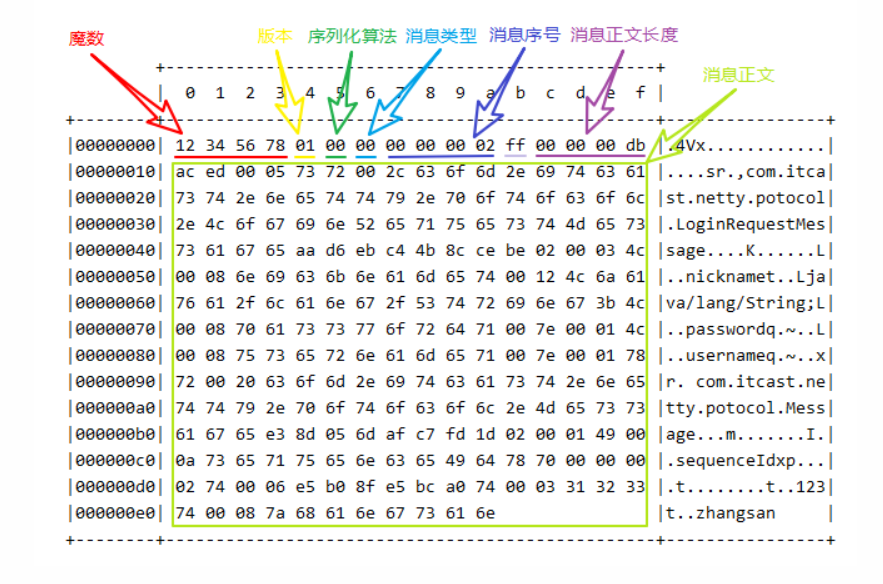
        // 4 字节的魔数
        out.writeBytes(new byte[]{1, 2, 3, 4});
        // 1 字节的版本,
        out.writeByte(1);
        // 1 字节的序列化方式 jdk 0 , json 1
        out.writeByte(0);
        // 1 字节的指令类型
        out.writeByte(msg.getMessageType());
        // 4 个字节
        out.writeInt(msg.getSequenceId());
        // 无意义,对齐填充, 1 字节
        out.writeByte(0xff);
        // 获取内容的字节数组,msg 对象序列化
        ByteArrayOutputStream bos = new ByteArrayOutputStream();
        ObjectOutputStream oos = new ObjectOutputStream(bos);
        oos.writeObject(msg);
        byte[] bytes = bos.toByteArray();
        // 长度
        out.writeInt(bytes.length);
        // 写入内容
        out.writeBytes(bytes);
    }

    // 解码
    @Override
    protected void decode(ChannelHandlerContext ctx, ByteBuf in, List<Object> out) throws Exception {
        int magicNum = in.readInt();
        byte version = in.readByte();
        byte serializerType = in.readByte();
        byte messageType = in.readByte();
        int sequenceId = in.readInt();
        in.readByte();
        int length = in.readInt();
        byte[] bytes = new byte[length];
        in.readBytes(bytes, 0, length);
        ObjectInputStream ois = new ObjectInputStream(new ByteArrayInputStream(bytes));
        Message message = (Message) ois.readObject();
        log.debug("{}, {}, {}, {}, {}, {}", magicNum, version, serializerType, messageType, sequenceId, length);
        log.debug("{}", message);
        out.add(message);
    }
}
测试代码:
public static void main(String[] args) throws Exception {
    EmbeddedChannel channel = new EmbeddedChannel(new LoggingHandler(), new MessageCodec());
    // encode
    LoginRequestMessage message = new LoginRequestMessage("zhangsan", "123");
    channel.writeOutbound(message);

    // decode
    ByteBuf buf = ByteBufAllocator.DEFAULT.buffer();
    new MessageCodec().encode(null, message, buf);
    // 入站
    channel.writeInbound(buf);
}
public class LoginRequestMessage extends Message {
    private String username;
    private String password;
    // set + get
}
Sharable
@Sharable 注解的添加时机:
当 handler 不保存状态时,就可以安全地在多线程下被共享
对于编解码器类不能继承 ByteToMessageCodec 或 CombinedChannelDuplexHandler,它们的构造方法对 @Sharable 有限制
javaprotected ByteToMessageCodec(boolean preferDirect) { ensureNotSharable(); outboundMsgMatcher = TypeParameterMatcher.find(this, ByteToMessageCodec.class, "I"); encoder = new Encoder(preferDirect); }javaprotected void ensureNotSharable() { // 如果类上有该注解 if (isSharable()) { throw new IllegalStateException(); } }如果能确保编解码器不会保存状态,可以继承 MessageToMessageCodec 父类
java@Slf4j @ChannelHandler.Sharable // 必须和 LengthFieldBasedFrameDecoder 一起使用,确保接到的 ByteBuf 消息是完整的 public class MessageCodecSharable extends MessageToMessageCodec<ByteBuf, Message> { @Override protected void encode(ChannelHandlerContext ctx, Message msg, List<Object> outList) throws Exception { ByteBuf out = ctx.alloc().buffer(); // 4 字节的魔数 out.writeBytes(new byte[]{1, 2, 3, 4}); // .... outList.add(out); } @Override protected void decode(ChannelHandlerContext ctx, ByteBuf in, List<Object> out) throws Exception { //.... } }
场景优化
空闲检测
连接假死
连接假死就是客户端数据发不出去,服务端也一直收不到数据,保持这种状态,假死的连接占用的资源不能自动释放,而且向假死连接发送数据,得到的反馈是发送超时
解决方案:每隔一段时间就检查这段时间内是否接收到客户端数据,没有就可以判定为连接假死
IdleStateHandler 是 Netty 提供的处理空闲状态的处理器,用来判断是不是读空闲时间或写空闲时间过长
- 参数一 long readerIdleTime:读空闲,表示多长时间没有读
- 参数二 long writerIdleTime:写空闲,表示多长时间没有写
- 参数三 long allIdleTime:读写空闲,表示多长时间没有读写
serverBootstrap.childHandler(new ChannelInitializer<SocketChannel>() {
	@Override
	protected void initChannel(SocketChannel ch) throws Exception {
        ch.pipeline().addLast(new LengthFieldBasedFrameDecoder(1024, 12, 4, 0, 0));
        ch.pipeline().addLast(new MessageCodec());
        // 5s 内如果没有收到 channel 的数据,会触发一个 IdleState#READER_IDLE 事件,
        ch.pipeline().addLast(new IdleStateHandler(5, 0, 0));
        // ChannelDuplexHandler 【可以同时作为入站和出站】处理器
        ch.pipeline().addLast(new ChannelDuplexHandler() {
            // 用来触发特殊事件
            @Override
            public void userEventTriggered(ChannelHandlerContext ctx, Object evt) throws Exception{
                IdleStateEvent event = (IdleStateEvent) evt;
                // 触发了读空闲事件
                if (event.state() == IdleState.READER_IDLE) {
                    log.debug("已经 5s 没有读到数据了");
                    ctx.channel().close();
                }
            }
        });
    }
}
心跳机制
客户端定时向服务器端发送数据,时间间隔要小于服务器定义的空闲检测的时间间隔,就能防止误判连接假死,这就是心跳机制
bootstrap.handler(new ChannelInitializer<SocketChannel>() {
    @Override
    protected void initChannel(SocketChannel ch) throws Exception {
        ch.pipeline().addLast(new LengthFieldBasedFrameDecoder(1024, 12, 4, 0, 0));
        ch.pipeline().addLast(new MessageCodec());
        // 3s 内如果没有向服务器写数据,会触发一个 IdleState#WRITER_IDLE 事件
        ch.pipeline().addLast(new IdleStateHandler(0, 3, 0));
        // ChannelDuplexHandler 可以同时作为入站和出站处理器
        ch.pipeline().addLast(new ChannelDuplexHandler() {
            // 用来触发特殊事件
            @Override
            public void userEventTriggered(ChannelHandlerContext ctx, Object evt) throws Exception {
                IdleStateEvent event = (IdleStateEvent) evt;
                // 触发了写空闲事件
                if (event.state() == IdleState.WRITER_IDLE) {
                    // 3s 没有写数据了,【发送一个心跳包】
                    ctx.writeAndFlush(new PingMessage());
                }
            }
        });
    }
}
序列化
普通方式
序列化,反序列化主要用在消息正文的转换上
- 序列化时,需要将 Java 对象变为要传输的数据(可以是 byte[],或 json 等,最终都需要变成 byte[])
- 反序列化时,需要将传入的正文数据还原成 Java 对象,便于处理
代码实现:
抽象一个 Serializer 接口
javapublic interface Serializer { // 反序列化方法 <T> T deserialize(Class<T> clazz, byte[] bytes); // 序列化方法 <T> byte[] serialize(T object); }提供两个实现
javaenum SerializerAlgorithm implements Serializer { // Java 实现 Java { @Override public <T> T deserialize(Class<T> clazz, byte[] bytes) { try { ObjectInputStream in = new ObjectInputStream(new ByteArrayInputStream(bytes)); Object object = in.readObject(); return (T) object; } catch (IOException | ClassNotFoundException e) { throw new RuntimeException("SerializerAlgorithm.Java 反序列化错误", e); } } @Override public <T> byte[] serialize(T object) { try { ByteArrayOutputStream out = new ByteArrayOutputStream(); new ObjectOutputStream(out).writeObject(object); return out.toByteArray(); } catch (IOException e) { throw new RuntimeException("SerializerAlgorithm.Java 序列化错误", e); } } }, // Json 实现(引入了 Gson 依赖) Json { @Override public <T> T deserialize(Class<T> clazz, byte[] bytes) { return new Gson().fromJson(new String(bytes, StandardCharsets.UTF_8), clazz); } @Override public <T> byte[] serialize(T object) { return new Gson().toJson(object).getBytes(StandardCharsets.UTF_8); } }; // 需要从协议的字节中得到是哪种序列化算法 public static SerializerAlgorithm getByInt(int type) { SerializerAlgorithm[] array = SerializerAlgorithm.values(); if (type < 0 || type > array.length - 1) { throw new IllegalArgumentException("超过 SerializerAlgorithm 范围"); } return array[type]; } }
ProtoBuf
基本介绍
Codec(编解码器)的组成部分有两个:Decoder(解码器)和 Encoder(编码器)。Encoder 负责把业务数据转换成字节码数据,Decoder 负责把字节码数据转换成业务数据

Protobuf 是 Google 发布的开源项目,全称 Google Protocol Buffers ,是一种轻便高效的结构化数据存储格式,可以用于结构化数据串行化,或者说序列化。很适合做数据存储或 RPC(远程过程调用 remote procedure call)数据交换格式。目前很多公司从 HTTP + Json 转向 TCP + Protobuf ,效率会更高
Protobuf 是以 message 的方式来管理数据,支持跨平台、跨语言(客户端和服务器端可以是不同的语言编写的),高性能、高可靠性
工作过程:使用 Protobuf 编译器自动生成代码,Protobuf 是将类的定义使用 .proto 文件进行描述,然后通过 protoc.exe 编译器根据 .proto 自动生成 .java 文件
代码实现
单个 message:
lesssyntax = "proto3"; // 版本 option java_outer_classname = "StudentPOJO"; // 生成的外部类名,同时也是文件名 message Student { // 在 StudentPOJO 外部类种生成一个内部类 Student,是真正发送的 POJO 对象 int32 id = 1; // Student 类中有一个属性:名字为 id 类型为 int32(protobuf类型) ,1表示属性序号,不是值 string name = 2; }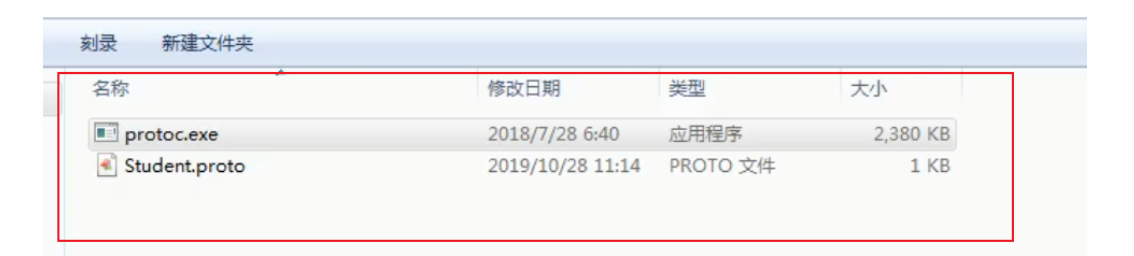
编译
protoc.exe --java_out=.Student.proto(cmd 窗口输入) 将生成的 StudentPOJO 放入到项目使用Server 端:
javanew ServerBootstrap() //... .childHandler(new ChannelInitializer<SocketChannel>() { // 创建一个通道初始化对象 // 给pipeline 设置处理器 @Override protected void initChannel(SocketChannel ch) throws Exception { // 在pipeline加入ProtoBufDecoder,指定对哪种对象进行解码 ch.pipeline().addLast("decoder", new ProtobufDecoder( StudentPOJO.Student.getDefaultInstance())); ch.pipeline().addLast(new NettyServerHandler()); } }); }Client 端:
javanew Bootstrap().group(group) // 设置线程组 .channel(NioSocketChannel.class) // 设置客户端通道的实现类(反射) .handler(new ChannelInitializer<SocketChannel>() { @Override protected void initChannel(SocketChannel ch) throws Exception { // 在pipeline中加入 ProtoBufEncoder ch.pipeline().addLast("encoder", new ProtobufEncoder()); ch.pipeline().addLast(new NettyClientHandler()); // 加入自定义的业务处理器 } });多个 message:Protobuf 可以使用 message 管理其他的 message。假设某个项目需要传输 20 个对象,可以在一个文件里定义 20 个 message,最后再用一个总的 message 来决定在实际传输时真正需要传输哪一个对象
lesssyntax = "proto3"; option optimize_for = SPEED; // 加快解析 option java_package="com.atguigu.netty.codec2"; // 指定生成到哪个包下 option java_outer_classname="MyDataInfo"; // 外部类名, 文件名 message MyMessage { // 定义一个枚举类型,DataType 如果是 0 则表示一个 Student 对象实例,DataType 这个名称自定义 enum DataType { StudentType = 0; //在 proto3 要求 enum 的编号从 0 开始 WorkerType = 1; } // 用 data_type 来标识传的是哪一个枚举类型,这里才真正开始定义 Message 的数据类型 DataType data_type = 1; // 所有后面的数字都只是编号而已 // oneof 关键字,表示每次枚举类型进行传输时,限制最多只能传输一个对象。 // dataBody名称也是自定义的 // MyMessage 里出现的类型只有两个 DataType 类型,Student 或者 Worker 类型,在真正传输的时候只会有一个出现 oneof dataBody { Student student = 2; //注意这后面的数字也都只是编号而已,上面DataType data_type = 1 占了第一个序号了 Worker worker = 3; } } message Student { int32 id = 1; // Student类的属性 string name = 2; // } message Worker { string name=1; int32 age=2; }编译:
Server 端:
javach.pipeline().addLast("decoder", new ProtobufDecoder(MyDataInfo.MyMessage.getDefaultInstance()));Client 端:
javapipeline.addLast("encoder", new ProtobufEncoder());
长连接
HTTP 协议是无状态的,浏览器和服务器间的请求响应一次,下一次会重新创建连接。实现基于 WebSocket 的长连接的全双工的交互,改变 HTTP 协议多次请求的约束
开发需求:
- 实现长连接,服务器与浏览器相互通信客户端
- 浏览器和服务器端会相互感知,比如服务器关闭了,浏览器会感知,同样浏览器关闭了,服务器会感知
代码实现:
WebSocket:
WebSocket 的数据是以帧(frame)形式传递,WebSocketFrame 下面有六个子类,代表不同的帧格式
浏览器请求 URL:ws://localhost:8080/xxx
javapublic class MyWebSocket { public static void main(String[] args) throws Exception { // 创建两个线程组 EventLoopGroup bossGroup = new NioEventLoopGroup(1); EventLoopGroup workerGroup = new NioEventLoopGroup(); try { ServerBootstrap serverBootstrap = new ServerBootstrap(); serverBootstrap.group(bossGroup, workerGroup); serverBootstrap.channel(NioServerSocketChannel.class); serverBootstrap.handler(new LoggingHandler(LogLevel.INFO)); serverBootstrap.childHandler(new ChannelInitializer<SocketChannel>() { @Override protected void initChannel(SocketChannel ch) throws Exception { ChannelPipeline pipeline = ch.pipeline(); // 基于 http 协议,使用 http 的编码和解码器 pipeline.addLast(new HttpServerCodec()); // 是以块方式写,添加 ChunkedWriteHandler 处理器 pipeline.addLast(new ChunkedWriteHandler()); // http 数据在传输过程中是分段, HttpObjectAggregator 就是可以将多个段聚合 // 这就就是为什么,当浏览器发送大量数据时,就会发出多次 http 请求 pipeline.addLast(new HttpObjectAggregator(8192)); // WebSocketServerProtocolHandler 核心功能是【将 http 协议升级为 ws 协议】,保持长连接 pipeline.addLast(new WebSocketServerProtocolHandler("/hello")); // 自定义的handler ,处理业务逻辑 pipeline.addLast(new MyTextWebSocketFrameHandler()); } }); // 启动服务器 ChannelFuture channelFuture = serverBootstrap.bind(8080).sync(); channelFuture.channel().closeFuture().sync(); } finally { bossGroup.shutdownGracefully(); workerGroup.shutdownGracefully(); } } }处理器:
javapublic class MyTextWebSocketFrameHandler extends SimpleChannelInboundHandler<TextWebSocketFrame> { // TextWebSocketFrame 类型,表示一个文本帧(frame) @Override protected void channelRead0(ChannelHandlerContext ctx, TextWebSocketFrame msg) throws Exception { System.out.println("服务器收到消息 " + msg.text()); // 回复消息 ctx.writeAndFlush(new TextWebSocketFrame("服务器时间" + LocalDateTime.now() + " " + msg.text())); } // 当web客户端连接后, 触发方法 @Override public void handlerAdded(ChannelHandlerContext ctx) throws Exception { // id 表示唯一的值,LongText 是唯一的 ShortText 不是唯一 System.out.println("handlerAdded 被调用" + ctx.channel().id().asLongText()); System.out.println("handlerAdded 被调用" + ctx.channel().id().asShortText()); } @Override public void handlerRemoved(ChannelHandlerContext ctx) throws Exception { System.out.println("handlerRemoved 被调用" + ctx.channel().id().asLongText()); } @Override public void exceptionCaught(ChannelHandlerContext ctx, Throwable cause) throws Exception { System.out.println("异常发生 " + cause.getMessage()); ctx.close(); // 关闭连接 } }HTML:
html<!DOCTYPE html> <html lang="en"> <head> <meta charset="UTF-8"> <title>Title</title> </head> <body> <script> var socket; // 判断当前浏览器是否支持websocket if(window.WebSocket) { //go on socket = new WebSocket("ws://localhost:8080/hello"); //相当于channelReado, ev 收到服务器端回送的消息 socket.onmessage = function (ev) { var rt = document.getElementById("responseText"); rt.value = rt.value + "\n" + ev.data; } //相当于连接开启(感知到连接开启) socket.onopen = function (ev) { var rt = document.getElementById("responseText"); rt.value = "连接开启了.." } //相当于连接关闭(感知到连接关闭) socket.onclose = function (ev) { var rt = document.getElementById("responseText"); rt.value = rt.value + "\n" + "连接关闭了.." } } else { alert("当前浏览器不支持websocket") } // 发送消息到服务器 function send(message) { // 先判断socket是否创建好 if(!window.socket) { return; } if(socket.readyState == WebSocket.OPEN) { // 通过socket 发送消息 socket.send(message) } else { alert("连接没有开启"); } } </script> <form onsubmit="return false"> <textarea name="message" style="height: 300px; width: 300px"></textarea> <input type="button" value="发生消息" onclick="send(this.form.message.value)"> <textarea id="responseText" style="height: 300px; width: 300px"></textarea> <input type="button" value="清空内容" onclick="document.getElementById('responseText').value=''"> </form> </body> </html>
参数调优
CONNECT
参数配置方式:
- 客户端通过 .option() 方法配置参数,给 SocketChannel 配置参数
- 服务器端:
- new ServerBootstrap().option(): 给 ServerSocketChannel 配置参数
- new ServerBootstrap().childOption():给 SocketChannel 配置参数
CONNECT_TIMEOUT_MILLIS 参数:
属于 SocketChannal 参数
在客户端建立连接时,如果在指定毫秒内无法连接,会抛出 timeout 异常
SO_TIMEOUT 主要用在阻塞 IO,阻塞 IO 中 accept,read 等都是无限等待的,如果不希望永远阻塞,可以调整超时时间
public class ConnectionTimeoutTest {
    public static void main(String[] args) {
        NioEventLoopGroup group = new NioEventLoopGroup();
        try {
            Bootstrap bootstrap = new Bootstrap()
                    .group(group)
                    .option(ChannelOption.CONNECT_TIMEOUT_MILLIS, 5000)
                    .channel(NioSocketChannel.class)
                    .handler(new LoggingHandler());
            ChannelFuture future = bootstrap.connect("127.0.0.1", 8080);
            future.sync().channel().closeFuture().sync();
        } catch (Exception e) {
            e.printStackTrace();
            log.debug("timeout");
        } finally {
            group.shutdownGracefully();
        }
    }
}
SO_BACKLOG
属于 ServerSocketChannal 参数,通过 option(ChannelOption.SO_BACKLOG, value) 来设置大小
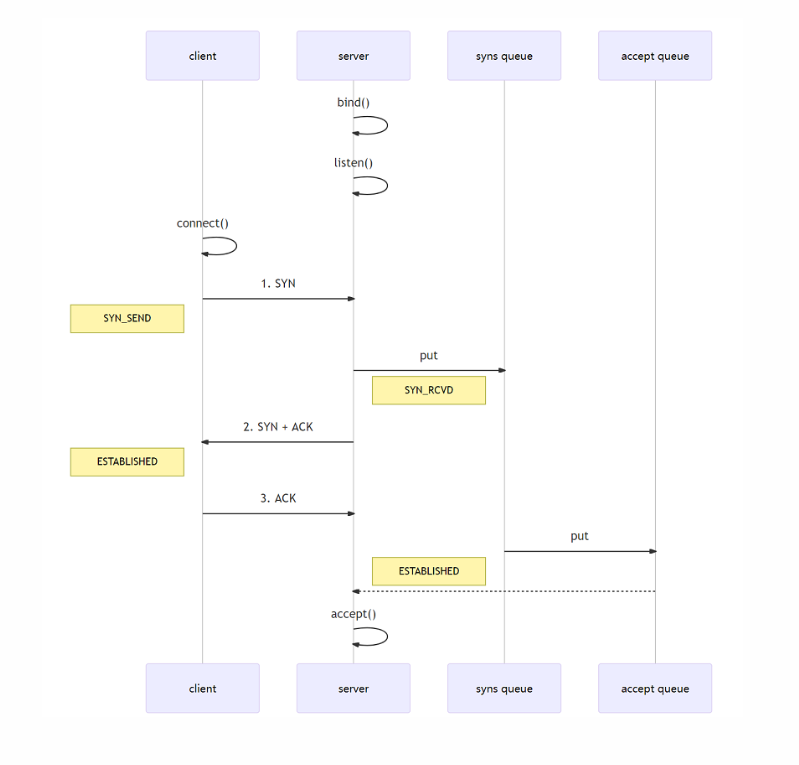
在 Linux 2.2 之前,backlog 大小包括了两个队列的大小,在 2.2 之后,分别用下面两个参数来控制
- sync queue:半连接队列,大小通过
/proc/sys/net/ipv4/tcp_max_syn_backlog指定,在syncookies启用的情况下,逻辑上没有最大值限制 - accept queue:全连接队列,大小通过
/proc/sys/net/core/somaxconn指定,在使用 listen 函数时,内核会根据传入的 backlog 参数与系统参数,取二者的较小值。如果 accpet queue 队列满了,server 将发送一个拒绝连接的错误信息到 client
其他参数
ALLOCATOR:属于 SocketChannal 参数,用来分配 ByteBuf, ctx.alloc()
RCVBUF_ALLOCATOR:属于 SocketChannal 参数
- 控制 Netty 接收缓冲区大小
- 负责入站数据的分配,决定入站缓冲区的大小(并可动态调整),统一采用 direct 直接内存,具体池化还是非池化由 allocator 决定
To Be Continued.