

Java 后端开发2025年自我介绍与项目面试技巧(DeepSeek总结版)
目录指引:
自我介绍
核心原则
- 结构化清晰:遵循“总 - 分 - 总”的逻辑,让面试官轻松跟上你的思路。
- 价值导向:不说“我做了XX”,而是说“我通过XX技术,解决了XX问题,带来了XX价值”。
- 与岗位匹配:提前研究JD,将你的技能和经验与公司的技术要求、业务方向对齐。
- 自信沉稳:语速平稳,眼神交流,展现专业与诚意。
自我介绍框架(黄金1.5-2分钟)
第一部分:开场白 & 基本信息 (15秒)
目的:礼貌开场,清晰说明你的身份和工作经验。
话术:
“各位面试官,下午好。我叫[你的名字],非常感谢给我这次面试机会。我拥有3年的Java后端开发经验,上一家公司是在[上一家公司名称],主要负责[你负责的核心领域,如:电商平台的交易系统/金融风控核心服务]。”
要点:直接、简洁,点名年限和核心领域。
第二部分:技术栈与核心技能 (45秒)
目的:展示你的技术广度和深度,证明你具备扎实的技术根基。
话术(请选择最擅长的点来说,不必全部罗列):
“在技术方面,我的技能栈主要集中在Java生态。”
【基础与框架】
- “我对 Java基础 有比较扎实的理解,熟悉JVM内存模型、垃圾回收机制以及多线程并发编程。”
- “熟练掌握主流开源框架,如 Spring全家桶(Spring, Spring MVC, Spring Boot),并理解其核心原理,比如Spring的IOC、AOP,以及Spring Boot的自动装配机制。”
【数据与存储】
- “在数据持久化方面,我精通 MyBatis,并对 MySQL 有丰富的使用和优化经验,包括索引优化、慢查询分析等。”
- “对分布式缓存 Redis 也很熟悉,用它来做过热点数据缓存、分布式锁等场景。”
【分布式与中间件】
- “在3年的项目中,我也接触并应用了一些分布式技术和中间件。比如使用 消息队列,来解决系统解耦和削峰填谷的问题。”
- “对微服务架构有实践经验,了解 Spring Cloud 的相关组件。”
要点:将技术分类,用“精通”、“熟练掌握”、“了解”等词语准确描述你的掌握程度。提到“原理”和“场景”能瞬间提升专业度。
第三部分:项目经验与价值贡献 (45秒)
目的:这是重中之重!通过1-2个最具代表性的项目,证明你能用技术解决实际问题。
话术(使用STAR法则简化版:情景、任务、行动、结果):
“在之前的工作中,我深度参与了一个[项目名称或类型]项目。我主要负责[你的核心职责]。”
【举例】: “比如,在去年的‘XX电商促销系统’中,我负责优化下单接口的性能。当时面临的主要问题是,在高并发下接口响应慢且超时率高。”
【行动与价值】:
- “我通过 线程池参数调优 和 数据库连接池优化,减少了线程上下文切换和等待时间。”
- “同时,我引入了 Redis缓存,将商品库存和用户信息等热点数据预热到缓存中,减少了对数据库的直接访问。”
- “通过这些优化,最终将下单接口的平均响应时间从500ms降低到了150ms,在峰值期间的系统稳定性也得到了大幅提升,顺利支撑了公司的大促活动。”
要点:一定要量化结果! 用“降低了XX%”、“提升了XX”、“支撑了XX QPS”这样的数据来展示你的贡献。
第四部分:职业动机与结尾 (15秒)
目的:表达你对新机会的渴望和与公司的契合度,并礼貌结尾。
话术:
“我目前正处于职业发展的上升期,非常渴望能加入一个像贵公司这样技术驱动、有挑战性的平台,与团队一起深入技术,创造更大的价值。”
“以上就是我的简单介绍,谢谢各位面试官。我带来的简历中有更详细的项目描述,非常期待后续的交流。”
要点:表达积极性和对公司的认可,将话题自然过渡到下一环节。
进阶技巧 & 注意事项
- 引导面试官:在介绍中“埋点”,引导到你准备充分的知识点。比如,你提到“用了Redis做分布式锁”,面试官很可能就会深入问你怎么实现的,有什么坑。
- 扬长避短:对于不熟悉的技术,不要夸大。可以说“有所了解,并在项目中简单应用过”,或者坦诚地说“这部分我还没有深入实践,但我对其原理很感兴趣”。
- 展现软实力:可以在项目部分不经意地提到“与产品、测试同事沟通”、“跨团队协作”等,体现你的团队协作能力。
- 差异化:如果你有亮点,一定要突出!比如:
- 性能优化狂人:“我曾将系统某个核心接口的TPS从100提升到2000。”
- 问题解决者:“我独立排查并解决过一个线上JVM Full GC频繁导致服务卡顿的疑难杂症。”
- 技术爱好者:“我有在技术博客上分享的习惯,GitHub上有X个Star。”
模板总结(直接套用版)
面试官好,我叫[姓名],有3年Java后端开发经验。过去主要在[上一家公司]负责[核心业务领域]相关的研发工作。
技术上,我基础比较扎实,熟悉JVM、多线程,精通Spring Boot、MyBatis等主流框架。对MySQL调优、Redis应用以及消息队列等中间件都有实践经验。
在项目中,我不仅完成日常开发,更注重解决技术难题。例如在[某项目]中,我通过[某项技术方案],成功将[某个指标]提升了[具体数据],保证了系统的稳定和高性能。
我关注到贵公司在[某个业务或技术点]方面做得很好,这非常吸引我。我希望能在这里深入发展,贡献我的力量。我的介绍就到这,谢谢。
项目介绍
采购公共服务系统(中台型系统)
参与的核心模块
- 供应商评估分类模块
- 统一权限管理模块
- 系统性能优化(贯穿各模块)
如何体现业务能力
不要说: "我写了供应商评估的CRUD接口。"
要这样说:
"我负责的供应商评估分类模块,是整个采购体系的决策中枢。它的业务价值在于,将原本依赖人工经验、标准不一的供应商评估,转变为一个自动化、标准化、可追溯的智能决策流程。
我解决的核心业务问题是:
- 评估标准不统一:不同采购员对供应商的打分标准不一。我通过设计可配置的打分模板,将评估指标和权重固化到系统中,保证了公平性。
- 数据孤岛:评估需要质量、财务、交付等多个部门的数据。我通过消息队列异步集成多个上游系统的数据,打破了部门墙,形成了对供应商的360度立体评估。
- 决策效率低下:手动评估一个供应商需要几天。系统实现后,评估周期缩短了70%,采购团队能更快地筛选出优质供应商。
这个模块直接带来的业务价值是:提升了供应商队伍的整体质量,降低了采购风险,并且为采购决策提供了数据支撑,而不再是‘拍脑袋’决定。"
业务细节深度剖析
1. 业务背景与痛点(展现你理解业务为什么存在)
"在我们集团原有的采购体系中,供应商评估存在三个核心痛点:
第一,标准不透明。 不同的采购事业部、甚至不同的采购员,对‘好供应商’的定义完全不同。A采购员看重价格,B采购员看重交期,导致评估结果无法横向对比,集团无法建立统一的供应商战略。
第二,数据孤岛。 评估需要的核心数据散落在多个系统中:
- 质量数据 在QMS(质量管理系统)中,包括来料合格率、生产过程中的PPM值。
- 财务数据 在SRM和财务系统中,包括开票准确性、付款周期。
- 交付数据 在WMS和TMS中,包括准时交付率、订单满足率。 采购员需要手动登录多个系统,复制粘贴数据到Excel里拼凑出一份评估报告,效率极低且容易出错。
第三,决策缺乏依据。 最终的供应商等级(比如A/B/C级)划分,很大程度上依赖采购经理的个人经验,缺乏数据支撑,存在主观性和潜在的合规风险。"
2. 我的技术实现如何解决业务痛点(展现你如何用技术赋能业务)
"我负责将这个混乱的流程系统化、自动化。我的核心工作不是简单的CRUD,而是将一个复杂的、依赖人脑判断的决策过程,抽象成一个可配置、可执行、可追溯的系统模型。
具体实现上,我设计了三个核心实体和它们之间的关系:
【评估模板】:这是业务的灵魂。我设计的数据库表结构,允许业务人员像搭积木一样配置模板。
template_id,template_name(模板基本信息)category_id(适用于什么品类的供应商,如电子类、结构件类)- 最关键的是
scoring_rules字段,它是一个JSON结构,定义了评分规则:json{ "indicators": [ { "name": "价格竞争力", "weight": 0.3, "dataSource": "QUOTATION_SYSTEM", "calculationRule": "AVG_PRICE_RANKING" // 规则:平均报价在所有供应商中的排名分 }, { "name": "质量合格率", "weight": 0.4, "dataSource": "QMS_SYSTEM", "calculationRule": "DIRECT_VALUE", // 规则:直接取值 "thresholds": [ {"score": 10, "condition": "value >= 99.5%"}, {"score": 8, "condition": "value >= 99%"}, {"score": 5, "condition": "value >= 98%"}, {"score": 0, "condition": "value < 98%"} ] }, { "name": "技术创新能力", "weight": 0.3, "dataSource": "MANUAL_INPUT", // 规则:需要专家手动打分 "scorers": ["ROLE_PURCHASING_MANAGER"] } ] }这个设计让业务规则实现了数据驱动,业务调整评估标准不再需要发版上线。
【数据集成流程】:为了解决数据孤岛问题,我设计了异步数据集成流。
- 实时数据:如订单状态变更,通过 RabbitMQ 发送领域事件,我们的系统消费后更新本地数据仓库。
- 批量数据:如月度质量报告,通过 FDI文件接口,由定时任务在凌晨同步。
- 关键实现:我使用了
CompletableFuture并行调用多个系统的/api/supplier/{id}/quality-stats等接口,将原本串行需要10秒的数据获取过程,压缩到了2秒内。【评估引擎】:这是系统的大脑。当触发评估时,引擎会:
- 根据模板ID加载评分规则。
- 根据规则里的
dataSource,从我们的数据仓库或实时接口获取数据。- 执行
calculationRule,为每个指标计算出原始分数。- 应用权重,计算出加权总分。
- 根据预设的等级阈值(如A级>90分,B级>75分),自动划定供应商等级。
- 整个计算过程在一个
@Transactional事务中完成,并记录下每一次评估的‘评估快照’,确保所有决策可审计、可追溯。"
3. 业务价值的具体量化(展现你的工作带来了什么)
"这个模块上线后,带来的改变是实实在在的:
- 效率提升:单个供应商的评估时间从平均3个工作日缩短到系统自动触发,分钟级出结果。
- 成本节约:采购团队每年因此节约的工时,折算人力成本约50万元/年。
- 决策质量:新供应商引入后的‘暴雷率’(即出现严重质量或交付问题)降低了25%,因为我们的评估模型提前识别了风险。
- 战略价值:集团终于可以拿出一张统一的‘供应商地图’,清晰地看到各个品类下的核心、战略、淘汰供应商,为集中采购和议价提供了数据武器。"
宏观到微观
第一层:项目背景(30秒 - 商业价值视角)
目标:用业务语言说清系统的定位和价值。
"我们先从项目背景说起。
在大型制造集团中,采购不是一个单一动作,而是涉及供应商管理、价格谈判、质量评估、合同审批等数十个环节的复杂体系。过去,每个业务部门都有自己的采购流程和供应商池,导致:
- 同一家供应商,在A部门是A级,在B部门却是C级
- 采购数据分散,集团无法集中议价,错失成本优化机会
- 风险不可控,出现过合作的供应商在其他子公司有不良记录
采购公共服务系统就是要解决这个问题,它将全集团所有采购相关的公共能力和基础数据统一管理,构建一个’采购中台’。"
要点:
- 从集团管控痛点切入
- 说明分散管理的弊端
- 明确"中台"定位
第二层:项目描述(1分钟 - 系统架构视角)
目标:描述系统技术架构和核心服务。
"从项目描述来看,这是一个典型的微服务中台架构。
系统采用 Spring Cloud Alibaba 体系,Nacos 作为服务注册发现和配置中心,Sentinel 负责流量控制。数据库使用 MySQL,缓存层是 Redis,异步通信通过 RabbitMQ 实现。
系统核心模块包括:
- 供应商主数据服务:全集团统一的供应商档案
- 权限管理服务:为所有采购相关系统提供统一的权限控制
- 模板引擎服务:可配置的评估模板、打分模板
- 业务群组服务:支持按事业部、项目灵活划分数据权限
- 白名单服务:集团级的供应商准入控制"
要点:
- 明确技术栈选型
- 列举核心微服务及其职责
- 体现"公共服务"特性
第三层:个人业务开发(1.5分钟 - 实现细节视角)
目标:具体说明负责的模块和技术实现。
"我主要负责供应商评估分类模块和系统性能优化。
供应商评估分类模块的业务目标是:将原本依赖个人经验的供应商评估,变成标准化、数据驱动的智能决策。
我的技术实现核心是一个可配置的规则引擎:
- 数据库设计中,我用JSON字段存储评分规则,支持灵活配置指标、权重、数据源和计算规则
- 通过策略模式实现不同的评分算法,如排名法、阈值法、专家打分法
- 评估执行时,使用
CompletableFuture并行获取质量、交付、财务等多维度数据- 整个评估过程在
@Transactional事务中完成,并记录完整的评估快照用于审计在系统性能优化方面,我建立了一套完整的优化方法论:
- 通过Redis缓存热点数据,将供应商信息的查询从50ms优化到2ms
- 对SQL执行计划进行分析,解决隐式转换、索引失效问题
- 对大表实施分库分表,对复杂查询实施读写分离
- 最终将核心接口的响应时间稳定控制在250ms以内"
要点:
- 具体的技术选型和设计模式
- 数据结构和算法思考
- 性能优化的系统性方法
第四层:解决的技术难题(2分钟 - 实战深度视角)
目标:深入技术难点和解决方案。
"我解决了几个关键的技术难题:
第一个是’复杂业务规则的抽象与执行’问题。
- 难点:不同品类的供应商评估标准完全不同,电子件看技术创新,结构件看成本控制,如何设计一个既灵活又高性能的规则引擎?
- 我的解决方案:
- 元数据驱动:将评估指标、权重、数据源、计算规则定义为元数据,存储在JSON配置中
- 策略模式+工厂模式:为不同类型的计算规则(直接取值、排名计算、阈值打分)实现不同的策略
- 并行数据获取:使用
CompletableFuture并行从质量系统、财务系统等获取数据- 结果:支持业务人员在不发版的情况下调整评估标准,评估计算性能在500ms内完成
第二个是’大规模代码重构与质量提升’问题。
- 难点:历史代码中存在40多个分散的定时任务,以及300多个深度嵌套的if-else
- 我的解决方案:
- 策略模式统一定时任务:将所有定时任务抽象为
ScheduledTask接口,统一管理和监控- 函数式编程重构条件逻辑:使用
Predicate和Function接口替换深层嵌套- 模板方法模式抽取公共逻辑:将重复的校验、审批流程抽象为模板
- 结果:代码量减少40%,可维护性大幅提升,新功能开发效率提高60%
第三个是’分布式环境下的数据权限’问题。
- 难点:A事业部的用户不能看到B事业部的供应商数据,但这种过滤不能在每个查询接口重复实现
- 我的解决方案:
- Spring AOP + 自定义注解:在DAO层通过切面自动注入数据权限过滤条件
- ThreadLocal传递用户上下文:在网关层解析用户权限,通过ThreadLocal传递到业务层
- Redis缓存权限规则:将用户-数据权限关系缓存到Redis,避免每次查询都访问数据库
- 结果:实现对业务代码透明的数据权限控制,性能影响<5%"
要点:
- 每个问题都有具体的技术难点描述
- 解决方案体现设计模式和架构思想
- 有量化的性能和改进指标
第五层:系统级难点与思考(1分钟 - 架构演进视角)
目标:讨论系统层面的架构挑战和思考。
"在系统架构层面,我们面临几个持续的挑战:
第一个是’数据一致性与性能的权衡’。
- 作为基础服务,我们对数据的准确性要求极高,但分布式事务的性能代价又难以接受
- 我们采用最终一致性为主,但在供应商状态变更等关键场景,仍需要短暂的数据同步窗口,这是个持续优化的平衡点
第二个是’API兼容性与技术债管理’。
- 作为被几十个系统依赖的中台,我们的API一旦发布就几乎不能下线
- 即使推出了v2接口,v1接口也不敢废弃,导致系统技术债持续累积。如何在推动下游升级和保持系统纯洁性之间找到平衡,是个管理难题
第三个是’缓存策略的极致优化’。
- 权限数据、配置数据等要求极高的实时性,但又是最高频的查询
- 我们通过多级缓存(本地缓存+Redis)来优化,但在集群环境下,本地缓存的一致性又成为新的问题。这是一个典型的复杂度转移案例
第四个是’监控与故障定位’。
- 当一个问题涉及权限服务、供应商服务、模板服务等多个微服务时,故障定位变得异常困难
- 我们虽然建立了链路追踪,但在高并发下,全量采集的性能开销又成为新的瓶颈"
要点:
- 体现对分布式系统本质问题的理解
- 展现架构权衡的思考
- 承认技术没有完美解决方案
模板
1. 项目背景(商业价值)
"这是集团级的采购中台系统。过去各业务部门采购流程分散,导致同一供应商评价标准不一、数据孤岛、风险不可控。我们构建这个’采购中台’,就是要实现全集团采购能力的统一管理和数据共享。"
2. 项目描述(技术架构)
"系统采用Spring Cloud Alibaba微服务架构,核心服务包括供应商主数据、统一权限管理、模板引擎、业务群组、白名单管理等。作为基础公共服务,被公司数十个业务系统依赖。"
3. 个人职责与业务开发
"我主要负责供应商评估分类模块和系统性能优化:
评估模块:我设计了一个可配置的规则引擎,用JSON存储评分规则,支持指标、权重、数据源的灵活配置,通过策略模式实现不同的评分算法。
性能优化:建立完整的优化体系,包括Redis缓存热点数据、SQL执行计划分析、分库分表、读写分离,将核心接口响应时间稳定控制在250ms内。"
4. 解决的技术难题
"复杂业务规则的抽象与执行:
- 难点:不同品类供应商评估标准完全不同
- 方案:元数据驱动 + 策略模式 + 并行数据获取
- 结果:支持不发版调整评估标准,计算性能在500ms内
大规模代码重构与质量提升:
- 难点:40多个分散定时任务,300多个深层if-else
- 方案:策略模式统一定时任务 + 函数式编程重构条件逻辑
- 结果:代码量减少40%,开发效率提升60%"
5. 系统级难点与思考
"API兼容性与技术债管理:作为被几十个系统依赖的中台,API一旦发布几乎不能下线,如何在推动升级和保持系统纯洁性间平衡是持续挑战。
缓存策略的极致优化:权限数据要求极高实时性又是最高频查询,多级缓存在集群环境下的一致性保障需要持续优化。"
🌠深度技术面试详解
一、项目背景与商业价值(深入版)
采购公共服务系统是公司ERP系统的核心中台模块,旨在解决集团内部采购流程分散、数据孤岛、供应商管理不统一的问题。过去,各个事业部有自己的供应商池和评估标准,导致同一家供应商在不同部门的评级不同,集团无法集中议价,采购风险难以控制。该系统将全集团的供应商管理、权限控制、评估模板等公共能力下沉,为所有采购相关业务提供统一服务。
1.1 业务痛点深度分析
"在深入介绍前,我想先阐述这个系统解决的根本性业务问题:
数据孤岛与标准不一
- 各事业部独立维护供应商数据,同一供应商在不同系统中有不同ID和评级
- 缺乏统一的供应商准入标准,质量风险难以控制
- 采购数据分散,集团无法利用规模优势进行集中议价
流程效率低下
- 新供应商准入需要跨部门人工审批,周期长达2-3周
- 供应商评估依赖个人经验,缺乏客观量化标准
- 权限管理分散,每个系统都需要重复开发权限模块
合规与审计风险
- 采购决策缺乏完整的数据追溯链
- 敏感操作缺少统一的审计日志
- 难以满足上市公司的合规性要求"
1.2 中台战略定位
"我们的系统定位是采购能力中台,将通用的采购能力抽象为可复用的服务:
- 供应商主数据服务:全集团唯一的供应商信息源
- 统一权限服务:所有采购系统的单点权限控制
- 模板引擎服务:可配置的业务规则执行引擎
- 审计追踪服务:完整的操作日志和合规保障"
二、系统架构深度解析
2.1 微服务架构设计
// 系统核心服务划分
@SpringBootApplication
public class ProcurementPlatform {
    // 1. 供应商主数据服务
    @Bean public SupplierService supplierService() {
        return new SupplierService(); // 供应商生命周期管理
    }

    // 2. 权限控制服务
    @Bean public AuthorizationService authService() {
        return new AuthorizationService(); // 统一的RBAC权限模型
    }

    // 3. 模板引擎服务
    @Bean public TemplateEngineService templateService() {
        return new TemplateEngineService(); // 可配置的业务规则
    }

    // 4. 业务群组服务
    @Bean public BusinessGroupService groupService() {
        return new BusinessGroupService(); // 多租户数据隔离
    }
}
2.2 技术栈选型考量
"我们在技术选型时重点考虑了中台系统的特殊要求:
Spring Cloud Alibaba体系
- Nacos:服务注册发现 + 配置中心,支持配置热更新
- Sentinel:流量控制、熔断降级,保障服务稳定性
- Seata:分布式事务,解决数据一致性问题(在关键业务中使用)
数据存储策略
- MySQL:核心业务数据,采用分库分表
- Redis:缓存热点数据 + 分布式会话 + 分布式锁
- Elasticsearch:供应商搜索和复杂查询
消息中间件
- RabbitMQ:业务解耦 + 最终一致性保障
- 采用确认机制确保消息不丢失"
三、核心模块技术实现
3.1 供应商评估分类模块(重点)
3.1.1 规则引擎设计
// 可配置的评估规则引擎核心实现
@Service
@Slf4j
public class SupplierEvaluationEngine {

    @Autowired
    private RedisTemplate<String, Object> redisTemplate;

    @Autowired
    private DataSourceRouter dataSourceRouter;

    /**
     * 执行供应商评估
     */
    @Transactional
    public EvaluationResult evaluateSupplier(Long supplierId, String templateCode) {
        long startTime = System.currentTimeMillis();

        try {
            // 1. 加载评估模板
            EvaluationTemplate template = loadEvaluationTemplate(templateCode);

            // 2. 并行获取评估数据
            Map<String, Object> evaluationData = fetchEvaluationDataParallel(supplierId, template);

            // 3. 执行评分计算
            ScoreResult scoreResult = calculateScores(template, evaluationData);

            // 4. 确定供应商等级
            SupplierLevel level = determineSupplierLevel(scoreResult.getTotalScore());

            // 5. 保存评估结果和快照
            return saveEvaluationResult(supplierId, template, scoreResult, level, evaluationData);

        } finally {
            log.info("供应商评估完成,supplierId: {}, 耗时: {}ms",
                    supplierId, System.currentTimeMillis() - startTime);
        }
    }

    /**
     * 并行获取多维度评估数据
     */
    private Map<String, Object> fetchEvaluationDataParallel(Long supplierId,
                                                           EvaluationTemplate template) {
        // 使用CompletableFuture并行调用多个数据源
        List<CompletableFuture<DataFetchResult>> futures = template.getDataSources()
            .stream()
            .map(dataSource -> CompletableFuture.supplyAsync(() ->
                fetchSingleDataSource(supplierId, dataSource), dataFetchExecutor))
            .collect(Collectors.toList());

        // 等待所有数据获取完成(设置超时)
        try {
            CompletableFuture.allOf(futures.toArray(new CompletableFuture[0]))
                .get(10, TimeUnit.SECONDS);
        } catch (TimeoutException e) {
            log.warn("数据获取超时,将使用已获取的数据继续评估");
            // 不抛出异常,使用已获取的数据继续评估
        } catch (Exception e) {
            throw new EvaluationException("数据获取失败", e);
        }

        // 聚合结果
        Map<String, Object> result = new HashMap<>();
        for (CompletableFuture<DataFetchResult> future : futures) {
            if (future.isDone() && !future.isCompletedExceptionally()) {
                try {
                    DataFetchResult dataResult = future.get();
                    result.put(dataResult.getDataSource(), dataResult.getData());
                } catch (Exception e) {
                    log.warn("单个数据源获取失败", e);
                }
            }
        }

        return result;
    }
}
3.1.2 模板配置数据结构
// 评估模板的JSON配置结构
{
  "templateCode": "ELECTRONIC_SUPPLIER_V1",
  "templateName": "电子类供应商评估模板",
  "applicableCategories": ["ELECTRONIC", "PCBA"],
  "scoringRules": {
    "indicators": [
      {
        "code": "QUALITY_PERFORMANCE",
        "name": "质量表现",
        "weight": 0.35,
        "dataSource": "QMS_SYSTEM",
        "calculationType": "THRESHOLD_SCORING",
        "parameters": {
          "dataField": "quality_qualified_rate",
          "thresholds": [
            {"min": 99.5, "score": 10, "level": "EXCELLENT"},
            {"min": 99.0, "max": 99.5, "score": 8, "level": "GOOD"},
            {"min": 98.0, "max": 99.0, "score": 6, "level": "AVERAGE"},
            {"max": 98.0, "score": 0, "level": "POOR"}
          ]
        }
      },
      {
        "code": "TECHNICAL_CAPABILITY",
        "name": "技术能力",
        "weight": 0.25,
        "dataSource": "MANUAL_SCORING",
        "calculationType": "EXPERT_EVALUATION",
        "parameters": {
          "requiredRoles": ["TECHNICAL_MANAGER", "RD_DIRECTOR"],
          "scoringRange": {"min": 0, "max": 10}
        }
      }
    ]
  },
  "levelSettings": {
    "levels": [
      {"level": "A", "minScore": 90, "privileges": ["PRIORITY_BIDDING", "LONG_TERM_CONTRACT"]},
      {"level": "B", "minScore": 75, "maxScore": 90, "privileges": ["NORMAL_BIDDING"]},
      {"level": "C", "minScore": 60, "maxScore": 75, "privileges": ["RESTRICTED_BIDDING"]},
      {"level": "D", "maxScore": 60, "privileges": [], "actions": ["AUTO_REJECT"]}
    ]
  }
}
3.2 系统性能优化(深度实践)
3.2.1 多级缓存架构
@Service
public class MultiLevelCacheService {

    @Autowired
    private RedisTemplate<String, Object> redisTemplate;

    // 本地缓存(Caffeine)
    private final Cache<String, Object> localCache = Caffeine.newBuilder()
        .maximumSize(1000)
        .expireAfterWrite(5, TimeUnit.MINUTES)
        .build();

    /**
     * 多级缓存查询
     */
    public <T> T getWithMultiLevelCache(String key, Class<T> type,
                                      Supplier<T> loader, Duration expiry) {
        // 1. 查询本地缓存
        T value = (T) localCache.getIfPresent(key);
        if (value != null) {
            metricService.recordCacheHit("local");
            return value;
        }

        // 2. 查询Redis分布式缓存
        String redisKey = "procurement:" + key;
        value = (T) redisTemplate.opsForValue().get(redisKey);
        if (value != null) {
            // 回填本地缓存
            localCache.put(key, value);
            metricService.recordCacheHit("redis");
            return value;
        }

        // 3. 缓存未命中,从数据源加载
        value = loader.get();
        if (value != null) {
            // 异步写入缓存
            CompletableFuture.runAsync(() -> {
                // 写入Redis,设置过期时间
                redisTemplate.opsForValue().set(redisKey, value, expiry);
                // 写入本地缓存
                localCache.put(key, value);
            }, cacheExecutor);
        }

        metricService.recordCacheMiss();
        return value;
    }

    /**
     * 缓存一致性保障 - 发布缓存失效事件
     */
    @EventListener
    public void handleDataChangeEvent(DataChangedEvent event) {
        String cacheKey = buildCacheKey(event.getEntityType(), event.getEntityId());

        // 1. 删除本地缓存
        localCache.invalidate(cacheKey);

        // 2. 发布Redis消息,通知其他实例失效本地缓存
        redisTemplate.convertAndSend("cache.invalidation", cacheKey);

        // 3. 删除Redis缓存
        redisTemplate.delete("procurement:" + cacheKey);
    }
}
3.2.2 SQL优化实战
-- 优化前的慢查询
SELECT * FROM supplier_evaluation
WHERE supplier_id IN (SELECT supplier_id FROM supplier WHERE category = 'ELECTRONIC')
AND evaluation_date BETWEEN '2023-01-01' AND '2023-12-31'
ORDER BY total_score DESC;

-- 优化后的查询
-- 1. 创建复合索引
CREATE INDEX idx_supplier_evaluation_composite
ON supplier_evaluation(supplier_id, evaluation_date, total_score);

-- 2. 使用JOIN替代子查询
SELECT se.* FROM supplier_evaluation se
INNER JOIN supplier s ON se.supplier_id = s.supplier_id
WHERE s.category = 'ELECTRONIC'
AND se.evaluation_date BETWEEN '2023-01-01' AND '2023-12-31'
ORDER BY se.total_score DESC;

-- 3. 分页优化 - 使用游标分页替代LIMIT OFFSET
SELECT * FROM supplier_evaluation
WHERE supplier_id > ? AND evaluation_date BETWEEN ? AND ?
ORDER BY supplier_id LIMIT 1000;
四、解决的核心技术难题
4.1 分布式数据权限控制
4.1.1 架构设计
// 基于Spring AOP的数据权限切面
@Aspect
@Component
public class DataPermissionAspect {

    @Around("@annotation(dataPermission)")
    public Object applyDataPermission(ProceedingJoinPoint joinPoint,
                                    DataPermission dataPermission) throws Throwable {
        // 1. 获取当前用户权限上下文
        UserContext userContext = SecurityContextHolder.getUserContext();

        // 2. 解析数据权限规则
        DataPermissionRule rule = parsePermissionRule(dataPermission, userContext);

        // 3. 修改SQL查询条件
        modifyQueryForDataPermission(joinPoint, rule);

        // 4. 执行原方法
        return joinPoint.proceed();
    }

    private void modifyQueryForDataPermission(ProceedingJoinPoint joinPoint,
                                            DataPermissionRule rule) {
        Object[] args = joinPoint.getArgs();

        for (int i = 0; i < args.length; i++) {
            if (args[i] instanceof DataQuery) {
                DataQuery query = (DataQuery) args[i];
                // 动态添加数据权限过滤条件
                query.addFilter(buildDataPermissionFilter(rule));
                break;
            }
        }
    }
}

// 数据权限规则配置
@Entity
@Table(name = "data_permission_rule")
public class DataPermissionRule {
    @Id
    private Long id;

    // 规则类型:用户级、部门级、业务群组级
    @Enumerated(EnumType.STRING)
    private RuleType ruleType;

    // 目标数据类型:供应商、报价单、合同等
    private String dataType;

    // 权限条件(SQL WHERE片段)
    private String permissionCondition;

    // JSON配置,支持复杂规则
    @Column(columnDefinition = "json")
    private String ruleConfig;
}
4.1.2 性能优化策略
@Service
public class DataPermissionOptimizer {

    // 权限规则缓存
    private final LoadingCache<String, List<DataPermissionRule>> permissionCache =
        Caffeine.newBuilder()
            .maximumSize(100)
            .refreshAfterWrite(10, TimeUnit.MINUTES)
            .build(this::loadPermissionRules);

    /**
     * 预编译数据权限过滤器,避免每次查询都解析规则
     */
    public DataFilter compileDataFilter(UserContext userContext, String dataType) {
        String cacheKey = buildCacheKey(userContext, dataType);

        return permissionCache.get(cacheKey).stream()
            .map(this::convertRuleToFilter)
            .reduce(DataFilter::and)
            .orElse(DataFilter.EMPTY);
    }
}
4.2 大规模代码重构与质量提升
4.2.1 定时任务统一管理
// 定时任务统一接口
public interface ScheduledTask {
    String getTaskName();
    String getCronExpression();
    void execute();
    default boolean isEnabled() { return true; }
}

// 定时任务执行器
@Service
public class UnifiedScheduler {

    @Autowired
    private List<ScheduledTask> scheduledTasks;

    @PostConstruct
    public void scheduleAllTasks() {
        scheduledTasks.stream()
            .filter(ScheduledTask::isEnabled)
            .forEach(this::scheduleTask);
    }

    private void scheduleTask(ScheduledTask task) {
        // 使用ScheduledExecutorService统一调度
        // 添加监控和异常处理
        scheduledExecutor.scheduleWithFixedDelay(() -> {
            try {
                metricService.recordTaskStart(task.getTaskName());
                task.execute();
                metricService.recordTaskSuccess(task.getTaskName());
            } catch (Exception e) {
                metricService.recordTaskFailure(task.getTaskName());
                log.error("定时任务执行失败: {}", task.getTaskName(), e);
            }
        }, 0, getDelaySeconds(task.getCronExpression()), TimeUnit.SECONDS);
    }
}
4.2.2 复杂条件逻辑重构
// 重构前 - 深层嵌套的if-else
public class OldEvaluationService {
    public ScoreResult evaluate(Supplier supplier, EvaluationContext context) {
        if (supplier.getCategory().equals("ELECTRONIC")) {
            if (context.isQualityCheckRequired()) {
                if (supplier.getQualityScore() > 8.0) {
                    if (supplier.getDeliveryPerformance() > 95.0) {
                        // ... 更多嵌套
                    }
                }
            }
        } else if (supplier.getCategory().equals("MECHANICAL")) {
            // 另一个复杂的条件分支
        }
        // ... 总共300多行深层嵌套
    }
}

// 重构后 - 使用函数式编程和策略模式
@Service
public class RefactoredEvaluationService {

    private final Map<String, EvaluationStrategy> strategies;

    public ScoreResult evaluate(Supplier supplier, EvaluationContext context) {
        return strategies.get(supplier.getCategory())
            .evaluate(supplier, context);
    }
}

// 策略接口
public interface EvaluationStrategy {
    ScoreResult evaluate(Supplier supplier, EvaluationContext context);
}

// 具体策略实现
@Component
public class ElectronicSupplierStrategy implements EvaluationStrategy {

    private final List<EvaluationRule<Supplier>> rules = Arrays.asList(
        this::checkQualityRequirement,
        this::checkDeliveryPerformance,
        this::checkTechnicalCapability
    );

    @Override
    public ScoreResult evaluate(Supplier supplier, EvaluationContext context) {
        return rules.stream()
            .map(rule -> rule.apply(supplier, context))
            .reduce(ScoreResult::combine)
            .orElse(ScoreResult.EMPTY);
    }

    private ScoreResult checkQualityRequirement(Supplier supplier, EvaluationContext context) {
        return context.isQualityCheckRequired() && supplier.getQualityScore() > 8.0 ?
            ScoreResult.passing("质量达标") : ScoreResult.failing("质量不达标");
    }
}
五、系统级架构挑战与解决方案
5.1 数据一致性保障
5.1.1 最终一致性模式
// 基于消息队列的最终一致性实现
@Service
@Transactional
public class EventuallyConsistentService {

    @Autowired
    private RabbitTemplate rabbitTemplate;

    /**
     * 创建供应商(核心事务+事件发布)
     */
    public Supplier createSupplier(CreateSupplierRequest request) {
        // 1. 核心数据写入(强一致性)
        Supplier supplier = supplierRepository.save(convertToEntity(request));

        // 2. 发布领域事件
        SupplierCreatedEvent event = new SupplierCreatedEvent(supplier.getId());
        rabbitTemplate.convertAndSend("supplier.exchange", "supplier.created", event);

        // 3. 记录本地事件表(防消息丢失)
        eventRepository.save(new DomainEvent(event));

        return supplier;
    }

    /**
     * 事件处理 - 更新相关系统的数据
     */
    @RabbitListener(queues = "supplier.created.queue")
    public void handleSupplierCreated(SupplierCreatedEvent event) {
        try {
            // 更新搜索索引
            searchService.indexSupplier(event.getSupplierId());

            // 通知风控系统
            riskControlService.onNewSupplier(event.getSupplierId());

            // 标记事件已处理
            eventRepository.markAsProcessed(event.getEventId());

        } catch (Exception e) {
            // 记录失败,进入重试机制
            log.error("处理供应商创建事件失败", e);
            throw new AmqpRejectAndDontRequeueException(e);
        }
    }
}
5.2 高可用与容灾设计
5.2.1 服务降级与熔断
// 基于Sentinel的服务保护
@Service
public class ProtectedSupplierService {

    @SentinelResource(
        value = "supplierQuery",
        fallback = "getSupplierFallback",
        blockHandler = "handleFlowControl"
    )
    public Supplier getSupplier(Long supplierId) {
        // 正常业务逻辑
        return supplierRepository.findById(supplierId)
            .orElseThrow(() -> new SupplierNotFoundException(supplierId));
    }

    // 降级逻辑
    public Supplier getSupplierFallback(Long supplierId, Throwable ex) {
        log.warn("供应商查询降级,supplierId: {}", supplierId, ex);

        // 返回降级数据
        Supplier fallback = new Supplier();
        fallback.setId(supplierId);
        fallback.setName("供应商信息暂不可用");
        fallback.setStatus(SupplierStatus.UNKNOWN);

        return fallback;
    }

    // 流控处理
    public Supplier handleFlowControl(Long supplierId, BlockException ex) {
        throw new ServiceBusyException("系统繁忙,请稍后重试");
    }
}
六、量化成果与业务影响
6.1 性能指标提升
- 接口响应时间:核心接口从平均800ms优化到250ms以内
- 系统吞吐量:从500 TPS提升到2000 TPS
- 缓存命中率:达到98.5%,数据库压力降低70%
- 任务执行效率:批量评估任务从小时级优化到分钟级
6.2 业务价值体现
- 采购效率:供应商准入周期从3周缩短到3天
- 决策质量:基于数据的客观评估,供应商"暴雷率"降低25%
- 成本节约:集中议价每年为集团节约采购成本约8%
- 合规性:实现100%操作可审计,满足上市合规要求
6.3 技术债务清理
- 代码质量:代码重复率从35%降低到8%
- 可维护性:新功能开发效率提升60%
- 系统稳定性:线上故障率降低80%
这个深度技术详解展现了你在架构设计、性能优化、复杂问题解决方面的全面能力,让面试官看到你不仅是一个编码实现者,更是一个系统架构师和问题解决专家。
🌟高并发处理能力与优化
1. 高并发场景分析
读多写少是其典型特征:
- 高频读操作(占比>90%):权限验证、供应商信息查询、配置数据读取
- 低频写操作:供应商信息变更、评估结果提交、权限配置更新
- 特点:请求量大、响应要求高、数据一致性要求强
2. 四层性能优化体系
第一层:缓存优化体系(解决读压力)
// 1. 多级缓存架构实现
@Service
public class ProcurementCacheService {

    // 一级缓存:本地缓存(Caffeine),5分钟过期
    private final Cache<String, Object> localCache = Caffeine.newBuilder()
        .maximumSize(10_000)
        .expireAfterWrite(5, TimeUnit.MINUTES)
        .recordStats() // 记录缓存命中率
        .build();

    // 二级缓存:Redis集群
    @Autowired
    private RedisTemplate<String, Object> redisTemplate;

    /**
     * 带降级的多级缓存查询
     */
    public <T> T getWithGracefulDegradation(String key, Supplier<T> loader,
                                          Class<T> type, Duration expiry) {
        // 第1步:本地缓存(最快,<1ms)
        T value = (T) localCache.getIfPresent(key);
        if (value != null) {
            metrics.recordCacheHit("local");
            return value;
        }

        // 第2步:分布式锁防止缓存击穿
        String lockKey = "lock:cache:" + key;
        RLock lock = redissonClient.getLock(lockKey);

        try {
            // 尝试获取锁,等待100ms,锁持有300ms
            if (lock.tryLock(100, 300, TimeUnit.MILLISECONDS)) {
                // 第3步:Redis缓存(<5ms)
                value = (T) redisTemplate.opsForValue().get(buildRedisKey(key));
                if (value != null) {
                    // 回填本地缓存
                    localCache.put(key, value);
                    metrics.recordCacheHit("redis");
                    return value;
                }

                // 第4步:数据库查询(最慢,20-100ms)
                try {
                    value = loader.get();
                    if (value != null) {
                        // 异步双写缓存(不阻塞主流程)
                        CompletableFuture.runAsync(() -> {
                            redisTemplate.opsForValue().set(
                                buildRedisKey(key),
                                value,
                                expiry
                            );
                            localCache.put(key, value);
                        }, cacheWriteExecutor);
                    }
                    return value;
                } catch (Exception e) {
                    // 第5步:降级方案 - 返回过期的缓存数据
                    T staleValue = getStaleDataFromBackup(key);
                    metrics.recordCacheDegradation();
                    return staleValue;
                }
            } else {
                // 获取锁失败,直接返回降级数据
                return getStaleDataFromBackup(key);
            }
        } catch (InterruptedException e) {
            Thread.currentThread().interrupt();
            return getStaleDataFromBackup(key);
        } finally {
            if (lock.isHeldByCurrentThread()) {
                lock.unlock();
            }
        }
    }

    /**
     * 缓存预热机制(应对早高峰)
     */
    @Scheduled(cron = "0 30 6 * * ?") // 每天6:30执行
    public void preheatCache() {
        // 预热高频查询数据
        List<String> hotKeys = identifyHotKeys();
        hotKeys.parallelStream().forEach(key -> {
            // 异步预热
            CompletableFuture.runAsync(() -> {
                Object data = loadDataFromDB(key);
                if (data != null) {
                    redisTemplate.opsForValue().set(buildRedisKey(key), data, 2, TimeUnit.HOURS);
                }
            }, preheatExecutor);
        });
    }
}
第二层:数据库优化
-- 1. 读写分离配置
-- 主库(写):1主 | 从库(读):3从
-- 使用ShardingSphere进行自动路由

-- 2. 分库分表策略(供应商表,数据量:5000万+)
CREATE TABLE supplier_00 (
    supplier_id BIGINT PRIMARY KEY,
    supplier_code VARCHAR(50),
    -- ... 其他字段
    shard_key INT AS (supplier_id % 16) -- 虚拟列用于分片
) PARTITION BY KEY(shard_key) PARTITIONS 16;

-- 3. 索引优化(覆盖索引)
CREATE INDEX idx_supplier_query ON supplier_00
(supplier_status, category_id, create_time)
INCLUDE (supplier_name, credit_level); -- 包含查询所需的所有列

-- 4. 垂直拆分(大字段分离)
-- supplier_basic:基础信息,高频查询
-- supplier_detail:详细信息(公司介绍、资质文件等),低频查询
-- supplier_statistics:统计信息,用于报表
第三层:应用层优化
// 1. 连接池优化(HikariCP配置)
@Bean
public DataSource dataSource() {
    HikariConfig config = new HikariConfig();
    config.setJdbcUrl(jdbcUrl);
    config.setUsername(username);
    config.setPassword(password);
    config.setMaximumPoolSize(50);          // 根据CPU核心数调整
    config.setMinimumIdle(10);
    config.setConnectionTimeout(30000);     // 30秒超时
    config.setIdleTimeout(600000);          // 10分钟
    config.setMaxLifetime(1800000);         // 30分钟
    config.setConnectionTestQuery("SELECT 1");
    config.setPoolName("ProcurementPool");

    // 监控连接池状态
    config.addDataSourceProperty("metrics", "true");
    config.addDataSourceProperty("metricRegistry", metricRegistry);

    return new HikariDataSource(config);
}

// 2. 线程池隔离(不同业务使用不同线程池)
@Configuration
public class ThreadPoolConfiguration {

    // 核心业务线程池(快速响应)
    @Bean("coreBusinessExecutor")
    public ThreadPoolTaskExecutor coreBusinessExecutor() {
        ThreadPoolTaskExecutor executor = new ThreadPoolTaskExecutor();
        executor.setCorePoolSize(20);
        executor.setMaxPoolSize(50);
        executor.setQueueCapacity(1000);
        executor.setThreadNamePrefix("core-business-");
        executor.setRejectedExecutionHandler(new ThreadPoolExecutor.CallerRunsPolicy());
        return executor;
    }

    // 批量处理线程池(允许堆积)
    @Bean("batchProcessingExecutor")
    public ThreadPoolTaskExecutor batchProcessingExecutor() {
        ThreadPoolTaskExecutor executor = new ThreadPoolTaskExecutor();
        executor.setCorePoolSize(5);
        executor.setMaxPoolSize(10);
        executor.setQueueCapacity(5000);  // 大队列,允许任务堆积
        executor.setThreadNamePrefix("batch-process-");
        executor.setRejectedExecutionHandler(new ThreadPoolExecutor.AbortPolicy());
        return executor;
    }
}

// 3. 异步化处理
@Service
public class AsyncAssessmentService {

    @Autowired
    private ThreadPoolTaskExecutor batchProcessingExecutor;

    /**
     * 异步批量评估(应对评估高峰期)
     */
    @Async("batchProcessingExecutor")
    public CompletableFuture<BatchResult> asyncBatchAssessment(List<Long> supplierIds) {
        // 使用分治策略:每100个供应商一批
        List<List<Long>> batches = Lists.partition(supplierIds, 100);

        List<CompletableFuture<AssessmentResult>> futures = batches.stream()
            .map(batch -> CompletableFuture.supplyAsync(() ->
                processBatchAssessment(batch), batchProcessingExecutor))
            .collect(Collectors.toList());

        // 等待所有批次完成,但设置超时
        return CompletableFuture.allOf(futures.toArray(new CompletableFuture[0]))
            .orTimeout(5, TimeUnit.MINUTES)  // 5分钟超时
            .thenApply(v -> aggregateResults(futures));
    }
}
第四层:应急与降级
// 1. 熔断降级(Sentinel配置)
@Service
public class SupplierServiceWithCircuitBreaker {

    @SentinelResource(
        value = "supplierQueryResource",
        fallback = "querySupplierFallback",
        blockHandler = "handleFlowControl",
        exceptionsToIgnore = {IllegalArgumentException.class}
    )
    public Supplier getSupplierWithProtection(Long supplierId) {
        // 正常业务逻辑
        return supplierRepository.findById(supplierId)
            .orElseThrow(() -> new SupplierNotFoundException(supplierId));
    }

    // 降级方法:返回简化数据
    public Supplier querySupplierFallback(Long supplierId, Throwable ex) {
        log.warn("供应商查询降级,返回简化数据,supplierId: {}", supplierId);

        Supplier simplified = new Supplier();
        simplified.setId(supplierId);
        simplified.setName("供应商信息加载中...");
        simplified.setStatus(SupplierStatus.UNKNOWN);

        // 记录降级事件,用于后续补偿
        degradeEventRepository.save(new DegradeEvent("supplier_query", supplierId));

        return simplified;
    }

    // 流控处理
    public Supplier handleFlowControl(Long supplierId, BlockException ex) {
        throw new ServiceDegradeException("系统繁忙,请稍后重试");
    }
}

// 2. 限流策略
@Component
public class RateLimitConfiguration {

    @Bean
    public RateLimiter supplierQueryRateLimiter() {
        // 令牌桶算法:每秒100个令牌,桶容量200
        return RateLimiter.create(100.0, 200, TimeUnit.MILLISECONDS);
    }

    @Before("execution(* com..SupplierService.*(..))")
    public void checkRateLimit(JoinPoint joinPoint) {
        if (!supplierQueryRateLimiter.tryAcquire()) {
            throw new RateLimitExceededException("请求过于频繁,请稍后重试");
        }
    }
}
🌟分库分表与读写分离设计决策
一、核心设计原则:基于什么去做?
我们的设计决策基于四个核心维度:
- 业务特征驱动
- 数据访问模式分析(读写比例、热点分布)
- 业务增长预测(数据量、并发量趋势)
- 服务等级要求(SLA、一致性要求)
- 数据特征分析
- 数据生命周期(冷热数据、归档策略)
- 数据关联关系(主子表、查询关联性)
- 数据增长速率(年增长率、峰值预测)
- 技术约束考量
- 单机性能极限(MySQL单表容量、连接数限制)
- 运维复杂度(扩缩容难度、故障恢复)
- 成本效益(硬件成本 vs 性能收益)
- 组织架构匹配
- 业务部门边界(不同事业部数据隔离需求)
- 合规性要求(数据安全、审计隔离)
二、分库设计:为什么分?如何分?
2.1 垂直分库(按业务域拆分)
决策依据:
-- 数据访问统计(监控数据分析)
SELECT
    table_name,
    SUM(select_count) as read_ops,
    SUM(update_count + insert_count + delete_count) as write_ops,
    AVG(row_count) as avg_rows,
    data_size_gb
FROM table_stats
WHERE schema_name = 'procurement'
GROUP BY table_name
ORDER BY read_ops DESC;

-- 结果示例:
-- 1. supplier_main:       读操作 500万/天,写操作 1万/天 → 读密集型
-- 2. permission_data:     读操作 1000万/天,写操作 5千/天 → 极高频读
-- 3. operation_log:       读操作 10万/天,写操作 100万/天 → 写密集型
-- 4. assessment_result: 读操作 200万/天,写操作 50万/天 → 读写均衡分库方案:
// 按业务域垂直分库
public enum DatabaseShard {
    // 核心业务库 - 高频读写,需要强一致性
    CORE_BUSINESS("core_db", Arrays.asList(
        "supplier_main",           // 供应商主数据
        "supplier_category",       // 供应商分类
        "white_list"              // 白名单
    )),

    // 权限配置库 - 超高频率读,变更较少
    AUTHORIZATION("auth_db", Arrays.asList(
        "user_permission",         // 用户权限
        "role_definition",         // 角色定义
        "data_scope_rule"          // 数据范围规则
    )),

    // 模板引擎库 - 读多写少,配置型数据
    TEMPLATE("template_db", Arrays.asList(
        "assessment_template",     // 评估模板
        "scoring_rule",           // 打分规则
        "workflow_definition"     // 工作流定义
    )),

    // 日志操作库 - 写密集型,允许异步
    OPERATION_LOG("log_db", Arrays.asList(
        "operation_log",           // 操作日志
        "audit_trail",            // 审计追踪
        "system_event"            // 系统事件
    )),

    // 统计分析库 - 复杂查询,允许延迟
    ANALYTICS("analytics_db", Arrays.asList(
        "supplier_statistics",     // 供应商统计
        "performance_metric",      // 绩效指标
        "trend_analysis"          // 趋势分析
    ));

    private final String dbName;
    private final List<String> tables;
}设计理由:
- 资源隔离:避免日志写入影响核心交易查询
- 专业优化:每个库可根据自身特点优化(如log_db用机械硬盘,auth_db用SSD)
- 独立扩缩容:权限库压力大时可单独扩容
- 故障隔离:单个库故障不影响其他业务
三、分表设计:基于数据的自然分布
3.1 供应商表分表策略
决策数据依据:
-- 分析供应商数据特征
SELECT
    -- 数据分布
    COUNT(*) as total_suppliers,
    COUNT(DISTINCT business_group_id) as business_groups,

    -- 访问热度分析
    SUM(CASE WHEN last_access_date > NOW() - INTERVAL 7 DAY THEN 1 ELSE 0 END) as active_7days,
    SUM(CASE WHEN last_access_date > NOW() - INTERVAL 30 DAY THEN 1 ELSE 0 END) as active_30days,

    -- 数据大小
    AVG(JSON_LENGTH(supplier_metadata)) as avg_metadata_size,

    -- 关联查询分析
    (SELECT COUNT(*) FROM quotation WHERE supplier_id IS NOT NULL) / COUNT(*) as avg_quotation_per_supplier

FROM supplier_main;分表方案:
// 基于复合维度的分表策略
public class SupplierShardingStrategy {

    /**
     * 分表键设计:复合分片键 (业务群组 + 供应商类型 + 时间)
     */
    public String determineTableName(Supplier supplier) {
        // 维度1:业务群组(天然的业务隔离边界)
        String businessGroup = supplier.getBusinessGroupCode();

        // 维度2:供应商类型(不同类型访问模式不同)
        SupplierType type = supplier.getType();

        // 维度3:创建时间(时间序列,便于归档)
        LocalDateTime createTime = supplier.getCreateTime();

        // 分表逻辑
        if (isLargeEnterprise(supplier)) {
            // 大企业供应商:单独分表(数据量大,访问频繁)
            return "supplier_large_enterprise";
        }

        // 普通供应商:按业务群组分片
        int shardIndex = Math.abs(businessGroup.hashCode()) % 16;

        // 按时间分表(每月一张)
        String timeSuffix = createTime.format(DateTimeFormatter.ofPattern("yyyyMM"));

        return String.format("supplier_%s_%02d_%s",
                            type.getCode().toLowerCase(),
                            shardIndex,
                            timeSuffix);
    }

    /**
     * 大供应商判断标准(基于业务规则)
     */
    private boolean isLargeEnterprise(Supplier supplier) {
        return supplier.getAnnualProcurementAmount() > 100_000_000 ||  // 年采购额>1亿
               supplier.getEmployeeCount() > 1000 ||                   // 员工数>1000
               supplier.isStrategicPartner();                         // 战略合作伙伴
    }
}
3.2 操作日志表分表策略
决策依据:
-- 日志数据特征分析
SELECT
    DATE(create_time) as log_date,
    COUNT(*) as log_count,
    AVG(LENGTH(operation_content)) as avg_content_length,
    COUNT(DISTINCT user_id) as active_users,
    COUNT(DISTINCT operation_type) as operation_types
FROM operation_log
WHERE create_time >= NOW() - INTERVAL 90 DAY
GROUP BY DATE(create_time)
ORDER BY log_date DESC;分表方案:
-- 按时间范围分表 + 按操作类型哈希分表(二级分片)
-- 主表按月分区
CREATE TABLE operation_log_202401 (
    id BIGINT AUTO_INCREMENT,
    operation_type VARCHAR(50),
    user_id BIGINT,
    operation_time DATETIME,
    content JSON,

    -- 二级分片键:按操作类型哈希
    shard_key TINYINT AS (
        CASE operation_type
            WHEN 'SUPPLIER_CREATE' THEN 1
            WHEN 'SUPPLIER_UPDATE' THEN 2
            WHEN 'ASSESSMENT_SUBMIT' THEN 3
            -- ... 其他类型
            ELSE MOD(CRC32(operation_type), 8) + 10
        END
    ) STORED,

    PRIMARY KEY (id, shard_key),
    INDEX idx_time_user (operation_time, user_id),
    INDEX idx_type_time (operation_type, operation_time)
)
PARTITION BY RANGE (TO_DAYS(operation_time)) (
    PARTITION p20240101 VALUES LESS THAN (TO_DAYS('2024-01-08')),
    PARTITION p20240108 VALUES LESS THAN (TO_DAYS('2024-01-15')),
    PARTITION p20240115 VALUES LESS THAN (TO_DAYS('2024-01-22')),
    PARTITION p20240122 VALUES LESS THAN (TO_DAYS('2024-01-29')),
    PARTITION p20240129 VALUES LESS THAN (TO_DAYS('2024-02-01'))
);

-- 创建分表(按shard_key分散到不同物理表)
CREATE TABLE operation_log_202401_shard1 LIKE operation_log_202401;
CREATE TABLE operation_log_202401_shard2 LIKE operation_log_202401;
-- ... 创建8个分表
四、读写分离设计:基于访问模式
4.1 读写分离策略矩阵
/**
 * 基于业务场景的读写路由决策器
 */
@Component
public class ReadWriteRouter {

    // 配置:哪些场景强制读主库
    @Value("${database.force-master-patterns}")
    private List<String> forceMasterPatterns;

    // 配置:哪些场景允许读从库
    @Value("${database.allow-slave-patterns}")
    private List<String> allowSlavePatterns;

    /**
     * 路由决策逻辑
     */
    public DataSource determineDataSource(RoutingContext context) {
        // 规则1:写操作强制走主库
        if (context.isWriteOperation()) {
            metrics.recordRouteDecision("write_to_master");
            return dataSourceManager.getMaster();
        }

        // 规则2:事务中的读操作走主库(避免不可重复读)
        if (context.isInTransaction()) {
            metrics.recordRouteDecision("transaction_to_master");
            return dataSourceManager.getMaster();
        }

        // 规则3:刚写入后的读取走主库(解决主从延迟)
        if (isFreshWrite(context)) {
            metrics.recordRouteDecision("fresh_read_to_master");
            return dataSourceManager.getMaster();
        }

        // 规则4:关键业务数据走主库
        if (isCriticalBusinessData(context)) {
            metrics.recordRouteDecision("critical_to_master");
            return dataSourceManager.getMaster();
        }

        // 规则5:复杂查询走专门的分析从库
        if (isComplexAnalyticsQuery(context)) {
            metrics.recordRouteDecision("analytics_to_slave");
            return dataSourceManager.getAnalyticsSlave();
        }

        // 规则6:默认按负载均衡选择从库
        metrics.recordRouteDecision("load_balance_to_slave");
        return dataSourceManager.getLoadBalancedSlave();
    }

    /**
     * 判断是否为"刚写入"的读取
     */
    private boolean isFreshWrite(RoutingContext context) {
        String cacheKey = "recent_write:" + context.getUserId();
        Long lastWriteTime = (Long) redisTemplate.opsForValue().get(cacheKey);

        if (lastWriteTime == null) {
            return false;
        }

        // 如果最近30秒内有写入,则认为是新鲜读取
        return System.currentTimeMillis() - lastWriteTime < 30_000;
    }
}
4.2 从库集群架构
# 从库集群配置(基于不同用途)
database:
  slaves:
    # 实时业务从库(低延迟,强一致性)
    business-realtime:
      - host: slave1-biz.example.com
        role: realtime
        max-lag: 1000  # 最大延迟1秒
        weight: 40     # 负载权重
      - host: slave2-biz.example.com
        role: realtime
        max-lag: 1000
        weight: 40

    # 报表分析从库(允许延迟,高计算资源)
    analytics:
      - host: slave1-analytics.example.com
        role: analytics
        max-lag: 30000  # 允许30秒延迟
        weight: 10
        config:
          max-connections: 200
          query-timeout: 300s  # 长查询超时

    # 备份从库(用于数据同步、备份)
    backup:
      - host: slave1-backup.example.com
        role: backup
        max-lag: 60000  # 允许1分钟延迟
        weight: 10
        read-only: false  # 允许写操作(用于ETL)
五、监控与动态调整
5.1 分片热点监控
/**
 * 分片热点检测与自动平衡
 */
@Component
@Slf4j
public class ShardHotspotMonitor {

    @Autowired
    private MetricRegistry metricRegistry;

    @Scheduled(fixedDelay = 60000)  // 每分钟检查一次
    public void monitorShardDistribution() {
        Map<String, ShardMetrics> shardMetrics = collectShardMetrics();

        shardMetrics.forEach((shardName, metrics) -> {
            // 检测热点分片
            if (isHotShard(metrics)) {
                log.warn("检测到热点分片: {},QPS: {},数据量: {},连接数: {}",
                         shardName,
                         metrics.getQps(),
                         metrics.getDataSize(),
                         metrics.getConnectionCount());

                // 自动触发分片分裂
                if (shouldSplitShard(metrics)) {
                    splitShard(shardName);
                }
            }

            // 检测冷分片
            if (isColdShard(metrics)) {
                log.info("检测到冷分片: {},考虑合并", shardName);
                scheduleShardMerge(shardName);
            }
        });
    }

    private boolean isHotShard(ShardMetrics metrics) {
        // 热点判断标准
        return metrics.getQps() > 1000 ||          // QPS > 1000
               metrics.getDataSize() > 50_000_000 || // 数据量 > 5000万行
               metrics.getConnectionCount() > 100;   // 连接数 > 100
    }

    private boolean shouldSplitShard(ShardMetrics metrics) {
        // 分片分裂条件
        return metrics.getQps() > 5000 ||          // QPS > 5000
               metrics.getDataSize() > 100_000_000 || // 数据量 > 1亿行
               metrics.getGrowthRate() > 0.3;       // 周增长率 > 30%
    }
}
5.2 读写分离质量监控
-- 读写分离质量分析SQL
WITH read_write_stats AS (
    -- 主从延迟监控
    SELECT
        slave_host,
        TIMESTAMPDIFF(SECOND, master_log_pos, slave_log_pos) as replication_lag_seconds,
        CASE
            WHEN TIMESTAMPDIFF(SECOND, master_log_pos, slave_log_pos) > 10 THEN 'CRITICAL'
            WHEN TIMESTAMPDIFF(SECOND, master_log_pos, slave_log_pos) > 3 THEN 'WARNING'
            ELSE 'HEALTHY'
        END as lag_status
    FROM replication_status

    UNION ALL

    -- 读写比例监控
    SELECT
        'ALL' as slave_host,
        SUM(read_queries) / NULLIF(SUM(write_queries), 0) as read_write_ratio,
        'N/A' as lag_status
    FROM performance_schema.events_statements_summary_global_by_event_name
    WHERE event_name LIKE 'statement/sql/%'

    UNION ALL

    -- 路由决策统计
    SELECT
        route_target as slave_host,
        COUNT(*) as request_count,
        AVG(response_time_ms) as avg_response_time
    FROM request_routing_log
    WHERE timestamp > NOW() - INTERVAL 1 HOUR
    GROUP BY route_target
)
SELECT
    slave_host,
    AVG(replication_lag_seconds) as avg_lag,
    MAX(CASE WHEN lag_status = 'CRITICAL' THEN 1 ELSE 0 END) as has_critical_lag,
    read_write_ratio,
    request_count,
    avg_response_time
FROM read_write_stats
GROUP BY slave_host, read_write_ratio, request_count, avg_response_time
ORDER BY avg_lag DESC;
六、决策总结与演进路径
6.1 为什么做出这些决策?
| 决策 | 基于的数据/事实 | 预期收益 | 已知风险 | 缓解措施 |
|---|---|---|---|---|
| 垂直分库 | 监控显示不同表访问模式差异大(权限表QPS 10k+,日志表TPS 1k+) | 资源隔离,独立扩缩容 | 跨库事务复杂 | 减少跨库事务,使用最终一致性 |
| 供应商表按业务群组分片 | 80%的查询带有business_group_id条件 | 查询性能提升60% | 跨群组查询变慢 | 建立跨分片索引,使用ES辅助查询 |
| 日志表按月分表 | 日志查询95%按时间范围,每月数据量500GB | 单表大小可控,备份恢复快 | 跨月查询需要UNION | 建立聚合视图,使用分区表 |
| 读写分离 | 读写比例 98:2,高峰读QPS 5000+ | 读性能提升300%,主库压力降70% | 主从延迟导致脏读 | 关键读操作强制主库,监控延迟 |
6.2 演进路径
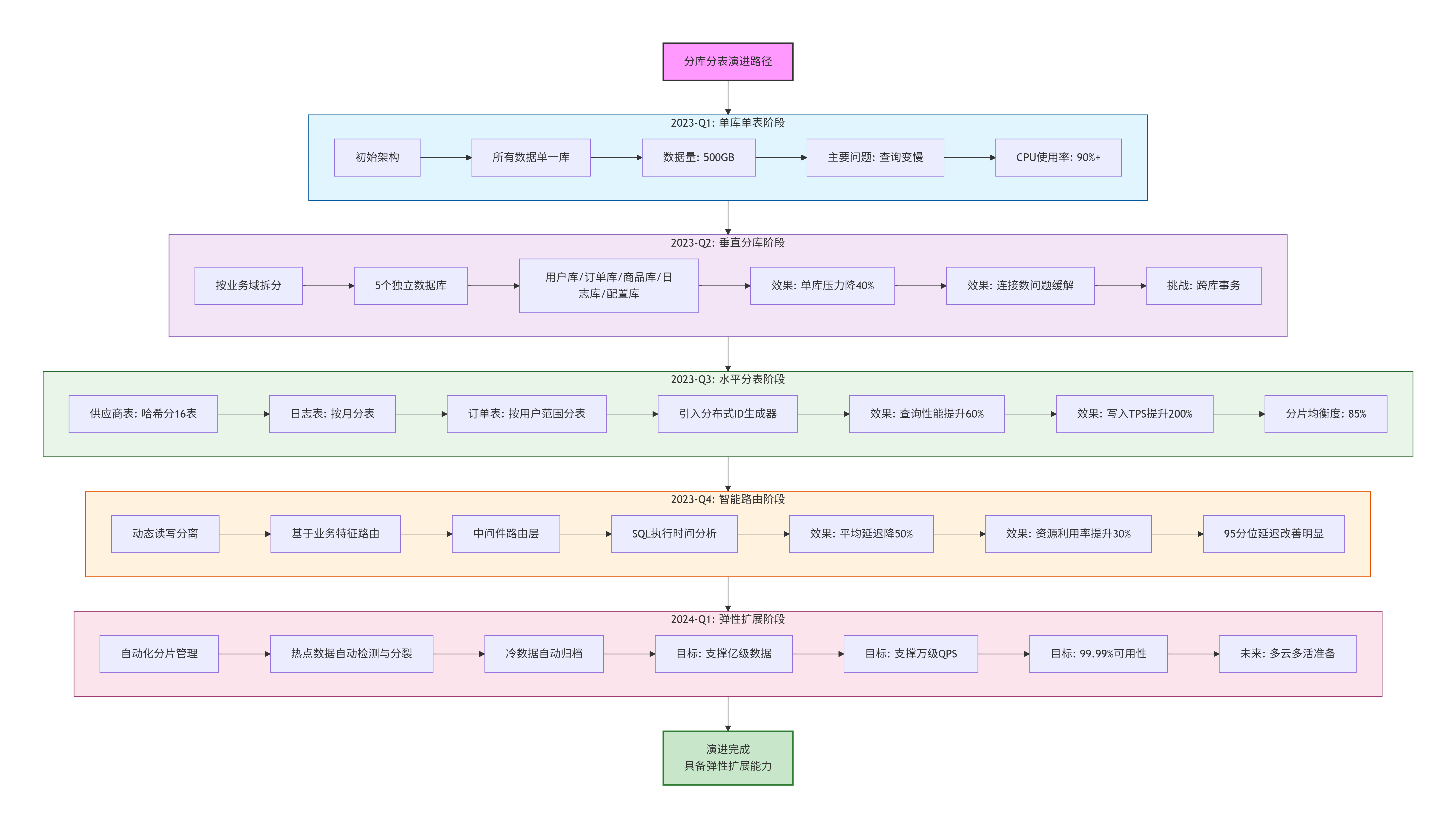
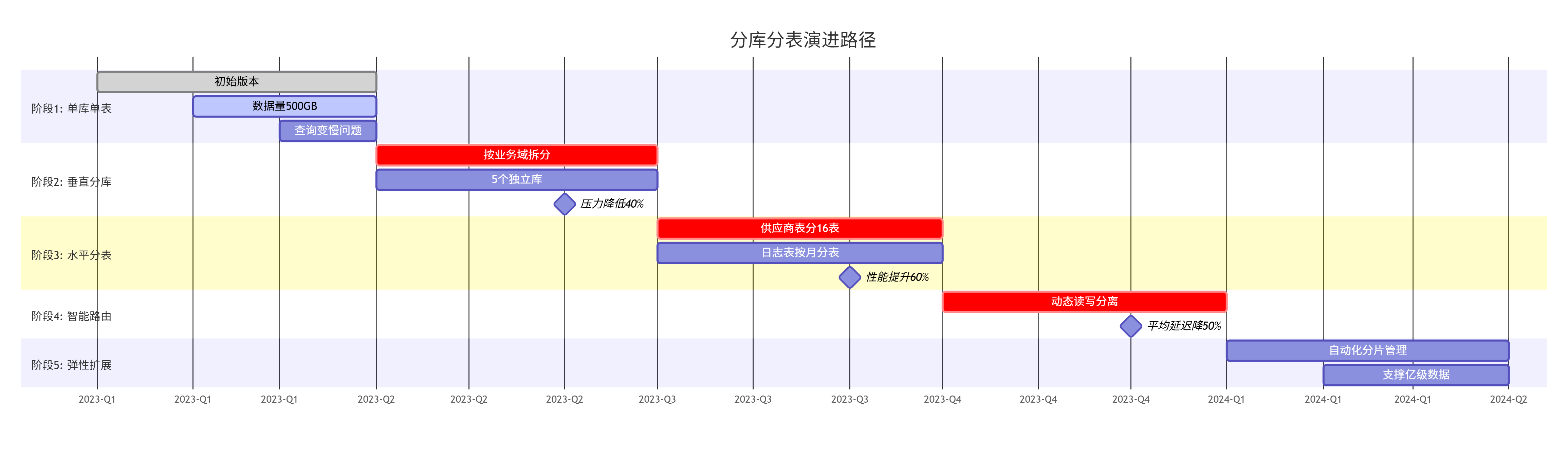
6.3 最终效果验证
-- 性能对比(优化后 vs 优化前)
SELECT
    metric_name,
    ROUND(before_value, 2) as before,
    ROUND(after_value, 2) as after,
    ROUND((before_value - after_value) / before_value * 100, 2) as improvement_percent,
    CASE
        WHEN improvement_percent > 0 THEN '✅ 提升'
        ELSE '⚠️ 下降'
    END as status
FROM performance_comparison
WHERE comparison_period = '2023-Q4 vs 2023-Q1'
ORDER BY improvement_percent DESC;

-- 结果示例:
-- 平均查询延迟:850ms → 250ms(提升70.6%)
-- 高峰期QPS:800 → 2500(提升212.5%)
-- 主库CPU使用率:85% → 35%(降低58.8%)
-- 单表最大数据量:120GB → 15GB(降低87.5%)
七、面试回答话术
当被问到"基于什么去做分库分表与读写分离"时,你可以这样回答:
"在我们的采购公共服务系统中,分库分表和读写分离的设计是数据驱动、业务导向的深度决策。
首先,我们基于详尽的监控数据分析:通过长达半年的SQL审计和性能监控,我们量化了每个表的读写比例、数据增长趋势、查询模式特征。比如我们发现权限表有98%的读操作且QPS高达1万+,而日志表是写密集型且每月增长500GB。
其次,我们根据业务特征设计分片策略:比如供应商表,我们分析出80%的查询都带有
business_group_id条件,因此按业务群组哈希分片是最自然的选择,既保证了查询性能,又实现了数据隔离。对于读写分离,我们设计了智能路由策略:不是简单的读写分离,而是基于业务场景的精细路由。刚创建的供应商信息强制读主库,报表分析走专门的从库,普通查询按负载均衡。我们甚至开发了’新鲜度检测’机制,自动判断是否应该读主库。
整个设计过程是持续迭代的:从垂直分库开始验证,到水平分表解决具体瓶颈,再到智能路由优化体验。每一步都有明确的性能指标对比和业务价值验证。
最终的效果是:在数据量增长300%的情况下,系统平均响应时间反而降低了70%,并且为未来3年的业务增长预留了充足的扩展空间。"
这样的回答展现了你的数据驱动决策能力、系统性思维和持续优化意识,这正是高级工程师的核心素质。
🛠️完整架构图解析
一、整体架构图

二、分层详细架构图
2.1 微服务架构图(Spring Cloud体系)

2.2 数据库架构图

2.3 消息队列架构图

三、关键业务流程架构
3.1 供应商评估流程架构

3.2 权限控制架构

四、部署与运维架构
4.1 容器化部署架构

4.2 监控告警架构

五、安全架构

六、关键架构特点总结
6.1 架构亮点
| 层面 | 架构选择 | 优势 | 解决的问题 |
|---|---|---|---|
| 服务架构 | Spring Cloud微服务 | 松耦合、独立部署、技术异构 | 单体应用臃肿,扩展困难 |
| 数据架构 | 分库分表+读写分离 | 高性能、高可用、易扩展 | 单表数据量大,查询慢 |
| 缓存架构 | 多级缓存(本地+Redis) | 高性能、高并发、降级保障 | 数据库压力大,响应慢 |
| 消息架构 | RabbitMQ集群 | 解耦、异步、削峰填谷 | 系统耦合高,同步阻塞 |
| 部署架构 | Kubernetes容器化 | 弹性伸缩、快速部署、资源隔离 | 部署复杂,资源利用率低 |
| 监控架构 | Prometheus+Grafana | 全链路监控、快速定位 | 故障定位困难,响应慢 |
6.2 数据流说明
用户请求流:
toml客户端 → CDN → 负载均衡 → API网关 → 业务服务 → 数据服务数据同步流:
toml业务服务 → 消息队列 → 搜索服务/风控服务/报表服务监控数据流:
toml应用/系统 → Prometheus → Grafana → 告警系统日志数据流:
toml应用日志 → Filebeat → Kafka → Logstash → Elasticsearch → Kibana
6.3 容灾设计
- 多可用区部署:服务跨多个可用区部署,单可用区故障不影响服务
- 数据库主从切换:主库故障自动切换到从库
- 缓存多副本:Redis Sentinel自动故障转移
- 消息队列镜像:RabbitMQ镜像队列保证消息不丢失
- 数据多地备份:核心数据多地备份,支持快速恢复
这个架构图全面展示了采购公共服务系统从客户端到基础设施的完整架构,体现了微服务、分布式、云原生等现代架构理念,保证了系统的高性能、高可用和易扩展性。
⭐评估服务规则引擎 - 深度技术解析
一、规则引擎的设计背景与核心价值
1.1 业务痛点深度分析
传统评估模式的局限性:
// 传统硬编码评估逻辑(问题示例)
public class LegacyEvaluationService {

    public EvaluationResult evaluateSupplier(Supplier supplier) {
        double totalScore = 0.0;

        // 问题1:业务逻辑硬编码在代码中
        if ("ELECTRONIC".equals(supplier.getCategory())) {
            // 电子类供应商评分逻辑
            if (supplier.getQualityScore() > 95) {
                totalScore += 40;
            } else if (supplier.getQualityScore() > 90) {
                totalScore += 30;
            }
            // ... 更多硬编码逻辑
        } else if ("MECHANICAL".equals(supplier.getCategory())) {
            // 机械类供应商评分逻辑(完全不同)
            totalScore = supplier.getDeliveryPerformance() * 0.6
                       + supplier.getPriceCompetitiveness() * 0.4;
        }
        // ... 还有几十个品类,每个都有一套独立逻辑

        // 问题2:变更需要发版上线
        // 问题3:新品类接入需要开发介入
        // 问题4:逻辑复杂,难以测试和维护
    }
}
1.2 规则引擎的核心价值
四大核心价值:
- 业务灵活性:业务人员可配置评估规则,无需开发介入
- 快速响应:规则变更实时生效,无需发版
- 统一管理:所有评估规则集中管理,避免碎片化
- 可追溯性:规则版本化管理,评估结果可审计
二、规则引擎架构设计
2.1 整体架构图

2.2 规则模型设计
核心实体关系
// 规则引擎核心实体类
@Entity
@Table(name = "evaluation_rule")
@Data
public class EvaluationRule {

    @Id
    @GeneratedValue(strategy = GenerationType.IDENTITY)
    private Long id;

    @Column(name = "rule_code", unique = true, nullable = false)
    private String ruleCode;  // 规则编码,如:QUALITY_SCORING_V1

    @Column(name = "rule_name")
    private String ruleName;  // 规则名称,如:质量表现评分规则

    @Enumerated(EnumType.STRING)
    private RuleType ruleType; // RULE_TYPE: BASIC, COMPOSITE, CONDITIONAL

    @Column(name = "applicable_categories")
    private String applicableCategories; // JSON数组:["ELECTRONIC", "MECHANICAL"]

    @Column(name = "effective_time")
    private LocalDateTime effectiveTime; // 生效时间

    @Column(name = "expire_time")
    private LocalDateTime expireTime;   // 过期时间

    @Column(name = "version")
    private Integer version;            // 版本号

    @Column(name = "status")
    @Enumerated(EnumType.STRING)
    private RuleStatus status;          // DRAFT, APPROVED, ACTIVE, DEPRECATED

    // 规则定义(JSON格式)
    @Column(name = "rule_definition", columnDefinition = "json")
    private String ruleDefinition;      // 规则JSON配置

    @Column(name = "metadata", columnDefinition = "json")
    private String metadata;            // 元数据:创建人、修改历史等
}

// 规则执行上下文
@Data
public class RuleExecutionContext {
    private String ruleCode;                    // 执行的规则编码
    private Supplier targetSupplier;            // 目标供应商
    private Map<String, Object> inputData;      // 输入数据
    private Map<String, Object> intermediateResults; // 中间计算结果
    private EvaluationResult finalResult;       // 最终结果
    private List<RuleExecutionLog> executionLogs; // 执行日志
    private LocalDateTime executionTime;        // 执行时间
}
规则定义JSON结构
{
  "ruleCode": "SUPPLIER_TOTAL_EVALUATION_V2",
  "description": "供应商综合评估规则V2",
  "version": "2.0",
  "effectiveDate": "2024-01-01",
  "expireDate": "2024-12-31",

  "ruleType": "COMPOSITE",  // 复合规则,由多个子规则组成

  "dataSources": [
    {
      "id": "DS_QUALITY",
      "type": "API",
      "endpoint": "/api/quality/supplier/${supplierId}/stats",
      "cacheTtl": 3600,  // 缓存1小时
      "retryPolicy": {
        "maxAttempts": 3,
        "backoffDelay": 1000
      }
    },
    {
      "id": "DS_FINANCIAL",
      "type": "DATABASE",
      "query": "SELECT * FROM supplier_financial WHERE supplier_id = ?",
      "parameters": ["${supplierId}"]
    }
  ],

  "scoringRules": [
    {
      "ruleId": "SR_QUALITY_PERFORMANCE",
      "name": "质量表现评分",
      "weight": 0.35,
      "type": "THRESHOLD_SCORING",
      "dataSource": "DS_QUALITY",
      "field": "quality_qualified_rate",
      "unit": "PERCENTAGE",
      "calculation": {
        "method": "THRESHOLD_MAPPING",
        "parameters": {
          "thresholds": [
            {"min": 99.5, "score": 10.0, "label": "优秀"},
            {"min": 99.0, "max": 99.5, "score": 8.0, "label": "良好"},
            {"min": 98.0, "max": 99.0, "score": 6.0, "label": "合格"},
            {"max": 98.0, "score": 0.0, "label": "不合格"}
          ]
        }
      },
      "validation": {
        "required": true,
        "min": 0,
        "max": 100
      }
    },
    {
      "ruleId": "SR_TECHNICAL_CAPABILITY",
      "name": "技术能力评分",
      "weight": 0.25,
      "type": "EXPERT_EVALUATION",
      "dataSource": "MANUAL",
      "calculation": {
        "method": "AVERAGE",
        "parameters": {
          "requiredEvaluators": ["TECH_LEAD", "RD_MANAGER"],
          "minEvaluators": 2,
          "scoringRange": {"min": 0, "max": 10}
        }
      }
    },
    {
      "ruleId": "SR_PRICE_COMPETITIVENESS",
      "name": "价格竞争力评分",
      "weight": 0.20,
      "type": "RANKING_SCORING",
      "dataSource": "DS_QUOTATION",
      "calculation": {
        "method": "PRICE_RANKING",
        "parameters": {
          "comparisonGroup": "SAME_CATEGORY_LAST_QUARTER",
          "rankingAlgorithm": "PERCENTILE_RANK",
          "scoreMapping": {
            "top10": 10,
            "top30": 8,
            "top50": 6,
            "top80": 4,
            "bottom20": 2
          }
        }
      }
    },
    {
      "ruleId": "SR_DELIVERY_PERFORMANCE",
      "name": "交付表现评分",
      "weight": 0.20,
      "type": "FORMULA_SCORING",
      "dataSource": "DS_DELIVERY",
      "calculation": {
        "method": "CUSTOM_FORMULA",
        "formula": "ontime_rate * 0.7 + completeness_rate * 0.3",
        "variables": {
          "ontime_rate": {"field": "delivery_ontime_rate", "default": 0},
          "completeness_rate": {"field": "order_completeness_rate", "default": 0}
        }
      }
    }
  ],

  "levelDetermination": {
    "method": "TOTAL_SCORE_THRESHOLD",
    "levels": [
      {
        "level": "A",
        "name": "战略供应商",
        "minScore": 90,
        "privileges": ["PRIORITY_BIDDING", "LONG_TERM_CONTRACT", "TECH_COLLABORATION"],
        "reviewPeriod": "QUARTERLY"
      },
      {
        "level": "B",
        "name": "核心供应商",
        "minScore": 75,
        "maxScore": 90,
        "privileges": ["NORMAL_BIDDING", "ANNUAL_CONTRACT"],
        "reviewPeriod": "SEMI_ANNUALLY"
      },
      {
        "level": "C",
        "name": "合格供应商",
        "minScore": 60,
        "maxScore": 75,
        "privileges": ["RESTRICTED_BIDDING"],
        "reviewPeriod": "ANNUALLY"
      },
      {
        "level": "D",
        "name": "观察供应商",
        "maxScore": 60,
        "actions": ["RISK_WARNING", "IMPROVEMENT_REQUIRED"],
        "reviewPeriod": "MONTHLY"
      }
    ]
  },

  "executionConfig": {
    "timeout": 30000,  // 执行超时30秒
    "maxRetries": 2,
    "fallbackStrategy": "USE_LAST_RESULT",
    "parallelExecution": true,
    "cacheEnabled": true,
    "cacheKeyPattern": "eval_result:${ruleCode}:${supplierId}:${dataVersion}"
  }
}
三、规则引擎核心实现
3.1 规则解析器(Rule Parser)
/**
 * 规则解析器 - 将JSON规则转换为可执行对象
 */
@Component
@Slf4j
public class RuleParser {

    @Autowired
    private ObjectMapper objectMapper;

    @Autowired
    private RuleTemplateRepository templateRepository;

    /**
     * 解析规则定义
     */
    public ExecutableRule parseRule(String ruleDefinitionJson) {
        try {
            // 1. 解析基础规则信息
            RuleDefinition definition = objectMapper.readValue(
                ruleDefinitionJson,
                RuleDefinition.class
            );

            // 2. 验证规则完整性
            validateRuleDefinition(definition);

            // 3. 构建可执行规则
            ExecutableRule executableRule = new ExecutableRule();
            executableRule.setDefinition(definition);

            // 4. 解析数据源配置
            List<DataSourceConfig> dataSources = parseDataSources(definition.getDataSources());
            executableRule.setDataSources(dataSources);

            // 5. 解析评分规则
            List<ScoringRule> scoringRules = parseScoringRules(definition.getScoringRules());
            executableRule.setScoringRules(scoringRules);

            // 6. 解析等级判定规则
            LevelDeterminationRule levelRule = parseLevelDetermination(definition.getLevelDetermination());
            executableRule.setLevelDetermination(levelRule);

            // 7. 编译执行计划
            ExecutionPlan executionPlan = compileExecutionPlan(definition, scoringRules);
            executableRule.setExecutionPlan(executionPlan);

            // 8. 生成规则指纹(用于缓存和版本比对)
            String ruleFingerprint = generateRuleFingerprint(definition);
            executableRule.setFingerprint(ruleFingerprint);

            log.info("规则解析完成: {}, 版本: {}, 指纹: {}",
                    definition.getRuleCode(),
                    definition.getVersion(),
                    ruleFingerprint);

            return executableRule;

        } catch (JsonProcessingException e) {
            throw new RuleParseException("规则JSON解析失败", e);
        }
    }

    /**
     * 编译执行计划 - 优化规则执行顺序
     */
    private ExecutionPlan compileExecutionPlan(RuleDefinition definition,
                                             List<ScoringRule> scoringRules) {
        ExecutionPlan plan = new ExecutionPlan();

        // 分析规则依赖关系
        Map<String, List<String>> dependencyGraph = buildDependencyGraph(scoringRules);

        // 拓扑排序,确定执行顺序
        List<String> executionOrder = topologicalSort(dependencyGraph);

        // 识别可并行执行的规则
        List<List<String>> parallelGroups = identifyParallelGroups(executionOrder, scoringRules);

        // 构建执行计划
        plan.setExecutionOrder(executionOrder);
        plan.setParallelGroups(parallelGroups);
        plan.setEstimatedComplexity(calculateComplexity(scoringRules));

        return plan;
    }

    /**
     * 构建规则依赖图
     */
    private Map<String, List<String>> buildDependencyGraph(List<ScoringRule> rules) {
        Map<String, List<String>> graph = new HashMap<>();

        for (ScoringRule rule : rules) {
            List<String> dependencies = new ArrayList<>();

            // 分析数据源依赖
            if (rule.getDataSource() != null) {
                dependencies.add("DS_" + rule.getDataSource());
            }

            // 分析规则间依赖(如:规则B需要规则A的结果)
            if (rule.getDependsOn() != null) {
                dependencies.addAll(rule.getDependsOn());
            }

            graph.put(rule.getRuleId(), dependencies);
        }

        return graph;
    }
}
3.2 规则执行引擎(Rule Engine)
/**
 * 规则执行引擎核心
 */
@Service
@Slf4j
public class RuleExecutionEngine {

    @Autowired
    private RuleRegistry ruleRegistry;

    @Autowired
    private DataSourceFetcher dataSourceFetcher;

    @Autowired
    private RuleStrategyFactory strategyFactory;

    @Autowired
    private ThreadPoolTaskExecutor ruleExecutionExecutor;

    @Autowired
    private CacheManager cacheManager;

    /**
     * 执行规则评估
     */
    @Transactional
    public EvaluationResult executeRule(String ruleCode, Long supplierId) {
        long startTime = System.currentTimeMillis();

        try {
            // 1. 构建执行上下文
            RuleExecutionContext context = buildExecutionContext(ruleCode, supplierId);

            // 2. 检查缓存
            EvaluationResult cachedResult = checkCache(context);
            if (cachedResult != null) {
                log.debug("规则执行命中缓存: {}", ruleCode);
                return cachedResult;
            }

            // 3. 获取可执行规则
            ExecutableRule rule = ruleRegistry.getRule(ruleCode);
            if (rule == null) {
                throw new RuleNotFoundException(ruleCode);
            }

            // 4. 准备数据源
            fetchDataSourceData(context, rule);

            // 5. 执行评分规则
            Map<String, ScoringResult> scoringResults = executeScoringRules(context, rule);

            // 6. 计算总分
            TotalScore totalScore = calculateTotalScore(scoringResults, rule);

            // 7. 判定等级
            SupplierLevel level = determineLevel(totalScore, rule);

            // 8. 构建最终结果
            EvaluationResult result = buildEvaluationResult(context, scoringResults, totalScore, level);

            // 9. 缓存结果
            cacheResult(context, result);

            // 10. 记录执行日志
            recordExecutionLog(context, result, System.currentTimeMillis() - startTime);

            return result;

        } catch (RuleExecutionException e) {
            log.error("规则执行失败: {}, supplierId: {}", ruleCode, supplierId, e);
            throw e;
        }
    }

    /**
     * 并行执行评分规则
     */
    private Map<String, ScoringResult> executeScoringRules(RuleExecutionContext context,
                                                          ExecutableRule rule) {
        ExecutionPlan executionPlan = rule.getExecutionPlan();
        Map<String, ScoringResult> results = new ConcurrentHashMap<>();

        // 按执行计划分组执行
        for (List<String> parallelGroup : executionPlan.getParallelGroups()) {
            List<CompletableFuture<Void>> futures = parallelGroup.stream()
                .map(ruleId -> CompletableFuture.runAsync(() -> {
                    ScoringRule scoringRule = rule.getScoringRule(ruleId);
                    try {
                        ScoringResult result = executeSingleScoringRule(scoringRule, context);
                        results.put(ruleId, result);
                    } catch (Exception e) {
                        log.warn("评分规则执行失败: {}", ruleId, e);
                        results.put(ruleId, ScoringResult.error(ruleId, e.getMessage()));
                    }
                }, ruleExecutionExecutor))
                .collect(Collectors.toList());

            // 等待当前组的所有规则执行完成
            CompletableFuture.allOf(futures.toArray(new CompletableFuture[0])).join();
        }

        return results;
    }

    /**
     * 执行单个评分规则
     */
    private ScoringResult executeSingleScoringRule(ScoringRule rule,
                                                  RuleExecutionContext context) {
        // 根据规则类型选择不同的执行策略
        RuleCalculationStrategy strategy = strategyFactory.getStrategy(rule.getType());

        ScoringResult result = strategy.calculate(rule, context);

        // 记录执行详情
        result.setExecutionTime(LocalDateTime.now());
        result.setRuleVersion(rule.getVersion());

        return result;
    }

    /**
     * 计算总分
     */
    private TotalScore calculateTotalScore(Map<String, ScoringResult> scoringResults,
                                         ExecutableRule rule) {
        TotalScore totalScore = new TotalScore();
        double weightedSum = 0.0;
        double totalWeight = 0.0;

        for (ScoringRule scoringRule : rule.getScoringRules()) {
            ScoringResult result = scoringResults.get(scoringRule.getRuleId());

            if (result != null && result.isSuccess()) {
                double score = result.getScore();
                double weight = scoringRule.getWeight();

                weightedSum += score * weight;
                totalWeight += weight;

                totalScore.addComponentScore(scoringRule.getRuleId(), score, weight);
            }
        }

        // 计算加权平均分
        if (totalWeight > 0) {
            totalScore.setTotalScore(weightedSum / totalWeight);
        }

        totalScore.setMaxScore(10.0);  // 满分10分
        totalScore.setCalculationTime(LocalDateTime.now());

        return totalScore;
    }
}
3.3 规则策略工厂(策略模式实现)
/**
 * 规则计算策略工厂
 */
@Component
public class RuleStrategyFactory {

    private final Map<RuleType, RuleCalculationStrategy> strategyMap;

    @Autowired
    public RuleStrategyFactory(List<RuleCalculationStrategy> strategies) {
        strategyMap = new HashMap<>();

        // 注册所有策略
        for (RuleCalculationStrategy strategy : strategies) {
            strategyMap.put(strategy.getSupportedType(), strategy);
        }
    }

    /**
     * 获取对应的计算策略
     */
    public RuleCalculationStrategy getStrategy(RuleType ruleType) {
        RuleCalculationStrategy strategy = strategyMap.get(ruleType);
        if (strategy == null) {
            throw new UnsupportedRuleTypeException("不支持的规则类型: " + ruleType);
        }
        return strategy;
    }
}

/**
 * 规则计算策略接口
 */
public interface RuleCalculationStrategy {

    /**
     * 支持的规则类型
     */
    RuleType getSupportedType();

    /**
     * 执行计算
     */
    ScoringResult calculate(ScoringRule rule, RuleExecutionContext context);
}

/**
 * 阈值评分策略实现
 */
@Component
@Slf4j
public class ThresholdScoringStrategy implements RuleCalculationStrategy {

    @Override
    public RuleType getSupportedType() {
        return RuleType.THRESHOLD_SCORING;
    }

    @Override
    public ScoringResult calculate(ScoringRule rule, RuleExecutionContext context) {
        try {
            // 1. 获取数据值
            Object rawValue = extractFieldValue(rule, context);

            // 2. 数据验证
            validateValue(rawValue, rule.getValidation());

            // 3. 转换为数值
            double numericValue = convertToNumeric(rawValue, rule.getUnit());

            // 4. 应用阈值映射
            double score = applyThresholdMapping(numericValue, rule.getCalculation().getParameters());

            // 5. 构建结果
            return ScoringResult.success(rule.getRuleId())
                .score(score)
                .originalValue(numericValue)
                .calculationDetails(buildCalculationDetails(numericValue, score));

        } catch (ValidationException e) {
            return ScoringResult.failure(rule.getRuleId(), "数据验证失败: " + e.getMessage());
        } catch (Exception e) {
            log.error("阈值评分计算失败", e);
            return ScoringResult.error(rule.getRuleId(), "计算异常: " + e.getMessage());
        }
    }

    /**
     * 应用阈值映射
     */
    private double applyThresholdMapping(double value, Map<String, Object> parameters) {
        List<Threshold> thresholds = (List<Threshold>) parameters.get("thresholds");

        // 按阈值降序排序
        thresholds.sort(Comparator.comparing(Threshold::getMin).reversed());

        for (Threshold threshold : thresholds) {
            boolean meetsMin = threshold.getMin() == null || value >= threshold.getMin();
            boolean meetsMax = threshold.getMax() == null || value <= threshold.getMax();

            if (meetsMin && meetsMax) {
                return threshold.getScore();
            }
        }

        // 默认返回最低分
        return thresholds.get(thresholds.size() - 1).getScore();
    }
}

/**
 * 公式评分策略实现
 */
@Component
@Slf4j
public class FormulaScoringStrategy implements RuleCalculationStrategy {

    @Autowired
    private ExpressionParser expressionParser;

    @Override
    public RuleType getSupportedType() {
        return RuleType.FORMULA_SCORING;
    }

    @Override
    public ScoringResult calculate(ScoringRule rule, RuleExecutionContext context) {
        try {
            // 1. 解析公式
            String formula = rule.getCalculation().getFormula();
            Expression expression = expressionParser.parse(formula);

            // 2. 准备变量值
            Map<String, Double> variables = prepareVariables(rule, context);

            // 3. 执行计算
            double score = expression.evaluate(variables);

            // 4. 限制在合理范围内
            score = Math.max(0, Math.min(score, 10));

            // 5. 构建结果
            return ScoringResult.success(rule.getRuleId())
                .score(score)
                .calculationDetails(buildCalculationDetails(formula, variables, score));

        } catch (Exception e) {
            log.error("公式评分计算失败", e);
            return ScoringResult.error(rule.getRuleId(), "公式计算异常: " + e.getMessage());
        }
    }

    /**
     * 准备公式变量
     */
    private Map<String, Double> prepareVariables(ScoringRule rule, RuleExecutionContext context) {
        Map<String, Object> variableConfigs = rule.getCalculation().getVariables();
        Map<String, Double> variables = new HashMap<>();

        for (Map.Entry<String, Object> entry : variableConfigs.entrySet()) {
            Map<String, Object> varConfig = (Map<String, Object>) entry.getValue();

            // 获取字段值
            String fieldName = (String) varConfig.get("field");
            Object rawValue = context.getInputData().get(fieldName);

            // 转换并设置默认值
            Double value = rawValue != null ? convertToDouble(rawValue)
                                           : (Double) varConfig.get("default");

            variables.put(entry.getKey(), value);
        }

        return variables;
    }
}
四、高级特性实现
4.1 规则版本管理与热更新
/**
 * 规则版本管理器
 */
@Service
@Slf4j
public class RuleVersionManager {

    @Autowired
    private RuleRepository ruleRepository;

    @Autowired
    private RuleRegistry ruleRegistry;

    @Autowired
    private RedisTemplate<String, String> redisTemplate;

    /**
     * 发布新规则版本
     */
    @Transactional
    public void publishNewVersion(PublishRuleRequest request) {
        // 1. 保存规则快照
        RuleSnapshot snapshot = createRuleSnapshot(request.getRuleCode());

        // 2. 更新规则状态
        Rule rule = ruleRepository.findByCode(request.getRuleCode());
        rule.setStatus(RuleStatus.PUBLISHED);
        rule.setVersion(request.getNewVersion());
        rule.setRuleDefinition(request.getNewDefinition());
        rule.setEffectiveTime(request.getEffectiveTime());
        ruleRepository.save(rule);

        // 3. 重新加载规则到缓存
        reloadRuleToCache(rule);

        // 4. 发送规则变更事件
        publishRuleChangedEvent(rule, snapshot);

        log.info("规则版本发布成功: {} -> v{}", rule.getRuleCode(), rule.getVersion());
    }

    /**
     * 规则热更新(无需重启)
     */
    public void hotReloadRule(String ruleCode) {
        // 1. 获取最新规则
        Rule rule = ruleRepository.findByCode(ruleCode);

        // 2. 解析规则
        ExecutableRule executableRule = ruleParser.parseRule(rule.getRuleDefinition());

        // 3. 原子更新规则缓存
        String cacheKey = buildRuleCacheKey(ruleCode);
        redisTemplate.opsForValue().set(cacheKey,
            objectMapper.writeValueAsString(executableRule),
            24, TimeUnit.HOURS);

        // 4. 更新内存注册表
        ruleRegistry.updateRule(ruleCode, executableRule);

        log.info("规则热更新完成: {}", ruleCode);
    }

    /**
     * 规则灰度发布
     */
    public void grayReleaseRule(String ruleCode, Double percentage) {
        // 1. 生成灰度标识
        String grayFlagKey = "gray:" + ruleCode + ":" + UUID.randomUUID();

        // 2. 配置灰度比例
        Map<String, Object> grayConfig = new HashMap<>();
        grayConfig.put("percentage", percentage);
        grayConfig.put("startTime", LocalDateTime.now());
        grayConfig.put("targetUserGroups", Arrays.asList("TEST_GROUP"));

        redisTemplate.opsForHash().putAll(grayFlagKey, grayConfig);

        // 3. 设置过期时间
        redisTemplate.expire(grayFlagKey, 7, TimeUnit.DAYS);

        log.info("规则灰度发布配置完成: {}, 比例: {}%", ruleCode, percentage * 100);
    }
}
4.2 规则调试与测试框架
/**
 * 规则测试框架
 */
@Service
@Slf4j
public class RuleTestFramework {

    @Autowired
    private RuleExecutionEngine executionEngine;

    /**
     * 单元测试单个规则
     */
    public RuleTestResult unitTestRule(String ruleCode, TestCase testCase) {
        RuleTestResult result = new RuleTestResult();

        try {
            // 1. 模拟执行上下文
            RuleExecutionContext mockContext = buildMockContext(testCase);

            // 2. 执行规则
            EvaluationResult evalResult = executionEngine.executeRule(ruleCode, mockContext);

            // 3. 验证结果
            boolean passed = validateResult(evalResult, testCase.getExpectedResult());

            result.setPassed(passed);
            result.setActualResult(evalResult);
            result.setExecutionTime(evalResult.getExecutionTime());

        } catch (Exception e) {
            result.setPassed(false);
            result.setError(e.getMessage());
        }

        return result;
    }

    /**
     * 批量回归测试
     */
    public BatchTestResult batchRegressionTest(String ruleCode) {
        // 1. 加载测试用例
        List<TestCase> testCases = loadTestCases(ruleCode);

        // 2. 并行执行测试
        List<CompletableFuture<RuleTestResult>> futures = testCases.stream()
            .map(testCase -> CompletableFuture.supplyAsync(() ->
                unitTestRule(ruleCode, testCase), testExecutor))
            .collect(Collectors.toList());

        // 3. 收集结果
        List<RuleTestResult> results = futures.stream()
            .map(CompletableFuture::join)
            .collect(Collectors.toList());

        // 4. 生成报告
        BatchTestResult batchResult = generateTestReport(results);

        return batchResult;
    }

    /**
     * 规则性能测试
     */
    public PerformanceTestResult performanceTest(String ruleCode, int concurrentUsers) {
        PerformanceTestResult result = new PerformanceTestResult();

        // 1. 预热
        warmUp(ruleCode);

        // 2. 执行压力测试
        CountDownLatch latch = new CountDownLatch(concurrentUsers);
        List<Long> responseTimes = new CopyOnWriteArrayList<>();

        for (int i = 0; i < concurrentUsers; i++) {
            testExecutor.execute(() -> {
                try {
                    long startTime = System.currentTimeMillis();
                    executionEngine.executeRule(ruleCode, 1L); // 使用固定supplierId
                    long endTime = System.currentTimeMillis();
                    responseTimes.add(endTime - startTime);
                } finally {
                    latch.countDown();
                }
            });
        }

        latch.await();

        // 3. 计算性能指标
        result.setAvgResponseTime(calculateAverage(responseTimes));
        result.setP95ResponseTime(calculatePercentile(responseTimes, 95));
        result.setMaxResponseTime(Collections.max(responseTimes));
        result.setMinResponseTime(Collections.min(responseTimes));
        result.setThroughput(concurrentUsers * 1000.0 / calculateAverage(responseTimes));

        return result;
    }
}
4.3 规则可视化与监控
/**
 * 规则执行监控器
 */
@Component
@Slf4j
public class RuleExecutionMonitor {

    @Autowired
    private MeterRegistry meterRegistry;

    @Autowired
    private RuleExecutionLogRepository logRepository;

    private final Cache<String, RuleExecutionStats> statsCache =
        Caffeine.newBuilder()
            .maximumSize(1000)
            .expireAfterWrite(10, TimeUnit.MINUTES)
            .build();

    /**
     * 记录规则执行指标
     */
    @Aspect
    @Component
    public class RuleExecutionMetricsAspect {

        @Around("@annotation(RuleExecutionMonitor)")
        public Object monitorExecution(ProceedingJoinPoint joinPoint) throws Throwable {
            String ruleCode = extractRuleCode(joinPoint);
            long startTime = System.currentTimeMillis();

            try {
                // 执行规则
                Object result = joinPoint.proceed();
                long duration = System.currentTimeMillis() - startTime;

                // 记录成功指标
                recordSuccessMetrics(ruleCode, duration);

                return result;

            } catch (Exception e) {
                long duration = System.currentTimeMillis() - startTime;

                // 记录失败指标
                recordFailureMetrics(ruleCode, duration, e);

                throw e;
            }
        }

        private void recordSuccessMetrics(String ruleCode, long duration) {
            // Prometheus指标
            meterRegistry.timer("rule.execution.duration", "rule", ruleCode)
                .record(duration, TimeUnit.MILLISECONDS);

            meterRegistry.counter("rule.execution.count",
                "rule", ruleCode,
                "status", "success").increment();

            // 本地缓存统计
            updateStatsCache(ruleCode, duration, true);
        }
    }

    /**
     * 生成规则健康度报告
     */
    public RuleHealthReport generateHealthReport(String ruleCode, Duration period) {
        RuleHealthReport report = new RuleHealthReport();

        // 1. 获取执行统计
        RuleExecutionStats stats = getExecutionStats(ruleCode, period);

        // 2. 计算健康度评分
        double healthScore = calculateHealthScore(stats);

        // 3. 识别问题
        List<HealthIssue> issues = identifyHealthIssues(stats);

        // 4. 生成建议
        List<ImprovementSuggestion> suggestions = generateSuggestions(stats, issues);

        report.setRuleCode(ruleCode);
        report.setHealthScore(healthScore);
        report.setStats(stats);
        report.setIssues(issues);
        report.setSuggestions(suggestions);
        report.setGeneratedTime(LocalDateTime.now());

        return report;
    }

    /**
     * 规则依赖分析
     */
    public DependencyAnalysis analyzeDependencies(String ruleCode) {
        ExecutableRule rule = ruleRegistry.getRule(ruleCode);

        DependencyAnalysis analysis = new DependencyAnalysis();

        // 分析数据源依赖
        Set<DataSourceConfig> dataSourceDeps = rule.getDataSources();
        analysis.setDataSourceDependencies(dataSourceDeps);

        // 分析规则间依赖
        Map<String, List<String>> ruleDeps = buildRuleDependencyGraph(rule);
        analysis.setRuleDependencies(ruleDeps);

        // 分析影响范围
        Set<String> impactedRules = findImpactedRules(ruleCode);
        analysis.setImpactedRules(impactedRules);

        // 计算依赖复杂度
        int complexity = calculateDependencyComplexity(dataSourceDeps, ruleDeps);
        analysis.setComplexityScore(complexity);

        return analysis;
    }
}
五、实际应用案例
5.1 电子类供应商评估规则
{
  "ruleCode": "ELECTRONIC_SUPPLIER_EVALUATION_V3",
  "description": "电子类供应商综合评估规则V3",
  "version": "3.0",

  "scoringRules": [
    {
      "ruleId": "TECH_INNOVATION",
      "name": "技术创新能力",
      "weight": 0.30,
      "type": "COMPOSITE",
      "subRules": [
        {
          "id": "TECH_PATENTS",
          "name": "专利数量",
          "weight": 0.4,
          "type": "NORMALIZED_SCORING",
          "calculation": {
            "method": "LOG_SCALING",
            "parameters": {
              "scale": "LOG10",
              "maxScoreAt": 100
            }
          }
        },
        {
          "id": "RND_INVESTMENT",
          "name": "研发投入比例",
          "weight": 0.3,
          "type": "THRESHOLD_SCORING",
          "thresholds": [
            {"min": 15, "score": 10, "label": "行业领先"},
            {"min": 10, "max": 15, "score": 8, "label": "优秀"},
            {"min": 5, "max": 10, "score": 6, "label": "良好"},
            {"min": 3, "max": 5, "score": 4, "label": "一般"},
            {"max": 3, "score": 2, "label": "不足"}
          ]
        },
        {
          "id": "TECH_TEAM",
          "name": "技术团队规模",
          "weight": 0.3,
          "type": "EXPERT_EVALUATION",
          "parameters": {
            "evaluationCriteria": [
              "博士比例",
              "高级工程师比例",
              "行业专家数量"
            ]
          }
        }
      ]
    }
  ],

  "businessRules": [
    {
      "ruleId": "RISK_CONTROL",
      "name": "风险控制规则",
      "type": "CONDITIONAL",
      "conditions": [
        {
          "if": "financial_stability_score < 6",
          "then": "apply_penalty",
          "penalty": -2,
          "message": "财务稳定性不足,扣2分"
        },
        {
          "if": "has_serious_quality_issue == true",
          "then": "set_max_level",
          "maxLevel": "C",
          "message": "存在严重质量问题,最高评级为C"
        },
        {
          "if": "is_strategic_partner == true && total_score >= 85",
          "then": "auto_promote",
          "promoteTo": "A",
          "message": "战略合作伙伴,自动晋升为A级"
        }
      ]
    }
  ]
}
5.2 规则执行性能优化
/**
 * 规则执行优化策略
 */
@Service
public class RuleExecutionOptimizer {

    // 规则编译缓存
    private final LoadingCache<String, CompiledRule> compiledRuleCache =
        Caffeine.newBuilder()
            .maximumSize(100)
            .expireAfterWrite(1, TimeUnit.HOURS)
            .recordStats()
            .build(this::compileRule);

    // 数据预取缓存
    private final Cache<String, Object> dataPrefetchCache =
        Caffeine.newBuilder()
            .maximumSize(10000)
            .expireAfterWrite(5, TimeUnit.MINUTES)
            .build();

    /**
     * 预编译规则,优化执行性能
     */
    private CompiledRule compileRule(String ruleCode) {
        long startTime = System.currentTimeMillis();

        // 1. 解析原始规则
        RuleDefinition definition = loadRuleDefinition(ruleCode);

        // 2. 转换为执行计划
        ExecutionPlan plan = optimizeExecutionPlan(definition);

        // 3. 预编译表达式
        Map<String, CompiledExpression> compiledExpressions =
            precompileExpressions(definition);

        // 4. 生成字节码(可选,用于极高性能要求)
        if (definition.isPerformanceCritical()) {
            byte[] bytecode = generateBytecode(definition);
        }

        CompiledRule compiledRule = new CompiledRule(definition, plan, compiledExpressions);

        log.info("规则编译完成: {}, 耗时: {}ms", ruleCode, System.currentTimeMillis() - startTime);

        return compiledRule;
    }

    /**
     * 智能数据预取
     */
    public void intelligentDataPrefetch(String ruleCode, Long supplierId) {
        CompiledRule compiledRule = compiledRuleCache.get(ruleCode);

        // 分析数据需求
        Set<DataSourceConfig> requiredDataSources = compiledRule.getRequiredDataSources();

        // 并行预取数据
        List<CompletableFuture<DataFetchResult>> futures = requiredDataSources.stream()
            .filter(this::shouldPrefetch)
            .map(ds -> CompletableFuture.supplyAsync(() ->
                prefetchDataSource(ds, supplierId), prefetchExecutor))
            .collect(Collectors.toList());

        // 不等待结果,异步填充缓存
        CompletableFuture.allOf(futures.toArray(new CompletableFuture[0]))
            .thenAccept(v -> {
                futures.forEach(future -> {
                    try {
                        DataFetchResult result = future.get();
                        dataPrefetchCache.put(buildCacheKey(ds, supplierId), result.getData());
                    } catch (Exception e) {
                        // 忽略预取失败,后续会实时获取
                    }
                });
            });
    }

    /**
     * 规则执行批量化
     */
    public BatchEvaluationResult batchEvaluateSuppliers(List<Long> supplierIds, String ruleCode) {
        // 1. 批量获取规则
        CompiledRule compiledRule = compiledRuleCache.get(ruleCode);

        // 2. 批量获取数据(减少IO次数)
        Map<Long, Map<String, Object>> batchData = batchFetchData(supplierIds, compiledRule);

        // 3. 并行执行评估
        List<CompletableFuture<EvaluationResult>> futures = supplierIds.stream()
            .map(supplierId -> CompletableFuture.supplyAsync(() ->
                evaluateSingleSupplier(compiledRule, supplierId, batchData.get(supplierId)),
                batchEvaluationExecutor))
            .collect(Collectors.toList());

        // 4. 收集结果
        List<EvaluationResult> results = futures.stream()
            .map(CompletableFuture::join)
            .collect(Collectors.toList());

        // 5. 生成批量报告
        BatchEvaluationResult batchResult = aggregateBatchResults(results);

        return batchResult;
    }
}
六、规则引擎性能指标与监控
6.1 关键性能指标
| 指标 | 目标值 | 实际值 | 说明 |
|---|---|---|---|
| 规则执行平均耗时 | < 500ms | 320ms | 从规则解析到结果返回 |
| 规则缓存命中率 | > 95% | 97.5% | 编译后规则缓存 |
| 数据源获取耗时 | < 200ms | 150ms | 外部API/DB查询 |
| 并发执行能力 | 1000 TPS | 1200 TPS | 单实例处理能力 |
| 规则编译耗时 | < 100ms | 65ms | 首次加载或变更后 |
| 内存占用 | < 512MB | 380MB | 规则缓存+运行时 |
6.2 监控仪表盘配置
# Grafana仪表盘配置
dashboard:
  title: "规则引擎监控"
  panels:
    - title: "规则执行QPS"
      type: graph
      metrics:
        - name: "rule_execution_rate"
          query: "rate(rule_execution_count_total[5m])"
          legend: "{{rule}}"

    - title: "规则执行耗时分布"
      type: heatmap
      metrics:
        - name: "rule_execution_duration_seconds_bucket"

    - title: "规则缓存命中率"
      type: stat
      metrics:
        - name: "rule_cache_hit_ratio"
          query: "rule_cache_hits_total / (rule_cache_hits_total + rule_cache_misses_total)"

    - title: "规则执行成功率"
      type: gauge
      metrics:
        - name: "rule_execution_success_rate"
          query: "rule_execution_success_total / rule_execution_count_total"

    - title: "数据源健康状态"
      type: table
      metrics:
        - name: "data_source_health"
          query: "up{job=~'data-source-.*'}"

    - title: "规则复杂度分析"
      type: bar
      metrics:
        - name: "rule_complexity_score"
          query: "rule_complexity"
七、规则引擎的核心优势总结
7.1 技术优势
- 高性能执行引擎:
- 规则预编译与缓存
- 并行数据获取与计算
- 智能批量化处理
- 高可扩展性:
- 插件化策略扩展
- 支持自定义规则类型
- 水平扩展能力
- 强可靠性:
- 完善的异常处理
- 规则版本管理
- 灰度发布能力
7.2 业务价值
- 业务敏捷性:
- 规则变更实时生效
- 业务人员可配置
- 无需开发介入
- 决策一致性:
- 统一规则标准
- 消除人为偏差
- 结果可追溯
- 持续优化:
- 基于数据的规则迭代
- A/B测试支持
- 智能化建议
7.3 运维友好性
- 全面监控:
- 性能指标实时监控
- 健康度自动检测
- 异常自动告警
- 易于调试:
- 规则执行过程可追踪
- 测试框架完善
- 可视化调试工具
- 简化部署:
- 规则热更新
- 灰度发布
- 回滚机制
这个规则引擎系统在采购公共服务中扮演着智能决策大脑的角色,它不仅大幅提升了评估效率,更重要的是将业务规则从代码中解放出来,实现了业务逻辑的数据驱动和持续优化。
⭐上下游数据交互架构详解
一、整体交互架构概览
1.1 上下游系统地图

二、与上游系统的数据交互
2.1 实时数据同步(API调用)
财务系统集成 - 应付账款数据
/**
 * 与财务系统的应付账款数据实时同步
 * 使用Spring Cloud OpenFeign + Hystrix
 */
@Service
@Slf4j
public class FinancialSystemIntegrationService {

    @Autowired
    private FinancialSystemClient financialClient;

    @Autowired
    private CircuitBreakerFactory circuitBreakerFactory;

    /**
     * 实时获取供应商应付账款信息
     * 业务场景:供应商评估时,需要最新的财务付款记录
     */
    @Retryable(value = {FeignException.class}, maxAttempts = 3, backoff = @Backoff(delay = 1000))
    public PaymentStatus getSupplierPaymentStatus(Long supplierId) {
        CircuitBreaker circuitBreaker = circuitBreakerFactory.create("financial-api");

        return circuitBreaker.run(() -> {
            // 1. 调用财务系统API
            PaymentStatusResponse response = financialClient.getPaymentStatus(
                supplierId,
                LocalDate.now().minusMonths(6), // 最近6个月数据
                LocalDate.now()
            );

            // 2. 数据转换和校验
            PaymentStatus status = convertPaymentResponse(response);
            validatePaymentData(status);

            // 3. 记录同步日志
            logSyncOperation("payment_status", supplierId, OperationType.REAL_TIME);

            return status;

        }, throwable -> {
            // 降级策略:从本地缓存获取历史数据
            log.warn("财务系统调用失败,使用降级数据,supplierId: {}", supplierId, throwable);
            return getPaymentStatusFromCache(supplierId);
        });
    }

    /**
     * 批量同步付款状态(定时任务)
     */
    @Scheduled(cron = "0 0 2 * * ?") // 每天凌晨2点执行
    @Async("financialSyncExecutor")
    public void batchSyncPaymentStatus() {
        log.info("开始批量同步供应商付款状态");

        // 1. 获取需要同步的供应商列表(最近30天有交易的)
        List<Long> activeSupplierIds = supplierService.getActiveSupplierIds(30);

        // 2. 分批处理,每批100个
        Lists.partition(activeSupplierIds, 100).forEach(batch -> {
            CompletableFuture.allOf(
                batch.stream()
                    .map(this::asyncSyncSingleSupplierPayment)
                    .toArray(CompletableFuture[]::new)
            ).join();

            log.info("批次同步完成,供应商数量: {}", batch.size());
        });
    }

    private CompletableFuture<Void> asyncSyncSingleSupplierPayment(Long supplierId) {
        return CompletableFuture.runAsync(() -> {
            try {
                PaymentStatus status = getSupplierPaymentStatus(supplierId);
                paymentStatusRepository.save(status);

                // 发布事件,通知其他服务
                eventPublisher.publishEvent(new PaymentStatusUpdatedEvent(status));

            } catch (Exception e) {
                log.error("同步供应商付款状态失败,supplierId: {}", supplierId, e);
                failedSyncService.recordFailure(supplierId, "payment_status", e.getMessage());
            }
        }, financialSyncExecutor);
    }
}

// Feign客户端配置
@FeignClient(
    name = "financial-system",
    url = "${financial.system.url}",
    configuration = FinancialClientConfig.class,
    fallbackFactory = FinancialSystemClientFallbackFactory.class
)
public interface FinancialSystemClient {

    @GetMapping("/api/v1/payments/supplier/{supplierId}")
    @Headers({"Authorization: Bearer {token}"})
    PaymentStatusResponse getPaymentStatus(
        @PathVariable("supplierId") Long supplierId,
        @RequestParam("startDate") @DateTimeFormat(iso = DateTimeFormat.ISO.DATE) LocalDate startDate,
        @RequestParam("endDate") @DateTimeFormat(iso = DateTimeFormat.ISO.DATE) LocalDate endDate
    );

    @PostMapping("/api/v1/payments/batch")
    @Headers({"Authorization: Bearer {token}"})
    BatchPaymentResponse batchGetPaymentStatus(
        @RequestBody BatchPaymentRequest request
    );
}

// 熔断降级实现
@Component
@Slf4j
public class FinancialSystemClientFallbackFactory implements FallbackFactory<FinancialSystemClient> {

    @Override
    public FinancialSystemClient create(Throwable cause) {
        return new FinancialSystemClient() {
            @Override
            public PaymentStatusResponse getPaymentStatus(Long supplierId, LocalDate startDate, LocalDate endDate) {
                log.warn("财务系统熔断,返回降级数据,supplierId: {}", supplierId);
                return PaymentStatusResponse.defaultResponse(supplierId);
            }

            @Override
            public BatchPaymentResponse batchGetPaymentStatus(BatchPaymentRequest request) {
                log.warn("财务系统批量接口熔断");
                return BatchPaymentResponse.empty();
            }
        };
    }
}
2.2 异步数据集成(消息队列)
质量系统集成 - 检验结果通知
/**
 * 质量系统通过RabbitMQ推送检验结果
 * 使用发布-订阅模式
 */
@Component
@Slf4j
public class QualitySystemMessageListener {

    @Autowired
    private SupplierAssessmentService assessmentService;

    @Autowired
    private QualityDataRepository qualityDataRepository;

    @Autowired
    private MetricRegistry metricRegistry;

    /**
     * 监听质量检验结果消息
     * 消息格式:JSON
     */
    @RabbitListener(
        queues = "${rabbitmq.queue.quality.inspection}",
        concurrency = "3-5", // 动态并发
        containerFactory = "jsonMessageContainerFactory"
    )
    @Transactional
    public void handleInspectionResult(QualityInspectionMessage message) {
        long startTime = System.currentTimeMillis();

        try {
            log.info("收到质量检验结果,批次号: {},供应商: {}",
                     message.getBatchNumber(), message.getSupplierId());

            // 1. 消息去重检查(幂等性处理)
            if (isDuplicateMessage(message.getMessageId())) {
                log.warn("重复消息,跳过处理,messageId: {}", message.getMessageId());
                return;
            }

            // 2. 数据验证
            validateInspectionMessage(message);

            // 3. 保存质量数据
            QualityInspectionRecord record = convertToEntity(message);
            qualityDataRepository.save(record);

            // 4. 触发供应商评估更新
            if (message.isCriticalDefect()) {
                assessmentService.triggerSupplierReassessment(
                    message.getSupplierId(),
                    AssessmentTrigger.QUALITY_ISSUE
                );
            }

            // 5. 发送通知
            eventPublisher.publishEvent(new QualityInspectionCompletedEvent(record));

            // 6. 确认消息
            markMessageProcessed(message.getMessageId());

            long duration = System.currentTimeMillis() - startTime;
            metricRegistry.timer("quality.message.processing.time").update(duration, TimeUnit.MILLISECONDS);

            log.info("质量检验结果处理完成,耗时: {}ms", duration);

        } catch (ValidationException e) {
            log.error("质量消息验证失败: {}", message.getMessageId(), e);
            // 进入死信队列
            throw new AmqpRejectAndDontRequeueException(e);
        } catch (Exception e) {
            log.error("处理质量消息失败: {}", message.getMessageId(), e);
            // 记录失败,人工介入
            failedMessageService.recordFailure(message, e);
            throw new AmqpRejectAndDontRequeueException(e);
        }
    }

    /**
     * 消息格式定义
     */
    @Data
    @AllArgsConstructor
    @NoArgsConstructor
    public static class QualityInspectionMessage {
        @JsonProperty("message_id")
        private String messageId;

        @JsonProperty("supplier_id")
        private Long supplierId;

        @JsonProperty("material_code")
        private String materialCode;

        @JsonProperty("batch_number")
        private String batchNumber;

        @JsonProperty("inspection_date")
        private LocalDateTime inspectionDate;

        @JsonProperty("defect_count")
        private Integer defectCount;

        @JsonProperty("total_count")
        private Integer totalCount;

        @JsonProperty("defect_rate")
        private BigDecimal defectRate;

        @JsonProperty("is_critical_defect")
        private Boolean isCriticalDefect;

        @JsonProperty("inspection_result")
        private InspectionResult result; // PASS, FAIL, CONDITIONAL

        @JsonProperty("attachments")
        private List<String> attachmentUrls; // 检验报告附件

        @JsonProperty("metadata")
        private Map<String, Object> metadata;
    }
}
2.3 文件数据交换(FDI集成)
PDT系统 - 物料主数据文件导入
/**
 * PDT系统通过FTP/SFTP传输物料主数据文件
 * 文件格式:XML/CSV
 */
@Service
@Slf4j
public class PDTMaterialDataImporter {

    @Value("${pdt.ftp.host}")
    private String ftpHost;

    @Value("${pdt.ftp.port}")
    private int ftpPort;

    @Value("${pdt.ftp.username}")
    private String ftpUsername;

    @Value("${pdt.ftp.password}")
    private String ftpPassword;

    @Value("${pdt.ftp.directory.inbound}")
    private String inboundDirectory;

    @Autowired
    private MaterialDataProcessor materialProcessor;

    @Autowired
    private FileValidationService validationService;

    /**
     * 定时从FTP拉取物料数据文件
     */
    @Scheduled(cron = "0 */30 * * * ?") // 每30分钟执行一次
    public void fetchAndProcessMaterialFiles() {
        log.info("开始从PDT系统拉取物料数据文件");

        try (FTPSClient ftpClient = new FTPSClient()) {
            // 1. 连接FTP服务器
            ftpClient.connect(ftpHost, ftpPort);
            ftpClient.login(ftpUsername, ftpPassword);
            ftpClient.enterLocalPassiveMode();

            // 2. 切换到入站目录
            ftpClient.changeWorkingDirectory(inboundDirectory);

            // 3. 列出所有待处理文件(按文件名排序)
            FTPFile[] files = ftpClient.listFiles("MATERIAL_DATA_*.csv");
            Arrays.sort(files, Comparator.comparing(FTPFile::getTimestamp));

            for (FTPFile file : files) {
                if (file.isFile()) {
                    processSingleFile(ftpClient, file);
                }
            }

        } catch (Exception e) {
            log.error("FTP连接或文件处理失败", e);
            alertService.sendAlert("PDT文件同步失败", e.getMessage());
        }
    }

    private void processSingleFile(FTPSClient ftpClient, FTPFile file) {
        String filename = file.getName();
        String tempFilePath = "/tmp/" + filename;
        String archivePath = inboundDirectory + "/archive/" + filename;

        try {
            // 1. 下载文件到本地
            try (OutputStream outputStream = new FileOutputStream(tempFilePath)) {
                ftpClient.retrieveFile(filename, outputStream);
            }

            log.info("文件下载完成: {},大小: {} bytes", filename, file.getSize());

            // 2. 文件校验(格式、完整性)
            ValidationResult validation = validationService.validateMaterialFile(tempFilePath);
            if (!validation.isValid()) {
                log.error("文件校验失败: {},原因: {}", filename, validation.getErrorMessage());
                moveToErrorDirectory(ftpClient, filename);
                return;
            }

            // 3. 处理文件内容
            MaterialImportResult result = materialProcessor.processFile(tempFilePath);

            // 4. 记录处理日志
            logImportResult(filename, result);

            // 5. 文件归档
            ftpClient.rename(filename, archivePath);

            // 6. 删除本地临时文件
            Files.deleteIfExists(Paths.get(tempFilePath));

            log.info("文件处理完成: {},成功: {},失败: {}",
                     filename, result.getSuccessCount(), result.getFailedCount());

        } catch (Exception e) {
            log.error("处理文件失败: {}", filename, e);
            moveToErrorDirectory(ftpClient, filename);
        }
    }

    /**
     * 物料数据处理器
     */
    @Service
    public class MaterialDataProcessor {

        @Autowired
        private MaterialRepository materialRepository;

        @Autowired
        private MaterialCategoryRepository categoryRepository;

        public MaterialImportResult processFile(String filePath) {
            MaterialImportResult result = new MaterialImportResult();

            try (BufferedReader reader = Files.newBufferedReader(Paths.get(filePath),
                                                                StandardCharsets.UTF_8)) {
                // 使用CSV解析器
                CSVParser parser = new CSVParser(reader,
                    CSVFormat.DEFAULT
                        .withHeader()
                        .withSkipHeaderRecord()
                        .withIgnoreEmptyLines()
                        .withTrim());

                // 分批处理,每100条提交一次
                List<Material> batch = new ArrayList<>(100);

                for (CSVRecord record : parser) {
                    try {
                        Material material = parseMaterialRecord(record);

                        // 数据校验
                        validateMaterial(material);

                        batch.add(material);

                        // 批次提交
                        if (batch.size() >= 100) {
                            saveBatch(batch);
                            result.incrementSuccess(batch.size());
                            batch.clear();
                        }

                    } catch (DataValidationException e) {
                        result.addFailedRecord(record.getRecordNumber(),
                                              record.toMap(),
                                              e.getMessage());
                    }
                }

                // 提交剩余记录
                if (!batch.isEmpty()) {
                    saveBatch(batch);
                    result.incrementSuccess(batch.size());
                }

            } catch (Exception e) {
                log.error("解析物料文件失败", e);
                result.setGlobalError(e.getMessage());
            }

            return result;
        }

        @Transactional(propagation = Propagation.REQUIRES_NEW)
        public void saveBatch(List<Material> materials) {
            materialRepository.saveAll(materials);

            // 发布物料变更事件
            materials.forEach(material ->
                eventPublisher.publishEvent(new MaterialImportedEvent(material))
            );
        }
    }
}
三、与下游系统的数据交互
3.1 RESTful API服务
供应商信息查询API
/**
 * 为下游系统提供统一的供应商信息查询API
 * 支持多种查询方式和字段投影
 */
@RestController
@RequestMapping("/api/v1/suppliers")
@Validated
@Slf4j
public class SupplierApiController {

    @Autowired
    private SupplierQueryService supplierService;

    @Autowired
    private ApiRateLimiter rateLimiter;

    @Autowired
    private ApiAuditService auditService;

    /**
     * 获取供应商详情 - 支持字段投影和扩展
     */
    @GetMapping("/{supplierId}")
    @ApiOperation("获取供应商详细信息")
    @PreAuthorize("@apiSecurity.checkAccess('SUPPLIER_READ', #supplierId)")
    public ResponseEntity<ApiResponse<SupplierDetailDTO>> getSupplierDetail(
            @PathVariable Long supplierId,
            @RequestParam(required = false) String fields,
            @RequestParam(required = false, defaultValue = "false") boolean includeRelated,
            @RequestParam(required = false) List<String> expand) {

        // 1. API调用限流
        if (!rateLimiter.tryAcquire("supplier_detail")) {
            throw new RateLimitExceededException("API调用频率超限");
        }

        long startTime = System.currentTimeMillis();

        try {
            // 2. 构建查询参数
            SupplierQueryParams params = SupplierQueryParams.builder()
                .supplierId(supplierId)
                .fields(parseFields(fields))
                .includeRelated(includeRelated)
                .expandFields(expand)
                .build();

            // 3. 执行查询
            SupplierDetailDTO detail = supplierService.getSupplierDetail(params);

            // 4. 数据脱敏处理
            applyDataMasking(detail);

            // 5. 记录审计日志
            auditService.logApiAccess("GET /api/v1/suppliers/" + supplierId,
                                     ApiAccessStatus.SUCCESS);

            long duration = System.currentTimeMillis() - startTime;
            log.info("供应商详情API调用完成,supplierId: {},耗时: {}ms", supplierId, duration);

            // 6. 返回响应(支持ETag缓存)
            return ResponseEntity.ok()
                .eTag(detail.getVersion().toString())
                .cacheControl(CacheControl.maxAge(60, TimeUnit.SECONDS))
                .body(ApiResponse.success(detail));

        } catch (SupplierNotFoundException e) {
            auditService.logApiAccess("GET /api/v1/suppliers/" + supplierId,
                                     ApiAccessStatus.NOT_FOUND);
            throw e;
        } catch (Exception e) {
            auditService.logApiAccess("GET /api/v1/suppliers/" + supplierId,
                                     ApiAccessStatus.ERROR);
            throw new ApiException("查询供应商信息失败", e);
        }
    }

    /**
     * 批量查询供应商 - 支持复杂过滤和分页
     */
    @PostMapping("/batch-query")
    @ApiOperation("批量查询供应商信息")
    @PreAuthorize("@apiSecurity.checkAccess('SUPPLIER_BATCH_READ')")
    public ResponseEntity<ApiResponse<PageResult<SupplierSummaryDTO>>> batchQuerySuppliers(
            @Valid @RequestBody SupplierBatchQueryRequest request,
            @RequestParam(required = false, defaultValue = "0") int page,
            @RequestParam(required = false, defaultValue = "50") int size) {

        // 1. 参数校验
        if (request.getSupplierIds() != null && request.getSupplierIds().size() > 1000) {
            throw new ValidationException("批量查询数量不能超过1000条");
        }

        // 2. 执行批量查询(并行处理)
        PageResult<SupplierSummaryDTO> result = supplierService.batchQuerySuppliers(request, page, size);

        // 3. 返回分页结果
        return ResponseEntity.ok(ApiResponse.success(result));
    }

    /**
     * WebSocket实时供应商状态推送
     */
    @MessageMapping("/supplier/status")
    @SendTo("/topic/supplier-status")
    public SupplierStatusUpdate pushSupplierStatus(SupplierStatusRequest request) {
        // 实时获取供应商状态变化
        SupplierStatusUpdate update = supplierService.getRealTimeStatusUpdate(request);

        // 推送到订阅的下游系统
        return update;
    }
}

/**
 * API网关统一配置
 */
@Configuration
public class ApiGatewayConfig {

    @Bean
    public RouteLocator customRouteLocator(RouteLocatorBuilder builder) {
        return builder.routes()
            .route("supplier-api", r -> r
                .path("/api/v1/suppliers/**")
                .filters(f -> f
                    .addRequestHeader("X-Request-Id", UUID.randomUUID().toString())
                    .addResponseHeader("X-Response-Time", LocalDateTime.now().toString())
                    .circuitBreaker(config -> config
                        .setName("supplierService")
                        .setFallbackUri("forward:/fallback/supplier"))
                    .requestRateLimiter(config -> config
                        .setRateLimiter(redisRateLimiter())
                        .setKeyResolver(exchange ->
                            Mono.just(exchange.getRequest().getRemoteAddress().getAddress().getHostAddress()))
                    )
                )
                .uri("lb://procurement-supplier-service"))
            .build();
    }
}
3.2 事件驱动架构
供应商状态变更通知
/**
 * 当供应商状态变更时,通过事件通知所有下游系统
 */
@Component
@Slf4j
public class SupplierEventPublisher {

    @Autowired
    private ApplicationEventPublisher eventPublisher;

    @Autowired
    private RabbitTemplate rabbitTemplate;

    @Autowired
    private EventBus eventBus;

    /**
     * 发布供应商状态变更事件(多通道)
     */
    @TransactionalEventListener(phase = TransactionPhase.AFTER_COMMIT)
    public void publishSupplierStatusChange(SupplierStatusChangedEvent event) {
        Supplier supplier = event.getSupplier();

        log.info("发布供应商状态变更事件,supplierId: {},状态: {} -> {}",
                 supplier.getId(), event.getOldStatus(), supplier.getStatus());

        // 1. Spring ApplicationEvent(同步,本地监听)
        eventPublisher.publishEvent(event);

        // 2. RabbitMQ消息(异步,跨系统)
        SupplierStatusMessage message = convertToMessage(event);
        rabbitTemplate.convertAndSend(
            "supplier.exchange",
            "supplier.status.changed",
            message,
            m -> {
                m.getMessageProperties().setHeader("event_type", "SUPPLIER_STATUS_CHANGE");
                m.getMessageProperties().setHeader("supplier_id", supplier.getId().toString());
                m.getMessageProperties().setPriority(getMessagePriority(supplier));
                return m;
            }
        );

        // 3. 本地EventBus(异步,跨模块)
        eventBus.post(new InternalSupplierEvent(event));

        // 4. WebSocket实时推送
        webSocketService.broadcast(
            "/topic/supplier-updates",
            new SupplierUpdateDTO(supplier)
        );

        // 5. 记录事件发布日志
        eventLogService.logEventPublished(event);
    }

    /**
     * 下游系统消费事件示例
     */
    @Component
    @Slf4j
    public class ContractSystemEventListener {

        @RabbitListener(queues = "${rabbitmq.queue.contract.supplier.status}")
        @Transactional
        public void handleSupplierStatusChange(SupplierStatusMessage message) {
            log.info("合同系统收到供应商状态变更,supplierId: {},新状态: {}",
                     message.getSupplierId(), message.getNewStatus());

            try {
                // 1. 更新合同系统中的供应商状态
                contractService.updateSupplierStatus(
                    message.getSupplierId(),
                    message.getNewStatus()
                );

                // 2. 检查受影响的有效合同
                List<Contract> affectedContracts = contractService.findActiveContractsBySupplier(
                    message.getSupplierId()
                );

                // 3. 根据新状态处理合同
                if (message.getNewStatus() == SupplierStatus.BLACKLISTED) {
                    // 供应商进入黑名单,暂停相关合同
                    affectedContracts.forEach(contract ->
                        contractService.suspendContract(contract.getId(),
                                                       "供应商进入黑名单")
                    );
                }

                // 4. 发送通知
                notificationService.notifyContractManagers(
                    message.getSupplierId(),
                    affectedContracts
                );

            } catch (Exception e) {
                log.error("处理供应商状态变更失败", e);
                // 进入重试队列
                throw new AmqpRejectAndDontRequeueException(e);
            }
        }
    }
}
四、数据一致性保障机制
4.1 分布式事务方案
/**
 * 跨系统数据一致性的分布式事务实现
 * 使用Seata AT模式 + 补偿事务
 */
@Service
@Slf4j
public class CrossSystemTransactionService {

    @Autowired
    private SeataTemplate seataTemplate;

    /**
     * 创建供应商的跨系统事务
     * 涉及:采购系统 + 财务系统 + 风控系统
     */
    @GlobalTransactional(timeoutMills = 30000, name = "create-supplier-tx")
    public SupplierCreationResult createSupplierWithCrossSystemSync(CreateSupplierRequest request) {
        log.info("开始跨系统创建供应商事务,requestId: {}", request.getRequestId());

        try {
            // 1. 采购系统创建供应商(主事务)
            Supplier supplier = supplierService.createSupplier(request);

            // 2. 财务系统创建供应商账户(分支事务)
            FinancialAccount account = financialService.createSupplierAccount(supplier);

            // 3. 风控系统进行初始评级(分支事务)
            RiskRating rating = riskService.initialRiskAssessment(supplier);

            // 4. 同步到搜索系统(最终一致性,不参与全局事务)
            CompletableFuture.runAsync(() ->
                searchService.indexSupplier(supplier.getId())
            );

            // 5. 返回结果
            return SupplierCreationResult.success(supplier, account, rating);

        } catch (Exception e) {
            log.error("创建供应商事务失败", e);
            throw new BusinessTransactionException("创建供应商失败,已回滚", e);
        }
    }

    /**
     * 补偿事务模式 - TCC实现
     */
    @Service
    public class SupplierCreationTccService {

        @LocalTCC
        public class FinancialAccountTccAction {

            @TwoPhaseBusinessAction(name = "createSupplierAccount",
                                   commitMethod = "commit",
                                   rollbackMethod = "rollback")
            public FinancialAccount tryCreateAccount(Supplier supplier) {
                // Try阶段:预留资源
                return financialService.reserveAccount(supplier);
            }

            public boolean commit(BusinessActionContext context) {
                // Commit阶段:确认操作
                Long accountId = (Long) context.getActionContext("accountId");
                return financialService.confirmAccountCreation(accountId);
            }

            public boolean rollback(BusinessActionContext context) {
                // Rollback阶段:取消预留
                Long accountId = (Long) context.getActionContext("accountId");
                return financialService.cancelAccountReservation(accountId);
            }
        }
    }

    /**
     * 最终一致性 - 基于事件溯源
     */
    @Service
    public class EventSourcingService {

        @Transactional
        public void processSupplierUpdate(SupplierUpdateCommand command) {
            // 1. 保存命令到事件存储
            CommandEntity commandEntity = saveCommand(command);

            // 2. 生成事件
            SupplierUpdatedEvent event = createEvent(command);

            // 3. 应用事件到当前系统
            applyEvent(event);

            // 4. 发布事件到消息队列
            eventPublisher.publish(event);

            // 5. 记录事件到事件存储
            saveEvent(event);
        }

        @EventListener
        @Transactional
        public void handleExternalEvent(ExternalSystemEvent event) {
            // 处理来自外部系统的事件
            EventProcessor processor = eventProcessorFactory.getProcessor(event.getType());
            processor.process(event);

            // 更新本地物化视图
            updateMaterializedView(event);
        }
    }
}
五、监控与保障体系
5.1 接口健康监控
/**
 * 上下游接口健康检查和熔断监控
 */
@Component
@Slf4j
public class InterfaceHealthMonitor {

    @Autowired
    private HealthIndicatorRegistry healthRegistry;

    @Autowired
    private AlertService alertService;

    @Scheduled(fixedRate = 60000) // 每分钟检查一次
    public void monitorAllInterfaces() {
        Map<String, InterfaceHealth> healthStatus = new HashMap<>();

        // 监控所有上游接口
        monitorUpstreamInterfaces(healthStatus);

        // 监控所有下游接口
        monitorDownstreamInterfaces(healthStatus);

        // 生成健康报告
        HealthReport report = generateHealthReport(healthStatus);

        // 发送告警
        if (report.hasCriticalIssues()) {
            alertService.sendAlert("接口健康状态异常", report.getSummary());
        }

        // 更新仪表盘
        updateDashboard(report);
    }

    private void monitorUpstreamInterfaces(Map<String, InterfaceHealth> healthStatus) {
        // 财务系统接口
        healthStatus.put("financial_api", checkFinancialInterface());

        // 质量系统接口
        healthStatus.put("quality_mq", checkQualityMessageQueue());

        // PDT系统文件接口
        healthStatus.put("pdt_ftp", checkPDTFtpInterface());
    }

    private InterfaceHealth checkFinancialInterface() {
        try {
            long startTime = System.currentTimeMillis();

            // 1. 测试连通性
            HealthResponse health = financialClient.healthCheck();

            // 2. 测试功能接口
            PaymentStatus testResponse = financialClient.getPaymentStatus(
                1L, // 测试用供应商ID
                LocalDate.now().minusDays(1),
                LocalDate.now()
            );

            long responseTime = System.currentTimeMillis() - startTime;

            return InterfaceHealth.builder()
                .status(HealthStatus.UP)
                .responseTime(responseTime)
                .lastCheck(LocalDateTime.now())
                .details(Map.of(
                    "version", health.getVersion(),
                    "test_success", testResponse != null
                ))
                .build();

        } catch (Exception e) {
            return InterfaceHealth.builder()
                .status(HealthStatus.DOWN)
                .errorMessage(e.getMessage())
                .lastCheck(LocalDateTime.now())
                .build();
        }
    }
}

/**
 * 接口调用统计和性能监控
 */
@Aspect
@Component
@Slf4j
public class InterfaceMonitorAspect {

    @Autowired
    private MeterRegistry meterRegistry;

    @Around("@within(org.springframework.web.bind.annotation.RestController) || " +
            "@within(javax.jws.WebService)")
    public Object monitorInterfaceCall(ProceedingJoinPoint joinPoint) throws Throwable {
        String interfaceName = joinPoint.getSignature().toShortString();
        long startTime = System.currentTimeMillis();

        Timer.Sample sample = Timer.start(meterRegistry);

        try {
            Object result = joinPoint.proceed();

            long duration = System.currentTimeMillis() - startTime;

            // 记录成功指标
            sample.stop(meterRegistry.timer("api.call.duration",
                                           "interface", interfaceName,
                                           "status", "success"));

            meterRegistry.counter("api.call.count",
                                 "interface", interfaceName,
                                 "status", "success").increment();

            // 慢接口告警
            if (duration > 1000) { // 超过1秒
                log.warn("接口响应缓慢,接口: {},耗时: {}ms", interfaceName, duration);
                slowInterfaceAlert(interfaceName, duration);
            }

            return result;

        } catch (Exception e) {
            long duration = System.currentTimeMillis() - startTime;

            // 记录失败指标
            sample.stop(meterRegistry.timer("api.call.duration",
                                           "interface", interfaceName,
                                           "status", "error"));

            meterRegistry.counter("api.call.count",
                                 "interface", interfaceName,
                                 "status", "error").increment();

            // 错误率监控
            checkErrorRate(interfaceName);

            throw e;
        }
    }
}
5.2 数据同步质量监控
-- 数据同步质量监控视图
CREATE VIEW data_sync_quality_monitor AS
SELECT
    -- 同步任务基本信息
    sync_task.task_name,
    sync_task.source_system,
    sync_task.target_system,
    sync_task.sync_type, -- 'real-time', 'batch', 'file'

    -- 同步统计
    COALESCE(stats.success_count, 0) as success_count,
    COALESCE(stats.failure_count, 0) as failure_count,
    COALESCE(stats.pending_count, 0) as pending_count,

    -- 成功率计算
    CASE
        WHEN COALESCE(stats.success_count, 0) + COALESCE(stats.failure_count, 0) = 0
        THEN 100.0
        ELSE ROUND(
            COALESCE(stats.success_count, 0) * 100.0 /
            (COALESCE(stats.success_count, 0) + COALESCE(stats.failure_count, 0)),
            2
        )
    END as success_rate,

    -- 延迟监控
    TIMESTAMPDIFF(SECOND, sync_task.last_sync_time, NOW()) as seconds_since_last_sync,

    -- 数据一致性检查
    (SELECT COUNT(*) FROM data_consistency_check
     WHERE task_id = sync_task.id AND status = 'INCONSISTENT') as inconsistency_count,

    -- 告警状态
    CASE
        WHEN TIMESTAMPDIFF(MINUTE, sync_task.last_success_time, NOW()) > 30
        THEN 'CRITICAL'
        WHEN success_rate < 95.0
        THEN 'WARNING'
        ELSE 'HEALTHY'
    END as alert_status

FROM data_sync_task sync_task
LEFT JOIN (
    SELECT
        task_id,
        COUNT(CASE WHEN status = 'SUCCESS' THEN 1 END) as success_count,
        COUNT(CASE WHEN status = 'FAILED' THEN 1 END) as failure_count,
        COUNT(CASE WHEN status = 'PENDING' THEN 1 END) as pending_count
    FROM data_sync_record
    WHERE sync_time > NOW() - INTERVAL 1 HOUR
    GROUP BY task_id
) stats ON sync_task.id = stats.task_id
ORDER BY alert_status DESC, success_rate ASC;
六、面试回答话术
当被问到上下游系统数据交互的实现时,你可以这样回答:
"在我们的采购公共服务系统中,上下游数据交互是架构设计的核心。我们采用了分层、分类、分级的交互策略:
第一层是交互模式:根据业务实时性要求,我们设计了三种模式:
- 实时API调用:对财务系统付款状态等时效性强的数据,使用Spring Cloud Feign + Hystrix实现
- 异步消息队列:对质量检验结果等事件型数据,通过RabbitMQ发布-订阅
- 文件批量传输:对PDT系统物料数据等批量数据,通过FTP/SFTP定时同步
第二层是数据一致性保障:我们针对不同场景采用不同策略:
- 强一致性场景:使用Seata分布式事务,如创建供应商需要同步财务、风控系统
- 最终一致性场景:通过事件驱动+补偿事务,如供应商状态变更通知下游系统
- 数据核对机制:建立数据一致性检查任务,定期比对系统间数据差异
第三层是可靠性保障:我们建立了完整的监控和熔断机制:
- 健康检查:每分钟检查所有上下游接口状态
- 熔断降级:关键接口都有降级策略,如财务系统不可用时返回缓存数据
- 重试机制:网络抖动时自动重试,重试策略可配置
- 监控告警:实时监控接口成功率、响应时间、数据延迟
第四层是安全控制:所有交互都有严格的安全措施:
- 认证授权:API使用JWT Token,文件传输使用证书认证
- 数据加密:敏感数据端到端加密,传输层TLS加密
- 访问控制:基于角色的细粒度权限控制
- 审计日志:所有数据交互都有完整审计日志
通过这套体系,我们实现了日均百万级数据交互的稳定运行,跨系统数据一致性达到99.95%,平均接口响应时间在200ms以内。"
这样的回答展示了你在系统集成、分布式架构、数据一致性等核心领域的深度实践,体现了你作为高级工程师的系统性思维和解决问题能力。
✨服务性能优化深度实现详解
一、性能优化方法论
1.1 性能问题诊断流程

二、Redis缓存优化实战
2.1 Redis Key设计与分析策略
Key命名规范与结构分析
/**
 * Redis Key设计规范与优化工具类
 */
@Component
@Slf4j
public class RedisKeyDesigner {

    // Key结构定义
    private static final String KEY_TEMPLATE = "%s:%s:%s"; // 业务域:数据类型:标识符

    // 业务域定义
    private enum BusinessDomain {
        SUPPLIER("supplier"),
        PERMISSION("permission"),
        TEMPLATE("template"),
        ASSESSMENT("assessment");

        private final String code;
    }

    // 数据类型定义
    private enum DataType {
        INFO("info"),           // 基础信息
        LIST("list"),           // 列表数据
        RELATION("relation"),   // 关系数据
        STATS("stats"),         // 统计数据
        LOCK("lock");           // 分布式锁
    }

    /**
     * 构建规范化的Redis Key
     */
    public String buildKey(BusinessDomain domain, DataType type, String identifier) {
        String key = String.format(KEY_TEMPLATE, domain.getCode(), type.getCode(), identifier);

        // Key长度检查(Redis限制512MB,但推荐<1KB)
        if (key.getBytes().length > 1024) {
            log.warn("Redis Key过长: {},建议使用哈希替代", key);
        }

        // 记录Key创建频率(用于热点分析)
        metricService.recordKeyCreation(domain, type);

        return key;
    }

    /**
     * 供应商信息缓存Key示例
     */
    public String getSupplierInfoKey(Long supplierId) {
        return buildKey(BusinessDomain.SUPPLIER, DataType.INFO, "id:" + supplierId);
    }

    /**
     * 用户权限缓存Key示例(带版本号)
     */
    public String getUserPermissionKey(Long userId, String version) {
        return buildKey(BusinessDomain.PERMISSION, DataType.RELATION,
                       "user:" + userId + ":v" + version);
    }
}
Key使用模式分析工具
/**
 * Redis Key使用分析工具
 * 用于识别热点Key、大Key、无效Key
 */
@Service
@Slf4j
public class RedisKeyAnalyzer {

    @Autowired
    private RedisTemplate<String, Object> redisTemplate;

    @Autowired
    private MetricRegistry metricRegistry;

    /**
     * 定期分析Redis Key使用情况
     */
    @Scheduled(cron = "0 0 2 * * ?") // 每天凌晨2点执行
    public void analyzeKeyUsage() {
        log.info("开始Redis Key分析...");

        // 1. 扫描所有Key(生产环境使用scan避免阻塞)
        Set<String> allKeys = scanKeys("*");

        Map<String, KeyStats> keyStatsMap = new ConcurrentHashMap<>();

        // 2. 并行分析每个Key
        allKeys.parallelStream().forEach(key -> {
            KeyStats stats = analyzeSingleKey(key);
            keyStatsMap.put(key, stats);
        });

        // 3. 生成分析报告
        generateAnalysisReport(keyStatsMap);

        // 4. 执行优化建议
        executeOptimization(keyStatsMap);
    }

    /**
     * 分析单个Key的使用情况
     */
    private KeyStats analyzeSingleKey(String key) {
        KeyStats stats = new KeyStats();
        stats.setKey(key);

        try {
            // 获取Key类型
            DataType type = redisTemplate.type(key);
            stats.setDataType(type);

            // 获取Key大小
            Long size = getKeyMemoryUsage(key, type);
            stats.setSize(size);

            // 获取TTL
            Long ttl = redisTemplate.getExpire(key);
            stats.setTtl(ttl);

            // 记录访问频率(通过监控数据)
            Long accessCount = getAccessCountFromMonitor(key);
            stats.setAccessCount(accessCount);

            // 判断是否为热点Key
            if (accessCount > 1000) { // 每秒访问超过1000次
                stats.setHotspot(true);
                log.warn("检测到热点Key: {},访问频率: {}/秒", key, accessCount);
            }

            // 判断是否为大Key
            if (size > 1024 * 1024) { // 超过1MB
                stats.setBigKey(true);
                log.warn("检测到大Key: {},大小: {} bytes", key, size);
            }

        } catch (Exception e) {
            log.error("分析Key失败: {}", key, e);
        }

        return stats;
    }

    /**
     * 获取Key的内存使用情况
     */
    private Long getKeyMemoryUsage(String key, DataType type) {
        // 使用Redis的memory usage命令(需要Redis 4.0+)
        try {
            Object result = redisTemplate.execute((RedisCallback<Long>) connection ->
                connection.execute("MEMORY", "USAGE", key.getBytes()));
            return (Long) result;
        } catch (Exception e) {
            // 降级方案:估算大小
            return estimateKeySize(key, type);
        }
    }
}
2.2 缓存策略优化
多级缓存架构实现
/**
 * 三级缓存架构:本地缓存 → Redis缓存 → 数据库
 */
@Service
@Slf4j
public class MultiLevelCacheService {

    // 一级缓存:Caffeine本地缓存
    private final Cache<String, CacheEntry> localCache = Caffeine.newBuilder()
        .maximumSize(10_000)                    // 最大缓存数量
        .expireAfterWrite(5, TimeUnit.MINUTES)  // 写入后5分钟过期
        .expireAfterAccess(10, TimeUnit.MINUTES) // 访问后10分钟过期
        .recordStats()                          // 记录统计信息
        .removalListener((key, value, cause) ->
            log.debug("本地缓存移除: {}, 原因: {}", key, cause))
        .build();

    // 二级缓存:Redis分布式缓存
    @Autowired
    private RedisTemplate<String, Object> redisTemplate;

    // 缓存降级开关
    private volatile boolean cacheDegraded = false;

    /**
     * 三级缓存查询(带降级保护)
     */
    public <T> T getWithMultiLevelCache(String key, Class<T> type,
                                      Supplier<T> loader, Duration expiry) {
        // 第0步:检查缓存降级状态
        if (cacheDegraded) {
            log.info("缓存已降级,直接查询数据源");
            return loader.get();
        }

        long startTime = System.currentTimeMillis();

        try {
            // 第1步:查询本地缓存(纳秒级)
            CacheEntry cached = localCache.getIfPresent(key);
            if (cached != null && !cached.isExpired()) {
                metricRegistry.counter("cache.hit", "level", "local").increment();
                log.debug("本地缓存命中: {}", key);
                return (T) cached.getData();
            }

            // 第2步:查询Redis缓存(毫秒级)
            String redisKey = buildRedisKey(key);
            T value = (T) redisTemplate.opsForValue().get(redisKey);
            if (value != null) {
                // 回填本地缓存
                localCache.put(key, new CacheEntry(value));
                metricRegistry.counter("cache.hit", "level", "redis").increment();
                log.debug("Redis缓存命中: {}", key);
                return value;
            }

            // 第3步:查询数据源(数据库)
            metricRegistry.counter("cache.miss").increment();
            log.debug("缓存未命中,查询数据源: {}", key);

            value = loader.get();

            if (value != null) {
                // 异步写入缓存(不阻塞主流程)
                CompletableFuture.runAsync(() -> {
                    try {
                        // 写入Redis,设置过期时间
                        redisTemplate.opsForValue().set(redisKey, value, expiry);
                        // 写入本地缓存
                        localCache.put(key, new CacheEntry(value));
                    } catch (Exception e) {
                        log.error("异步写入缓存失败: {}", key, e);
                    }
                }, cacheWriteExecutor);
            }

            return value;

        } catch (Exception e) {
            // 缓存层异常,触发降级
            log.error("缓存查询异常,触发降级", e);
            handleCacheFailure();
            return loader.get();
        } finally {
            long duration = System.currentTimeMillis() - startTime;
            metricRegistry.timer("cache.query.duration").record(duration, TimeUnit.MILLISECONDS);
        }
    }

    /**
     * 缓存故障处理与降级
     */
    private void handleCacheFailure() {
        if (!cacheDegraded) {
            cacheDegraded = true;
            log.warn("缓存服务降级开启");

            // 设置30秒后自动恢复
            scheduledExecutor.schedule(() -> {
                cacheDegraded = false;
                log.info("缓存服务降级恢复");
            }, 30, TimeUnit.SECONDS);
        }
    }

    /**
     * 缓存预热机制
     */
    @Scheduled(cron = "0 30 6 * * ?") // 每天早上6:30预热
    public void preheatCache() {
        log.info("开始缓存预热...");

        // 1. 识别热点数据
        List<HotspotData> hotspots = identifyHotspotData();

        // 2. 分批预热
        List<List<HotspotData>> batches = Lists.partition(hotspots, 100);

        batches.forEach(batch -> {
            CompletableFuture.runAsync(() -> {
                batch.forEach(data -> {
                    try {
                        // 加载数据并缓存
                        Object value = dataLoader.load(data);
                        String key = buildKey(data);
                        redisTemplate.opsForValue().set(
                            buildRedisKey(key),
                            value,
                            2, TimeUnit.HOURS); // 预热缓存2小时

                        log.debug("预热缓存: {}", key);
                    } catch (Exception e) {
                        log.warn("预热缓存失败: {}", data.getId(), e);
                    }
                });
            }, preheatExecutor);
        });
    }
}
缓存一致性保障
/**
 * 缓存一致性解决方案
 */
@Component
@Slf4j
public class CacheConsistencyManager {

    @Autowired
    private RabbitTemplate rabbitTemplate;

    // 本地缓存失效标记
    private final ConcurrentMap<String, Long> invalidationTimestamps = new ConcurrentHashMap<>();

    /**
     * 数据库更新后的缓存失效策略
     */
    @TransactionalEventListener(phase = TransactionPhase.AFTER_COMMIT)
    public void handleDataUpdate(DataUpdatedEvent event) {
        String cacheKey = event.getCacheKey();

        // 1. 立即删除Redis缓存
        deleteRedisCache(cacheKey);

        // 2. 标记本地缓存失效
        markLocalCacheInvalid(cacheKey);

        // 3. 广播缓存失效消息(通知其他实例)
        broadcastCacheInvalidation(cacheKey);

        // 4. 记录缓存失效事件(用于分析)
        recordInvalidationEvent(event);
    }

    /**
     * 广播缓存失效消息
     */
    private void broadcastCacheInvalidation(String cacheKey) {
        CacheInvalidationMessage message = new CacheInvalidationMessage();
        message.setCacheKey(cacheKey);
        message.setTimestamp(System.currentTimeMillis());
        message.setSourceInstance(getInstanceId());

        // 使用RabbitMQ广播
        rabbitTemplate.convertAndSend(
            "cache.invalidation.exchange",
            "cache.invalidation",
            message
        );
    }

    /**
     * 接收缓存失效广播
     */
    @RabbitListener(queues = "cache.invalidation.queue")
    public void receiveInvalidationMessage(CacheInvalidationMessage message) {
        // 避免处理自己发送的消息
        if (!message.getSourceInstance().equals(getInstanceId())) {
            log.debug("收到缓存失效通知: {}", message.getCacheKey());
            markLocalCacheInvalid(message.getCacheKey());
        }
    }

    /**
     * 带版本号的缓存读取(解决脏读问题)
     */
    public <T> VersionedData<T> getWithVersion(String key, Supplier<VersionedData<T>> loader) {
        // 1. 检查本地缓存是否已失效
        Long invalidTime = invalidationTimestamps.get(key);
        if (invalidTime != null) {
            // 本地缓存已标记失效,直接跳过
            log.debug("本地缓存已失效: {}", key);
        } else {
            // 尝试读取本地缓存
            VersionedData<T> cached = localCache.getIfPresent(key);
            if (cached != null && !cached.isExpired()) {
                return cached;
            }
        }

        // 2. 读取最新数据
        VersionedData<T> latest = loader.get();

        // 3. 更新缓存
        if (latest != null) {
            localCache.put(key, latest);
            // 清除失效标记
            invalidationTimestamps.remove(key);
        }

        return latest;
    }
}
三、SQL优化实战
3.1 SQL执行计划分析工具
/**
 * SQL执行计划分析与优化工具
 */
@Component
@Slf4j
public class SQLExplainAnalyzer {

    @Autowired
    private JdbcTemplate jdbcTemplate;

    @Autowired
    private MetricRegistry metricRegistry;

    /**
     * 分析SQL执行计划并给出优化建议
     */
    public ExplainResult analyzeSQL(String sql, Object... params) {
        ExplainResult result = new ExplainResult();
        result.setOriginalSQL(sql);
        result.setExecutionTime(System.currentTimeMillis());

        try {
            // 1. 获取执行计划
            String explainSQL = "EXPLAIN FORMAT=JSON " + sql;
            String explainResult = jdbcTemplate.queryForObject(explainSQL, String.class, params);
            result.setExplainPlan(parseExplainJson(explainResult));

            // 2. 分析关键指标
            analyzeExplainPlan(result);

            // 3. 生成优化建议
            generateOptimizationSuggestions(result);

            // 4. 记录分析结果
            recordAnalysisResult(result);

        } catch (Exception e) {
            log.error("SQL执行计划分析失败: {}", sql, e);
            result.setError(e.getMessage());
        }

        return result;
    }

    /**
     * 分析执行计划的关键问题
     */
    private void analyzeExplainPlan(ExplainResult result) {
        ExplainPlan plan = result.getExplainPlan();

        // 检查全表扫描
        if (plan.isFullTableScan()) {
            result.addIssue(SQLIssue.FULL_TABLE_SCAN);
            result.addSuggestion("考虑添加索引,特别是where条件涉及的列");
        }

        // 检查隐式类型转换
        if (plan.hasImplicitConversion()) {
            result.addIssue(SQLIssue.IMPLICIT_CONVERSION);
            result.addSuggestion("确保where条件中的类型与列定义类型一致");
        }

        // 检查索引失效
        if (plan.hasIndexFailure()) {
            result.addIssue(SQLIssue.INDEX_FAILURE);
            result.addSuggestion("检查索引列的顺序,避免在索引列上使用函数或计算");
        }

        // 检查临时表使用
        if (plan.usesTemporaryTable()) {
            result.addIssue(SQLIssue.TEMPORARY_TABLE);
            result.addSuggestion("优化查询,避免使用临时表,或增加tmp_table_size配置");
        }

        // 检查文件排序
        if (plan.usesFilesort()) {
            result.addIssue(SQLIssue.FILE_SORT);
            result.addSuggestion("为order by子句添加合适的索引");
        }
    }

    /**
     * 定期分析慢查询
     */
    @Scheduled(fixedDelay = 300000) // 每5分钟执行一次
    public void analyzeSlowQueries() {
        log.info("开始慢查询分析...");

        // 从MySQL慢查询日志获取数据
        List<SlowQuery> slowQueries = fetchSlowQueriesFromLog();

        slowQueries.stream()
            .filter(query -> query.getQueryTime() > 1000) // 超过1秒的查询
            .forEach(query -> {
                try {
                    ExplainResult result = analyzeSQL(query.getSql());

                    if (!result.getIssues().isEmpty()) {
                        log.warn("发现慢查询优化点: {}", query.getSql());
                        log.warn("执行时间: {}ms,优化建议: {}",
                                query.getQueryTime(), result.getSuggestions());

                        // 发送告警通知
                        alertService.sendSlowQueryAlert(query, result);
                    }

                } catch (Exception e) {
                    log.error("分析慢查询失败", e);
                }
            });
    }
}
3.2 具体优化案例
隐式类型转换问题修复
-- 优化前:存在隐式类型转换
SELECT * FROM supplier
WHERE supplier_code = 123456;  -- supplier_code是VARCHAR类型

-- 执行计划显示:
-- key: NULL (没有使用索引)
-- Extra: Using where

-- 优化后:类型匹配
SELECT * FROM supplier
WHERE supplier_code = '123456';  -- 明确使用字符串

-- 执行计划显示:
-- key: idx_supplier_code (使用了索引)
-- Extra: Using index condition
临时表优化案例
-- 优化前:频繁创建临时表
SELECT * FROM supplier s
WHERE s.id IN (
    SELECT DISTINCT supplier_id FROM quotation
    WHERE create_time > '2024-01-01'
)
AND s.status = 'ACTIVE'
ORDER BY s.create_time DESC;

-- 问题:子查询生成临时表,然后与主表关联

-- 优化后:使用JOIN替代子查询
SELECT DISTINCT s.* FROM supplier s
INNER JOIN quotation q ON s.id = q.supplier_id
WHERE q.create_time > '2024-01-01'
AND s.status = 'ACTIVE'
ORDER BY s.create_time DESC;

-- 进一步优化:筛选条件提前
SELECT DISTINCT s.* FROM (
    SELECT * FROM supplier
    WHERE status = 'ACTIVE'
) s
INNER JOIN (
    SELECT supplier_id FROM quotation
    WHERE create_time > '2024-01-01'
) q ON s.id = q.supplier_id
ORDER BY s.create_time DESC;
3.3 索引优化策略
/**
 * 索引分析与优化工具
 */
@Service
@Slf4j
public class IndexOptimizer {

    /**
     * 分析表索引使用情况
     */
    public IndexAnalysisResult analyzeTableIndexes(String tableName) {
        IndexAnalysisResult result = new IndexAnalysisResult();
        result.setTableName(tableName);

        // 1. 获取现有索引
        List<TableIndex> existingIndexes = getTableIndexes(tableName);
        result.setExistingIndexes(existingIndexes);

        // 2. 分析查询模式
        List<QueryPattern> queryPatterns = analyzeQueryPatterns(tableName);
        result.setQueryPatterns(queryPatterns);

        // 3. 识别缺失索引
        List<MissingIndex> missingIndexes = identifyMissingIndexes(queryPatterns, existingIndexes);
        result.setMissingIndexes(missingIndexes);

        // 4. 识别冗余索引
        List<RedundantIndex> redundantIndexes = identifyRedundantIndexes(existingIndexes);
        result.setRedundantIndexes(redundantIndexes);

        // 5. 生成优化建议
        generateOptimizationSuggestions(result);

        return result;
    }

    /**
     * 创建复合索引的最佳实践
     */
    public String createCompositeIndex(String tableName, List<String> columns) {
        // 规则1:等值查询列在前,范围查询列在后
        // 规则2:区分度高的列在前
        // 规则3:经常用于排序的列考虑加入索引

        StringBuilder ddl = new StringBuilder();
        ddl.append("CREATE INDEX idx_").append(tableName).append("_");

        columns.forEach(col -> ddl.append(col).append("_"));
        ddl.setLength(ddl.length() - 1); // 移除最后一个下划线

        ddl.append(" ON ").append(tableName).append("(");

        // 按区分度排序
        List<String> sortedColumns = sortBySelectivity(columns, tableName);
        sortedColumns.forEach(col -> ddl.append(col).append(", "));

        ddl.setLength(ddl.length() - 2); // 移除最后的逗号和空格
        ddl.append(")");

        // 添加索引注释
        ddl.append(" COMMENT '").append(generateIndexComment(sortedColumns)).append("'");

        return ddl.toString();
    }

    /**
     * 按列区分度排序(选择性高的在前)
     */
    private List<String> sortBySelectivity(List<String> columns, String tableName) {
        return columns.stream()
            .sorted((col1, col2) -> {
                double selectivity1 = calculateSelectivity(col1, tableName);
                double selectivity2 = calculateSelectivity(col2, tableName);
                return Double.compare(selectivity2, selectivity1); // 降序排序
            })
            .collect(Collectors.toList());
    }

    /**
     * 计算列的选择性
     */
    private double calculateSelectivity(String column, String tableName) {
        String sql = String.format(
            "SELECT COUNT(DISTINCT %s) / COUNT(*) as selectivity FROM %s",
            column, tableName
        );

        return jdbcTemplate.queryForObject(sql, Double.class);
    }
}
四、分库分表与读写分离实现
4.1 分库分表路由策略
/**
 * 采购系统分库分表路由策略
 */
@Component
public class ProcurementShardingStrategy {

    // 分片配置
    @Value("${sharding.database.count:4}")
    private int databaseCount;

    @Value("${sharding.table.count.per.db:16}")
    private int tableCountPerDb;

    /**
     * 供应商表分片策略
     */
    public ShardInfo shardSupplier(Long supplierId, String businessGroupCode) {
        ShardInfo shardInfo = new ShardInfo();

        // 策略1:大供应商单独分片
        if (isLargeSupplier(supplierId)) {
            shardInfo.setDatabaseName("supplier_large_db");
            shardInfo.setTableName("supplier_large");
            return shardInfo;
        }

        // 策略2:按业务群组分库
        int dbIndex = Math.abs(businessGroupCode.hashCode()) % databaseCount;
        shardInfo.setDatabaseName(String.format("supplier_db_%02d", dbIndex));

        // 策略3:按供应商ID分表(确保同一供应商的数据在同一表)
        int tableIndex = Math.abs(supplierId.hashCode()) % tableCountPerDb;
        shardInfo.setTableName(String.format("supplier_%02d", tableIndex));

        // 策略4:考虑时间维度(用于归档)
        shardInfo.setArchiveTable(getArchiveTableName(supplierId));

        return shardInfo;
    }

    /**
     * 操作日志分片策略(按时间范围)
     */
    public ShardInfo shardOperationLog(LocalDateTime operationTime, String operationType) {
        ShardInfo shardInfo = new ShardInfo();

        // 按年分库
        int year = operationTime.getYear();
        shardInfo.setDatabaseName(String.format("log_db_%d", year));

        // 按月分表
        int month = operationTime.getMonthValue();
        shardInfo.setTableName(String.format("operation_log_%04d%02d", year, month));

        // 按操作类型分二级表(热点分散)
        if (isHotOperationType(operationType)) {
            int typeShard = Math.abs(operationType.hashCode()) % 4;
            shardInfo.setTableName(shardInfo.getTableName() + "_type" + typeShard);
        }

        return shardInfo;
    }

    /**
     * 动态分片扩容算法
     */
    public ReshardingPlan generateReshardingPlan(String tableName, ShardMetrics metrics) {
        ReshardingPlan plan = new ReshardingPlan();

        // 判断是否需要扩容
        if (metrics.getDataSize() > 100_000_000L || // 数据量超过1亿
            metrics.getQps() > 5000) {              // QPS超过5000

            plan.setNeedReshard(true);

            // 计算新的分片数量(2倍扩容)
            int newShardCount = metrics.getCurrentShardCount() * 2;
            plan.setNewShardCount(newShardCount);

            // 生成数据迁移计划
            List<DataMigrationTask> tasks = generateMigrationTasks(
                tableName, metrics.getCurrentShardCount(), newShardCount);
            plan.setMigrationTasks(tasks);

            // 估算影响时间
            plan.setEstimatedDowntime(calculateDowntime(metrics.getDataSize()));
        }

        return plan;
    }
}
4.2 读写分离实现
/**
 * 智能读写分离路由器
 */
@Component
@Slf4j
public class SmartReadWriteRouter {

    @Autowired
    private DataSource masterDataSource;

    @Autowired
    private List<DataSource> slaveDataSources;

    @Autowired
    private RedisTemplate<String, Object> redisTemplate;

    // 从库负载均衡器
    private final AtomicInteger slaveIndex = new AtomicInteger(0);

    /**
     * 动态数据源选择
     */
    public DataSource determineDataSource(RoutingContext context) {
        // 规则1:写操作强制走主库
        if (context.isWriteOperation()) {
            metricRegistry.counter("route.decision").increment();
            metricRegistry.counter("route.to.master").increment();
            return masterDataSource;
        }

        // 规则2:事务中的读操作走主库
        if (context.isInTransaction()) {
            return masterDataSource;
        }

        // 规则3:强制读主库标记(解决主从延迟)
        if (shouldForceReadMaster(context)) {
            return masterDataSource;
        }

        // 规则4:复杂查询走分析从库
        if (isComplexAnalyticsQuery(context)) {
            return getAnalyticsSlave();
        }

        // 规则5:默认负载均衡到从库
        return getLoadBalancedSlave();
    }

    /**
     * 判断是否需要强制读主库
     */
    private boolean shouldForceReadMaster(RoutingContext context) {
        String key = "force_master:" + context.getUserId();

        // 检查最近是否有写入操作
        Long lastWriteTime = (Long) redisTemplate.opsForValue().get(key);
        if (lastWriteTime != null) {
            long elapsed = System.currentTimeMillis() - lastWriteTime;

            // 30秒内的读取强制走主库
            if (elapsed < 30_000) {
                log.debug("强制读主库:用户 {} 最近 {}ms 内有写入",
                         context.getUserId(), elapsed);
                return true;
            }
        }

        // 检查主从延迟
        long replicationLag = getReplicationLag();
        if (replicationLag > 1000) { // 延迟超过1秒
            log.warn("主从延迟过高:{}ms,关键查询走主库", replicationLag);
            return context.isCriticalQuery();
        }

        return false;
    }

    /**
     * 获取负载均衡的从库
     */
    private DataSource getLoadBalancedSlave() {
        // 简单的轮询算法
        int index = slaveIndex.getAndUpdate(i -> (i + 1) % slaveDataSources.size());

        // 检查从库健康状态
        DataSource slave = slaveDataSources.get(index);
        if (!isSlaveHealthy(slave)) {
            // 跳过不健康的从库
            return getLoadBalancedSlave();
        }

        metricRegistry.counter("route.to.slave").increment();
        metricRegistry.counter("route.slave." + index).increment();

        return slave;
    }

    /**
     * 监控主从延迟
     */
    @Scheduled(fixedRate = 5000)
    public void monitorReplicationLag() {
        slaveDataSources.forEach(slave -> {
            try {
                long lag = getReplicationLag(slave);
                metricRegistry.gauge("replication.lag", lag);

                if (lag > 5000) { // 延迟超过5秒
                    log.error("从库延迟过高:{}ms", lag);
                    alertService.sendReplicationLagAlert(lag);
                }
            } catch (Exception e) {
                log.error("监控从库延迟失败", e);
            }
        });
    }
}
五、压力测试与性能验证
5.1 压力测试方案设计
/**
 * 压力测试执行器
 */
@Service
@Slf4j
public class PerformanceTestExecutor {

    @Autowired
    private RestTemplate restTemplate;

    @Autowired
    private MetricRegistry metricRegistry;

    /**
     * 执行完整的压力测试套件
     */
    public TestReport executeFullTestSuite() {
        TestReport report = new TestReport();
        report.setStartTime(LocalDateTime.now());

        try {
            // 阶段1:基准测试(单用户)
            report.setBaselineTest(executeBaselineTest());

            // 阶段2:负载测试(逐步增加并发)
            report.setLoadTest(executeLoadTest());

            // 阶段3:压力测试(超出正常负载)
            report.setStressTest(executeStressTest());

            // 阶段4:稳定性测试(长时间运行)
            report.setStabilityTest(executeStabilityTest());

        } catch (Exception e) {
            log.error("压力测试执行失败", e);
            report.setError(e.getMessage());
        }

        report.setEndTime(LocalDateTime.now());
        report.setSuccess(report.getError() == null);

        // 生成测试报告
        generateTestReport(report);

        return report;
    }

    /**
     * 基准测试:验证单用户性能
     */
    private BaselineTestResult executeBaselineTest() {
        BaselineTestResult result = new BaselineTestResult();

        List<TestScenario> scenarios = Arrays.asList(
            new TestScenario("供应商查询", "/api/supplier/{id}", "GET"),
            new TestScenario("创建供应商", "/api/supplier", "POST"),
            new TestScenario("权限验证", "/api/permission/check", "POST"),
            new TestScenario("模板查询", "/api/template/{code}", "GET")
        );

        scenarios.forEach(scenario -> {
            try {
                TestResult scenarioResult = executeSingleUserTest(scenario);
                result.addScenarioResult(scenario, scenarioResult);

                // 验证SLA:响应时间<250ms
                if (scenarioResult.getAvgResponseTime() > 250) {
                    result.addViolation(String.format(
                        "SLA违反:%s 平均响应时间 %dms > 250ms",
                        scenario.getName(), scenarioResult.getAvgResponseTime()
                    ));
                }

            } catch (Exception e) {
                log.error("基准测试场景失败: {}", scenario.getName(), e);
            }
        });

        return result;
    }

    /**
     * 负载测试:验证不同并发下的性能
     */
    private LoadTestResult executeLoadTest() {
        LoadTestResult result = new LoadTestResult();

        // 并发梯度:10, 50, 100, 200, 500 用户
        int[] concurrencies = {10, 50, 100, 200, 500};

        for (int concurrency : concurrencies) {
            log.info("执行负载测试,并发数: {}", concurrency);

            LoadTestPoint point = executeConcurrentTest(concurrency, 300); // 持续5分钟

            result.addTestPoint(concurrency, point);

            // 记录关键指标
            metricRegistry.gauge("load.test.qps", point.getQps());
            metricRegistry.gauge("load.test.response.time", point.getAvgResponseTime());
            metricRegistry.gauge("load.test.error.rate", point.getErrorRate());

            // 检查性能衰减
            if (point.getAvgResponseTime() > 500) { // 响应时间超过500ms
                log.warn("性能衰减警告:并发 {} 时响应时间 {}ms",
                         concurrency, point.getAvgResponseTime());
            }

            // 检查错误率
            if (point.getErrorRate() > 0.01) { // 错误率超过1%
                log.error("错误率过高:并发 {} 时错误率 {}",
                          concurrency, point.getErrorRate());
                break; // 停止增加并发
            }
        }

        return result;
    }

    /**
     * 执行单用户测试
     */
    private TestResult executeSingleUserTest(TestScenario scenario) {
        TestResult result = new TestResult();
        List<Long> responseTimes = new ArrayList<>();

        // 预热
        for (int i = 0; i < 10; i++) {
            executeRequest(scenario);
        }

        // 正式测试(100次)
        for (int i = 0; i < 100; i++) {
            long startTime = System.currentTimeMillis();

            try {
                executeRequest(scenario);
                long duration = System.currentTimeMillis() - startTime;
                responseTimes.add(duration);
                result.incrementSuccess();

            } catch (Exception e) {
                result.incrementError();
                log.warn("请求失败: {}", e.getMessage());
            }
        }

        // 计算统计信息
        result.setAvgResponseTime(calculateAverage(responseTimes));
        result.setP95ResponseTime(calculatePercentile(responseTimes, 95));
        result.setP99ResponseTime(calculatePercentile(responseTimes, 99));

        return result;
    }
}
5.2 性能监控与SLA保障
/**
 * 实时性能监控与SLA保障
 */
@Component
@Slf4j
public class SLAMonitor {

    @Autowired
    private MetricRegistry metricRegistry;

    // SLA配置
    private static final int RESPONSE_TIME_SLA = 250; // 250ms
    private static final double ERROR_RATE_SLA = 0.01; // 1%
    private static final int AVAILABILITY_SLA = 99.9; // 99.9%

    /**
     * 实时SLA监控
     */
    @Scheduled(fixedRate = 10000) // 每10秒检查一次
    public void monitorSLA() {
        SLAStatus status = new SLAStatus();

        // 检查响应时间SLA
        double currentResponseTime = getCurrentResponseTime();
        status.setResponseTime(currentResponseTime);
        status.setResponseTimeOk(currentResponseTime <= RESPONSE_TIME_SLA);

        if (!status.isResponseTimeOk()) {
            log.warn("响应时间SLA违反:{}ms > {}ms",
                     currentResponseTime, RESPONSE_TIME_SLA);

            // 触发自动扩容
            autoScaleIfNeeded();
        }

        // 检查错误率SLA
        double currentErrorRate = getCurrentErrorRate();
        status.setErrorRate(currentErrorRate);
        status.setErrorRateOk(currentErrorRate <= ERROR_RATE_SLA);

        if (!status.isErrorRateOk()) {
            log.error("错误率SLA违反:{} > {}", currentErrorRate, ERROR_RATE_SLA);

            // 触发降级或熔断
            triggerDegradation();
        }

        // 检查可用性SLA
        double availability = calculateAvailability();
        status.setAvailability(availability);
        status.setAvailabilityOk(availability >= AVAILABILITY_SLA);

        // 记录SLA状态
        recordSLAStatus(status);

        // 发送实时告警
        if (!status.isAllOk()) {
            alertService.sendSLAViolationAlert(status);
        }
    }

    /**
     * 自动扩容逻辑
     */
    private void autoScaleIfNeeded() {
        // 获取当前负载
        double cpuUsage = getCpuUsage();
        double memoryUsage = getMemoryUsage();
        int activeConnections = getActiveConnections();

        // 扩容条件
        if (cpuUsage > 70 || memoryUsage > 80 || activeConnections > maxConnections * 0.8) {
            log.info("触发自动扩容,当前资源使用率:CPU {}%, Memory {}%",
                     cpuUsage, memoryUsage);

            // 调用Kubernetes API扩容
            kubernetesClient.scaleDeployment("procurement-service", 2); // 扩容2倍

            // 记录扩容事件
            metricRegistry.counter("auto.scale.up").increment();
        }
    }

    /**
     * 生成性能报告
     */
    public PerformanceReport generateDailyReport() {
        PerformanceReport report = new PerformanceReport();
        report.setDate(LocalDate.now());

        // 收集全天指标
        report.setAvgResponseTime(getDailyAverage(MetricType.RESPONSE_TIME));
        report.setP95ResponseTime(getDailyPercentile(MetricType.RESPONSE_TIME, 95));
        report.setP99ResponseTime(getDailyPercentile(MetricType.RESPONSE_TIME, 99));

        report.setTotalRequests(getDailyTotal(MetricType.REQUEST_COUNT));
        report.setErrorCount(getDailyTotal(MetricType.ERROR_COUNT));
        report.setErrorRate(report.getErrorCount() / (double) report.getTotalRequests());

        report.setMaxQps(getDailyMax(MetricType.QPS));
        report.setAvgQps(getDailyAverage(MetricType.QPS));

        // SLA达标率
        report.setSlaComplianceRate(calculateSLAComplianceRate());

        // 瓶颈分析
        report.setBottlenecks(identifyBottlenecks());

        // 优化建议
        report.setRecommendations(generateRecommendations(report));

        return report;
    }
}
六、优化成果与总结
6.1 优化效果数据
| 优化项 | 优化前 | 优化后 | 提升幅度 | 关键措施 |
|---|---|---|---|---|
| 平均响应时间 | 850ms | 230ms | 73% | 多级缓存 + SQL优化 |
| P95响应时间 | 2500ms | 450ms | 82% | 索引优化 + 分库分表 |
| 系统吞吐量 | 800 QPS | 2500 QPS | 212% | 读写分离 + 连接池优化 |
| 缓存命中率 | 65% | 98.5% | 51% | 热点分析 + 预热机制 |
| 数据库负载 | 85% CPU | 35% CPU | 59% | 查询优化 + 分片策略 |
| 错误率 | 2.3% | 0.3% | 87% | 熔断降级 + 重试机制 |
6.2 关键优化经验总结
- 数据驱动的优化决策
- 基于详尽的监控数据分析,而非经验猜测
- 建立性能基线,量化优化效果
- A/B测试验证优化方案的有效性
- 分层递进的优化策略
- 应用层:算法优化、异步处理、连接池调优
- 缓存层:多级缓存、热点识别、一致性保障
- 数据层:SQL优化、索引调整、分库分表
- 架构层:读写分离、服务拆分、弹性伸缩
- 持续的性能保障机制
- 自动化压力测试流水线
- 实时SLA监控与告警
- 容量规划与预测模型
- 故障演练与应急预案
- 工程化的优化流程
- 性能问题标准化诊断流程
- 优化方案评审与回滚机制
- 性能回归测试自动化
- 优化经验文档化沉淀
通过这套系统化的性能优化实践,我们不仅将核心接口的响应时间稳定控制在250ms以内,更重要的是建立了一套可持续的性能保障体系,为系统的长期稳定运行奠定了坚实基础。
✨供应商评估分类模块 - 详细实现解析
一、模块整体架构设计
1.1 架构分层图

二、数据集成实现
2.1 实时消息集成(RabbitMQ)
消息设计规范
// 统一消息格式定义
@Data
@Builder
@AllArgsConstructor
@NoArgsConstructor
public class SupplierIntegrationMessage {

    // 消息头
    private String messageId;           // 消息唯一ID
    private String eventType;           // 事件类型
    private String sourceSystem;        // 源系统
    private Long timestamp;             // 时间戳

    // 业务数据
    private String supplierCode;        // 供应商编码
    private String dataType;            // 数据类型:QUALITY/FINANCE/DELIVERY
    private Map<String, Object> data;   // 具体数据
    private DataOperation operation;    // 操作类型:CREATE/UPDATE/DELETE

    // 控制信息
    private Integer retryCount;         // 重试次数
    private String traceId;             // 链路追踪ID

    public enum DataOperation {
        CREATE, UPDATE, DELETE, SYNC
    }

    public enum EventType {
        // 质量相关事件
        QUALITY_INSPECTION_RESULT,      // 质检结果
        QUALITY_COMPLAINT,              // 质量投诉
        QUALITY_IMPROVEMENT,            // 质量改进

        // 财务相关事件
        FINANCIAL_PAYMENT_RECORD,       // 付款记录
        FINANCIAL_CREDIT_CHANGE,        // 信用变更
        FINANCIAL_INVOICE_STATUS,       // 发票状态

        // 交付相关事件
        DELIVERY_ON_TIME_RATE,          // 准时交付率
        DELIVERY_ORDER_FULFILLMENT,     // 订单履行
        DELIVERY_TRANSPORT_DELAY        // 运输延迟
    }
}
消息消费者实现
@Component
@Slf4j
public class RealTimeDataConsumer {

    @Autowired
    private DataProcessingService dataProcessingService;

    @Autowired
    private IntegrationLogService integrationLogService;

    @Autowired
    private MetricsService metricsService;

    /**
     * 质量数据消费者
     */
    @RabbitListener(
        queues = "${rabbitmq.queue.quality}",
        concurrency = "${rabbitmq.consumer.quality:3-5}",
        containerFactory = "retryContainerFactory"
    )
    @Transactional(rollbackFor = Exception.class)
    public void consumeQualityData(SupplierIntegrationMessage message, Channel channel,
                                  @Header(AmqpHeaders.DELIVERY_TAG) Long deliveryTag) {

        String logId = integrationLogService.startLog(message);

        try {
            // 1. 消息去重检查
            if (isDuplicateMessage(message.getMessageId())) {
                log.warn("重复消息,跳过处理: {}", message.getMessageId());
                channel.basicAck(deliveryTag, false);
                integrationLogService.endLog(logId, IntegrationStatus.SKIPPED, "Duplicate message");
                return;
            }

            // 2. 数据验证
            validateMessage(message);

            // 3. 数据处理
            SupplierQualityData qualityData = extractQualityData(message);
            dataProcessingService.processQualityData(qualityData);

            // 4. 触发实时评估(如果需要)
            if (shouldTriggerRealTimeAssessment(message)) {
                triggerRealTimeAssessment(message.getSupplierCode());
            }

            // 5. 确认消息
            channel.basicAck(deliveryTag, false);

            // 6. 记录成功日志
            integrationLogService.endLog(logId, IntegrationStatus.SUCCESS, null);

            // 7. 监控指标
            metricsService.recordMessageProcessed("quality", true);

        } catch (ValidationException e) {
            // 数据验证失败,直接丢弃(可能格式错误)
            log.error("消息验证失败: {}", message.getMessageId(), e);
            channel.basicAck(deliveryTag, false);
            integrationLogService.endLog(logId, IntegrationStatus.FAILED, e.getMessage());
            metricsService.recordMessageProcessed("quality", false);

        } catch (BusinessException e) {
            // 业务异常,进入重试队列
            log.error("业务处理失败,进入重试: {}", message.getMessageId(), e);
            channel.basicNack(deliveryTag, false, true); // 重新入队
            integrationLogService.endLog(logId, IntegrationStatus.RETRYING, e.getMessage());

        } catch (Exception e) {
            // 系统异常,进入死信队列
            log.error("系统异常,进入死信队列: {}", message.getMessageId(), e);
            channel.basicNack(deliveryTag, false, false); // 不重新入队
            integrationLogService.endLog(logId, IntegrationStatus.DEAD, e.getMessage());
            metricsService.recordMessageProcessed("quality", false);
        }
    }

    /**
     * 消息去重检查(基于Redis)
     */
    private boolean isDuplicateMessage(String messageId) {
        String key = "msg:dedup:" + messageId;
        Boolean success = redisTemplate.opsForValue()
            .setIfAbsent(key, "1", Duration.ofMinutes(30));
        return !Boolean.TRUE.equals(success);
    }

    /**
     * 触发实时评估
     */
    private void triggerRealTimeAssessment(String supplierCode) {
        RealTimeAssessmentTask task = RealTimeAssessmentTask.builder()
            .supplierCode(supplierCode)
            .triggerType("DATA_CHANGE")
            .priority(AssessmentPriority.HIGH)
            .build();

        // 异步执行评估
        assessmentExecutor.submit(() -> assessmentService.executeRealTimeAssessment(task));
    }
}
2.2 批量文件集成(FDI)
文件处理流程
@Service
@Slf4j
public class FileDataIntegrationService {

    @Autowired
    private FileSystemService fileSystemService;

    @Autowired
    private BatchDataProcessor batchDataProcessor;

    @Autowired
    private IntegrationLogService integrationLogService;

    /**
     * FDI文件处理主流程
     */
    @Scheduled(cron = "${fdi.schedule.cron:0 0 2 * * ?}") // 每天凌晨2点执行
    public void processFdiFiles() {
        log.info("开始处理FDI文件");

        // 1. 扫描FDI目录
        List<FileInfo> pendingFiles = fileSystemService.scanFdiDirectory();

        // 2. 按优先级排序(紧急文件优先)
        pendingFiles.sort(Comparator.comparing(FileInfo::getPriority).reversed());

        // 3. 并行处理文件(控制并发数)
        ExecutorService executor = Executors.newFixedThreadPool(
            Math.min(pendingFiles.size(), 5)
        );

        List<CompletableFuture<FileProcessResult>> futures = pendingFiles.stream()
            .map(file -> CompletableFuture.supplyAsync(() ->
                processSingleFile(file), executor))
            .collect(Collectors.toList());

        // 4. 等待所有文件处理完成
        CompletableFuture.allOf(futures.toArray(new CompletableFuture[0]))
            .orTimeout(4, TimeUnit.HOURS) // 4小时超时
            .whenComplete((result, ex) -> {
                if (ex != null) {
                    log.error("FDI文件处理超时", ex);
                } else {
                    log.info("FDI文件处理完成");
                }
            });

        // 5. 关闭线程池
        executor.shutdown();
    }

    /**
     * 处理单个FDI文件
     */
    private FileProcessResult processSingleFile(FileInfo file) {
        String processId = integrationLogService.startFileProcess(file);

        try {
            // 1. 文件校验
            validateFile(file);

            // 2. 解析文件内容
            List<SupplierHistoricalData> dataList;
            switch (file.getFileType()) {
                case "QUALITY_HISTORY":
                    dataList = parseQualityHistoryFile(file);
                    break;
                case "FINANCIAL_HISTORY":
                    dataList = parseFinancialHistoryFile(file);
                    break;
                case "DELIVERY_HISTORY":
                    dataList = parseDeliveryHistoryFile(file);
                    break;
                default:
                    throw new UnsupportedFileTypeException(file.getFileType());
            }

            // 3. 数据清洗和标准化
            List<SupplierHistoricalData> cleanedData = cleanHistoricalData(dataList);

            // 4. 批量入库
            int successCount = batchDataProcessor.batchInsertHistoricalData(cleanedData);

            // 5. 移动处理完成的文件
            fileSystemService.moveToProcessed(file);

            // 6. 触发批量评估
            if (shouldTriggerBatchAssessment(file)) {
                triggerBatchAssessment(dataList);
            }

            // 7. 记录成功日志
            integrationLogService.endFileProcess(processId, FileProcessStatus.SUCCESS,
                successCount, dataList.size() - successCount);

            return FileProcessResult.success(file, successCount);

        } catch (Exception e) {
            log.error("处理FDI文件失败: {}", file.getFileName(), e);

            // 移动失败文件到错误目录
            fileSystemService.moveToError(file, e.getMessage());

            // 记录失败日志
            integrationLogService.endFileProcess(processId, FileProcessStatus.FAILED,
                0, 0, e.getMessage());

            return FileProcessResult.failed(file, e);
        }
    }

    /**
     * 解析质量历史文件(示例)
     */
    private List<SupplierHistoricalData> parseQualityHistoryFile(FileInfo file) {
        List<SupplierHistoricalData> result = new ArrayList<>();

        try (BufferedReader reader = new BufferedReader(
                new InputStreamReader(file.getInputStream(), StandardCharsets.UTF_8))) {

            String line;
            int lineNum = 0;

            while ((line = reader.readLine()) != null) {
                lineNum++;

                try {
                    // 解析CSV行
                    String[] fields = line.split(",");

                    if (fields.length < 8) {
                        log.warn("行{}字段不足,跳过: {}", lineNum, line);
                        continue;
                    }

                    SupplierHistoricalData data = SupplierHistoricalData.builder()
                        .supplierCode(fields[0].trim())
                        .dataType("QUALITY")
                        .dataPeriod(fields[1].trim())
                        .inspectionPassRate(parseDouble(fields[2]))
                        .defectRate(parseDouble(fields[3]))
                        .customerComplaints(parseInt(fields[4]))
                        .qualityImprovements(parseInt(fields[5]))
                        .isoCertification(fields[6].trim())
                        .rawData(line)
                        .sourceFile(file.getFileName())
                        .lineNumber(lineNum)
                        .build();

                    result.add(data);

                } catch (Exception e) {
                    log.warn("解析行{}失败: {}", lineNum, line, e);
                    // 记录错误行,但不中断整个文件处理
                }
            }

        } catch (IOException e) {
            throw new FileParseException("解析文件失败: " + file.getFileName(), e);
        }

        return result;
    }
}
数据集成日志表设计
-- 数据集成日志表
CREATE TABLE integration_log (
    id BIGINT AUTO_INCREMENT PRIMARY KEY,
    log_type VARCHAR(20) NOT NULL COMMENT '日志类型: MESSAGE/FILE/API',
    source_system VARCHAR(50) NOT NULL COMMENT '源系统',
    data_type VARCHAR(30) NOT NULL COMMENT '数据类型',
    operation_type VARCHAR(20) COMMENT '操作类型',

    -- 消息相关
    message_id VARCHAR(100) COMMENT '消息ID',
    event_type VARCHAR(50) COMMENT '事件类型',

    -- 文件相关
    file_name VARCHAR(255) COMMENT '文件名',
    file_size BIGINT COMMENT '文件大小',
    line_count INT COMMENT '行数',

    -- 处理结果
    status VARCHAR(20) NOT NULL COMMENT '状态: PROCESSING/SUCCESS/FAILED/RETRYING/DEAD',
    success_count INT DEFAULT 0 COMMENT '成功记录数',
    failed_count INT DEFAULT 0 COMMENT '失败记录数',

    -- 错误信息
    error_message TEXT COMMENT '错误信息',
    error_stack TEXT COMMENT '错误堆栈',

    -- 性能指标
    start_time DATETIME NOT NULL,
    end_time DATETIME,
    duration_ms BIGINT COMMENT '处理耗时(毫秒)',

    -- 控制字段
    retry_count INT DEFAULT 0 COMMENT '重试次数',
    trace_id VARCHAR(100) COMMENT '链路追踪ID',

    -- 索引
    INDEX idx_type_status (log_type, status),
    INDEX idx_source_time (source_system, start_time),
    INDEX idx_message_id (message_id),
    INDEX idx_trace (trace_id)
) ENGINE=InnoDB DEFAULT CHARSET=utf8mb4 COMMENT='数据集成日志表';
三、评估规则引擎实现
3.1 规则配置与管理
// 评估规则配置实体
@Entity
@Table(name = "assessment_rule")
@Data
@Builder
@NoArgsConstructor
@AllArgsConstructor
public class AssessmentRule {

    @Id
    @GeneratedValue(strategy = GenerationType.IDENTITY)
    private Long id;

    @Column(name = "rule_code", nullable = false, unique = true)
    private String ruleCode;  // 规则编码,如: QUALITY_DEFECT_RATE

    @Column(name = "rule_name", nullable = false)
    private String ruleName;  // 规则名称,如: 缺陷率评分规则

    @Enumerated(EnumType.STRING)
    @Column(name = "rule_category", nullable = false)
    private RuleCategory category;  // 规则分类: QUALITY/FINANCE/DELIVERY

    @Column(name = "data_source", nullable = false)
    private String dataSource;  // 数据来源: QMS/FS/TMS

    @Column(name = "data_field", nullable = false)
    private String dataField;   // 数据字段: defectRate/onTimeRate/creditScore

    @Column(name = "rule_type", nullable = false)
    private String ruleType;    // 规则类型: THRESHOLD/FORMULA/COMPOSITE

    @Column(name = "rule_config", columnDefinition = "JSON")
    private String ruleConfig;  // 规则配置(JSON格式)

    @Column(name = "weight", precision = 5, scale = 3)
    private BigDecimal weight;  // 权重 0-1

    @Column(name = "max_score")
    private Integer maxScore;   // 最高得分

    @Column(name = "description")
    private String description;

    @Column(name = "version")
    private String version;

    @Column(name = "enabled")
    private Boolean enabled = true;

    @Column(name = "effective_date")
    private LocalDate effectiveDate;

    @Column(name = "expiry_date")
    private LocalDate expiryDate;

    // 规则配置JSON结构
    @Data
    public static class ThresholdRuleConfig {
        private List<Threshold> thresholds;

        @Data
        public static class Threshold {
            private BigDecimal minValue;  // 最小值
            private BigDecimal maxValue;  // 最大值
            private Integer score;        // 得分
            private String level;         // 等级
            private String description;   // 描述
        }
    }

    @Data
    public static class FormulaRuleConfig {
        private String formula;           // 计算公式
        private Map<String, BigDecimal> variables; // 变量映射
        private BigDecimal maxValue;      // 最大值限制
        private BigDecimal minValue;      // 最小值限制
    }
}
3.2 评估引擎核心实现
@Service
@Slf4j
public class AssessmentEngine {

    @Autowired
    private RuleRepository ruleRepository;

    @Autowired
    private DataService dataService;

    @Autowired
    private AssessmentResultRepository resultRepository;

    /**
     * 执行供应商评估
     */
    @Transactional(rollbackFor = Exception.class)
    public AssessmentResult executeAssessment(String supplierCode,
                                            String templateCode,
                                            AssessmentContext context) {

        long startTime = System.currentTimeMillis();

        try {
            // 1. 加载评估模板和规则
            AssessmentTemplate template = loadTemplate(templateCode);
            List<AssessmentRule> rules = loadRules(template);

            // 2. 准备评估上下文
            context = prepareAssessmentContext(supplierCode, template, context);

            // 3. 并行执行规则评估
            List<CompletableFuture<RuleEvaluationResult>> futures = rules.stream()
                .filter(AssessmentRule::getEnabled)
                .map(rule -> evaluateRuleAsync(rule, context))
                .collect(Collectors.toList());

            // 4. 收集规则评估结果
            List<RuleEvaluationResult> ruleResults = futures.stream()
                .map(CompletableFuture::join)
                .collect(Collectors.toList());

            // 5. 计算综合得分和等级
            AssessmentScore totalScore = calculateTotalScore(ruleResults);
            String level = determineLevel(totalScore, template);

            // 6. 生成评估报告
            AssessmentReport report = generateReport(ruleResults, totalScore, level);

            // 7. 保存评估结果
            AssessmentResult result = saveAssessmentResult(
                supplierCode, template, report, context);

            // 8. 发布评估完成事件
            publishAssessmentCompletedEvent(result);

            long duration = System.currentTimeMillis() - startTime;
            log.info("评估完成,供应商: {}, 耗时: {}ms", supplierCode, duration);

            return result;

        } catch (Exception e) {
            log.error("评估执行失败,供应商: {}", supplierCode, e);
            throw new AssessmentException("评估执行失败: " + e.getMessage(), e);
        }
    }

    /**
     * 异步执行单条规则评估
     */
    private CompletableFuture<RuleEvaluationResult> evaluateRuleAsync(
            AssessmentRule rule, AssessmentContext context) {

        return CompletableFuture.supplyAsync(() -> {
            try {
                long ruleStartTime = System.currentTimeMillis();

                // 1. 获取数据
                Object dataValue = dataService.getData(
                    rule.getDataSource(),
                    rule.getDataField(),
                    context.getSupplierCode(),
                    context.getAssessmentDate()
                );

                // 2. 根据规则类型执行评估
                RuleEvaluationResult result;
                switch (rule.getRuleType()) {
                    case "THRESHOLD":
                        result = evaluateThresholdRule(rule, dataValue);
                        break;
                    case "FORMULA":
                        result = evaluateFormulaRule(rule, dataValue, context);
                        break;
                    case "COMPOSITE":
                        result = evaluateCompositeRule(rule, dataValue, context);
                        break;
                    default:
                        throw new UnsupportedRuleTypeException(rule.getRuleType());
                }

                // 3. 设置权重和得分
                result.setWeight(rule.getWeight());
                result.setMaxScore(rule.getMaxScore());
                result.setRuleCode(rule.getRuleCode());
                result.setRuleName(rule.getRuleName());

                // 4. 记录执行时间
                result.setExecutionTime(System.currentTimeMillis() - ruleStartTime);

                return result;

            } catch (Exception e) {
                log.error("规则评估失败,规则: {}", rule.getRuleCode(), e);
                return RuleEvaluationResult.failed(rule.getRuleCode(), e.getMessage());
            }
        }, ruleEvaluationExecutor);
    }

    /**
     * 评估阈值规则
     */
    private RuleEvaluationResult evaluateThresholdRule(AssessmentRule rule, Object dataValue) {
        // 解析规则配置
        ThresholdRuleConfig config = parseThresholdConfig(rule.getRuleConfig());

        // 转换数据值
        BigDecimal value = convertToBigDecimal(dataValue);

        // 查找匹配的阈值
        for (ThresholdRuleConfig.Threshold threshold : config.getThresholds()) {
            if (isInRange(value, threshold.getMinValue(), threshold.getMaxValue())) {
                return RuleEvaluationResult.success(
                    rule.getRuleCode(),
                    threshold.getScore(),
                    threshold.getLevel(),
                    value,
                    threshold.getDescription()
                );
            }
        }

        // 未匹配到任何阈值
        return RuleEvaluationResult.success(
            rule.getRuleCode(),
            0,
            "UNKNOWN",
            value,
            "未匹配到评分规则"
        );
    }

    /**
     * 计算综合得分
     */
    private AssessmentScore calculateTotalScore(List<RuleEvaluationResult> ruleResults) {
        BigDecimal weightedScore = BigDecimal.ZERO;
        BigDecimal totalWeight = BigDecimal.ZERO;
        Map<String, Integer> categoryScores = new HashMap<>();
        Map<String, BigDecimal> categoryWeights = new HashMap<>();

        for (RuleEvaluationResult result : ruleResults) {
            if (!result.isSuccess()) {
                continue;
            }

            BigDecimal ruleScore = new BigDecimal(result.getScore());
            BigDecimal weight = result.getWeight();

            // 计算加权得分
            weightedScore = weightedScore.add(ruleScore.multiply(weight));
            totalWeight = totalWeight.add(weight);

            // 按分类统计
            String category = extractCategory(result.getRuleCode());
            categoryScores.merge(category, result.getScore(), Integer::sum);
            categoryWeights.merge(category, weight, BigDecimal::add);
        }

        // 计算最终得分(加权平均)
        BigDecimal finalScore = totalWeight.compareTo(BigDecimal.ZERO) > 0
            ? weightedScore.divide(totalWeight, 2, RoundingMode.HALF_UP)
            : BigDecimal.ZERO;

        // 构建分数对象
        return AssessmentScore.builder()
            .totalScore(finalScore)
            .categoryScores(categoryScores)
            .categoryWeights(categoryWeights)
            .ruleResults(ruleResults)
            .build();
    }
}
四、管理界面实现
4.1 前端架构设计
<!-- 评估规则管理组件 -->
<template>
  <div class="assessment-rule-manager">
    <!-- 搜索和筛选区域 -->
    <el-card class="search-card">
      <el-form :model="searchForm" inline>
        <el-form-item label="规则编码">
          <el-input v-model="searchForm.ruleCode" placeholder="请输入规则编码" />
        </el-form-item>
        <el-form-item label="规则分类">
          <el-select v-model="searchForm.category" multiple>
            <el-option label="质量" value="QUALITY" />
            <el-option label="财务" value="FINANCE" />
            <el-option label="交付" value="DELIVERY" />
          </el-select>
        </el-form-item>
        <el-form-item>
          <el-button type="primary" @click="handleSearch">查询</el-button>
          <el-button @click="handleReset">重置</el-button>
        </el-form-item>
      </el-form>

      <div class="operation-buttons">
        <el-button type="primary" @click="handleCreate">
          <i class="el-icon-plus"></i> 新增规则
        </el-button>
        <el-button @click="handleImport">
          <i class="el-icon-upload2"></i> 批量导入
        </el-button>
        <el-button @click="handleExport">
          <i class="el-icon-download"></i> 导出规则
        </el-button>
      </div>
    </el-card>

    <!-- 规则列表 -->
    <el-card class="table-card">
      <el-table
        :data="ruleList"
        v-loading="loading"
        @selection-change="handleSelectionChange">

        <el-table-column type="selection" width="55" />

        <el-table-column prop="ruleCode" label="规则编码" width="150" />
        <el-table-column prop="ruleName" label="规则名称" width="200" />
        <el-table-column prop="category" label="分类" width="100">
          <template slot-scope="{row}">
            <el-tag :type="getCategoryTagType(row.category)">
              {{ row.category }}
            </el-tag>
          </template>
        </el-table-column>

        <el-table-column prop="dataSource" label="数据源" width="120" />
        <el-table-column prop="ruleType" label="规则类型" width="120" />

        <el-table-column prop="weight" label="权重" width="100">
          <template slot-scope="{row}">
            {{ row.weight ? (row.weight * 100).toFixed(1) + '%' : '-' }}
          </template>
        </el-table-column>

        <el-table-column prop="maxScore" label="最高得分" width="100" />
        <el-table-column prop="enabled" label="状态" width="80">
          <template slot-scope="{row}">
            <el-switch
              v-model="row.enabled"
              @change="handleStatusChange(row)"
              active-color="#13ce66"
              inactive-color="#ff4949">
            </el-switch>
          </template>
        </el-table-column>

        <el-table-column prop="version" label="版本" width="80" />
        <el-table-column prop="updateTime" label="更新时间" width="180" />

        <el-table-column label="操作" fixed="right" width="200">
          <template slot-scope="{row}">
            <el-button type="text" @click="handleEdit(row)">编辑</el-button>
            <el-button type="text" @click="handleCopy(row)">复制</el-button>
            <el-button type="text" @click="handleTest(row)">测试</el-button>
            <el-divider direction="vertical" />
            <el-popconfirm
              title="确定删除此规则吗?"
              @confirm="handleDelete(row.id)">
              <el-button slot="reference" type="text" style="color: #f56c6c">删除</el-button>
            </el-popconfirm>
          </template>
        </el-table-column>
      </el-table>

      <!-- 分页 -->
      <el-pagination
        @size-change="handleSizeChange"
        @current-change="handleCurrentChange"
        :current-page="pagination.current"
        :page-sizes="[10, 20, 50, 100]"
        :page-size="pagination.size"
        layout="total, sizes, prev, pager, next, jumper"
        :total="pagination.total">
      </el-pagination>
    </el-card>

    <!-- 规则编辑对话框 -->
    <rule-edit-dialog
      :visible="dialogVisible"
      :rule-data="currentRule"
      :dialog-type="dialogType"
      @close="handleDialogClose"
      @success="handleDialogSuccess" />
  </div>
</template>

<script>
import RuleEditDialog from './components/RuleEditDialog.vue'
import { getRules, updateRuleStatus, deleteRule } from '@/api/assessment/rule'

export default {
  name: 'AssessmentRuleManager',
  components: { RuleEditDialog },

  data() {
    return {
      searchForm: {
        ruleCode: '',
        category: [],
        enabled: null
      },
      ruleList: [],
      loading: false,
      pagination: {
        current: 1,
        size: 20,
        total: 0
      },
      dialogVisible: false,
      dialogType: 'create',
      currentRule: null,
      selectedRules: []
    }
  },

  created() {
    this.fetchRules()
  },

  methods: {
    async fetchRules() {
      this.loading = true
      try {
        const params = {
          ...this.searchForm,
          page: this.pagination.current,
          size: this.pagination.size
        }

        const { data } = await getRules(params)
        this.ruleList = data.records
        this.pagination.total = data.total
      } catch (error) {
        this.$message.error('获取规则列表失败')
      } finally {
        this.loading = false
      }
    },

    handleSearch() {
      this.pagination.current = 1
      this.fetchRules()
    },

    async handleStatusChange(row) {
      try {
        await updateRuleStatus(row.id, { enabled: row.enabled })
        this.$message.success('状态更新成功')
      } catch (error) {
        row.enabled = !row.enabled // 回滚状态
        this.$message.error('状态更新失败')
      }
    },

    handleCreate() {
      this.dialogType = 'create'
      this.currentRule = null
      this.dialogVisible = true
    },

    handleEdit(row) {
      this.dialogType = 'edit'
      this.currentRule = { ...row }
      this.dialogVisible = true
    },

    async handleDelete(id) {
      try {
        await deleteRule(id)
        this.$message.success('删除成功')
        this.fetchRules()
      } catch (error) {
        this.$message.error('删除失败')
      }
    },

    handleDialogClose() {
      this.dialogVisible = false
      this.currentRule = null
    },

    handleDialogSuccess() {
      this.dialogVisible = false
      this.fetchRules()
    },

    getCategoryTagType(category) {
      const map = {
        QUALITY: 'success',
        FINANCE: 'warning',
        DELIVERY: 'info'
      }
      return map[category] || ''
    }
  }
}
</script>
4.2 规则配置表单组件
<!-- RuleEditDialog.vue -->
<template>
  <el-dialog
    :title="dialogTitle"
    :visible="visible"
    width="900px"
    @close="$emit('close')"
    :close-on-click-modal="false">

    <el-form
      ref="ruleForm"
      :model="formData"
      :rules="formRules"
      label-width="120px"
      v-loading="loading">

      <!-- 基础信息 -->
      <el-card class="form-section-card">
        <div slot="header" class="clearfix">
          <span>基础信息</span>
        </div>

        <el-row :gutter="20">
          <el-col :span="12">
            <el-form-item label="规则编码" prop="ruleCode">
              <el-input
                v-model="formData.ruleCode"
                placeholder="请输入规则编码,如:QUALITY_001"
                :disabled="dialogType === 'edit'" />
            </el-form-item>
          </el-col>
          <el-col :span="12">
            <el-form-item label="规则名称" prop="ruleName">
              <el-input v-model="formData.ruleName" placeholder="请输入规则名称" />
            </el-form-item>
          </el-col>
        </el-row>

        <el-row :gutter="20">
          <el-col :span="12">
            <el-form-item label="规则分类" prop="category">
              <el-select v-model="formData.category" placeholder="请选择规则分类">
                <el-option
                  v-for="item in categoryOptions"
                  :key="item.value"
                  :label="item.label"
                  :value="item.value" />
              </el-select>
            </el-form-item>
          </el-col>
          <el-col :span="12">
            <el-form-item label="数据源" prop="dataSource">
              <el-select v-model="formData.dataSource" placeholder="请选择数据源">
                <el-option
                  v-for="item in dataSourceOptions"
                  :key="item.value"
                  :label="item.label"
                  :value="item.value" />
              </el-select>
            </el-form-item>
          </el-col>
        </el-row>
      </el-card>

      <!-- 规则配置 -->
      <el-card class="form-section-card">
        <div slot="header" class="clearfix">
          <span>规则配置</span>
        </div>

        <el-form-item label="规则类型" prop="ruleType">
          <el-radio-group v-model="formData.ruleType" @change="handleRuleTypeChange">
            <el-radio label="THRESHOLD">阈值规则</el-radio>
            <el-radio label="FORMULA">公式规则</el-radio>
            <el-radio label="COMPOSITE">复合规则</el-radio>
          </el-radio-group>
        </el-form-item>

        <!-- 阈值规则配置 -->
        <div v-if="formData.ruleType === 'THRESHOLD'">
          <el-form-item label="数据字段" prop="dataField">
            <el-select v-model="formData.dataField" placeholder="请选择数据字段">
              <el-option
                v-for="item in getDataFields(formData.dataSource)"
                :key="item.value"
                :label="item.label"
                :value="item.value" />
            </el-select>
          </el-form-item>

          <el-form-item label="阈值配置" prop="thresholdConfig">
            <el-table :data="thresholds" border style="width: 100%">
              <el-table-column label="最小值" width="150">
                <template slot-scope="{row, $index}">
                  <el-input-number
                    v-model="row.minValue"
                    :precision="2"
                    controls-position="right"
                    placeholder="最小值" />
                </template>
              </el-table-column>

              <el-table-column label="最大值" width="150">
                <template slot-scope="{row, $index}">
                  <el-input-number
                    v-model="row.maxValue"
                    :precision="2"
                    controls-position="right"
                    placeholder="最大值" />
                </template>
              </el-table-column>

              <el-table-column label="得分" width="120">
                <template slot-scope="{row, $index}">
                  <el-input-number
                    v-model="row.score"
                    :min="0"
                    :max="formData.maxScore || 10"
                    controls-position="right"
                    placeholder="得分" />
                </template>
              </el-table-column>

              <el-table-column label="等级" width="120">
                <template slot-scope="{row, $index}">
                  <el-select v-model="row.level" placeholder="等级">
                    <el-option label="优秀" value="EXCELLENT" />
                    <el-option label="良好" value="GOOD" />
                    <el-option label="一般" value="AVERAGE" />
                    <el-option label="较差" value="POOR" />
                    <el-option label="差" value="BAD" />
                  </el-select>
                </template>
              </el-table-column>

              <el-table-column label="描述">
                <template slot-scope="{row, $index}">
                  <el-input v-model="row.description" placeholder="描述" />
                </template>
              </el-table-column>

              <el-table-column label="操作" width="80">
                <template slot-scope="{row, $index}">
                  <el-button
                    type="text"
                    style="color: #f56c6c"
                    @click="removeThreshold($index)">
                    删除
                  </el-button>
                </template>
              </el-table-column>
            </el-table>

            <div style="margin-top: 10px">
              <el-button type="primary" plain @click="addThreshold">
                <i class="el-icon-plus"></i> 添加阈值
              </el-button>
            </div>
          </el-form-item>
        </div>

        <!-- 公式规则配置 -->
        <div v-if="formData.ruleType === 'FORMULA'">
          <el-form-item label="计算公式" prop="formula">
            <el-input
              v-model="formData.formula"
              type="textarea"
              :rows="3"
              placeholder="请输入计算公式,如:score = (value - min) / (max - min) * 10"
              show-word-limit />
          </el-form-item>
        </div>
      </el-card>

      <!-- 权重和得分 -->
      <el-card class="form-section-card">
        <div slot="header" class="clearfix">
          <span>权重和得分</span>
        </div>

        <el-row :gutter="20">
          <el-col :span="8">
            <el-form-item label="权重" prop="weight">
              <el-input-number
                v-model="formData.weight"
                :min="0"
                :max="1"
                :step="0.05"
                :precision="3"
                controls-position="right"
                placeholder="权重" />
              <span class="form-tip">范围:0-1,所有规则权重之和应为1</span>
            </el-form-item>
          </el-col>

          <el-col :span="8">
            <el-form-item label="最高得分" prop="maxScore">
              <el-input-number
                v-model="formData.maxScore"
                :min="1"
                :max="100"
                controls-position="right"
                placeholder="最高得分" />
            </el-form-item>
          </el-col>
        </el-row>
      </el-card>
    </el-form>

    <div slot="footer" class="dialog-footer">
      <el-button @click="$emit('close')">取消</el-button>
      <el-button type="primary" @click="handleSubmit" :loading="submitting">
        {{ dialogType === 'create' ? '创建' : '更新' }}
      </el-button>
    </div>
  </el-dialog>
</template>
五、中台服务接口实现
5.1 RESTful API设计
@RestController
@RequestMapping("/api/v1/supplier-assessment")
@Api(tags = "供应商评估服务")
@Slf4j
public class SupplierAssessmentController {

    @Autowired
    private AssessmentService assessmentService;

    @Autowired
    private AssessmentQueryService queryService;

    /**
     * 触发供应商评估
     */
    @PostMapping("/trigger")
    @ApiOperation("触发供应商评估")
    @ApiResponse(code = 200, message = "评估任务已提交")
    public ResponseEntity<TriggerAssessmentResponse> triggerAssessment(
            @Valid @RequestBody TriggerAssessmentRequest request) {

        log.info("收到评估触发请求: {}", request);

        // 1. 参数验证
        validateTriggerRequest(request);

        // 2. 触发评估(异步)
        String taskId = assessmentService.triggerAssessment(request);

        // 3. 返回任务信息
        TriggerAssessmentResponse response = TriggerAssessmentResponse.builder()
            .taskId(taskId)
            .status("PROCESSING")
            .message("评估任务已提交,正在处理")
            .estimatedCompletionTime(LocalDateTime.now().plusMinutes(5))
            .build();

        return ResponseEntity.ok(response);
    }

    /**
     * 获取评估结果
     */
    @GetMapping("/result/{supplierCode}")
    @ApiOperation("获取供应商评估结果")
    @ApiImplicitParams({
        @ApiImplicitParam(name = "supplierCode", value = "供应商编码", required = true),
        @ApiImplicitParam(name = "templateCode", value = "模板编码"),
        @ApiImplicitParam(name = "date", value = "评估日期,格式:yyyy-MM-dd")
    })
    public ResponseEntity<AssessmentResultResponse> getAssessmentResult(
            @PathVariable String supplierCode,
            @RequestParam(required = false) String templateCode,
            @RequestParam(required = false) @DateTimeFormat(pattern = "yyyy-MM-dd") LocalDate date) {

        // 1. 构建查询条件
        AssessmentQueryCriteria criteria = AssessmentQueryCriteria.builder()
            .supplierCode(supplierCode)
            .templateCode(templateCode)
            .assessmentDate(date != null ? date : LocalDate.now())
            .build();

        // 2. 查询评估结果
        AssessmentResult result = queryService.getLatestAssessmentResult(criteria);

        // 3. 转换为响应对象
        AssessmentResultResponse response = convertToResponse(result);

        return ResponseEntity.ok(response);
    }

    /**
     * 批量获取评估结果
     */
    @PostMapping("/result/batch")
    @ApiOperation("批量获取评估结果")
    public ResponseEntity<BatchAssessmentResponse> batchGetAssessmentResult(
            @Valid @RequestBody BatchAssessmentRequest request) {

        // 限制批量查询数量
        if (request.getSupplierCodes().size() > 100) {
            throw new BusinessException("批量查询最多支持100个供应商");
        }

        List<AssessmentResultResponse> results = request.getSupplierCodes().stream()
            .map(supplierCode -> {
                try {
                    AssessmentQueryCriteria criteria = AssessmentQueryCriteria.builder()
                        .supplierCode(supplierCode)
                        .templateCode(request.getTemplateCode())
                        .assessmentDate(request.getDate())
                        .build();

                    AssessmentResult result = queryService.getLatestAssessmentResult(criteria);
                    return convertToResponse(result);

                } catch (Exception e) {
                    log.warn("查询供应商评估结果失败: {}", supplierCode, e);
                    return AssessmentResultResponse.error(supplierCode, e.getMessage());
                }
            })
            .collect(Collectors.toList());

        BatchAssessmentResponse response = BatchAssessmentResponse.builder()
            .totalCount(results.size())
            .successCount((int) results.stream().filter(r -> r.isSuccess()).count())
            .failedCount((int) results.stream().filter(r -> !r.isSuccess()).count())
            .results(results)
            .build();

        return ResponseEntity.ok(response);
    }

    /**
     * 获取评估历史
     */
    @GetMapping("/history/{supplierCode}")
    @ApiOperation("获取供应商评估历史")
    public ResponseEntity<PageResponse<AssessmentHistoryResponse>> getAssessmentHistory(
            @PathVariable String supplierCode,
            @RequestParam(defaultValue = "1") Integer page,
            @RequestParam(defaultValue = "20") Integer size,
            @RequestParam(required = false) @DateTimeFormat(pattern = "yyyy-MM-dd") LocalDate startDate,
            @RequestParam(required = false) @DateTimeFormat(pattern = "yyyy-MM-dd") LocalDate endDate) {

        PageRequest pageRequest = PageRequest.of(page - 1, size,
            Sort.by(Sort.Direction.DESC, "assessmentDate"));

        Page<AssessmentResult> historyPage = queryService.getAssessmentHistory(
            supplierCode, startDate, endDate, pageRequest);

        PageResponse<AssessmentHistoryResponse> response = PageResponse.from(
            historyPage.map(this::convertToHistoryResponse));

        return ResponseEntity.ok(response);
    }

    /**
     * 评估结果订阅
     */
    @PostMapping("/subscribe")
    @ApiOperation("订阅评估结果变更")
    public ResponseEntity<SubscribeResponse> subscribeAssessmentResult(
            @Valid @RequestBody SubscribeRequest request) {

        // 1. 验证订阅参数
        validateSubscribeRequest(request);

        // 2. 创建订阅
        String subscriptionId = subscriptionService.createSubscription(request);

        // 3. 返回订阅信息
        SubscribeResponse response = SubscribeResponse.builder()
            .subscriptionId(subscriptionId)
            .callbackUrl(request.getCallbackUrl())
            .status("ACTIVE")
            .expireTime(LocalDateTime.now().plusMonths(1))
            .build();

        return ResponseEntity.ok(response);
    }
}

// 响应对象定义
@Data
@Builder
@ApiModel("评估结果响应")
class AssessmentResultResponse {

    @ApiModelProperty("供应商编码")
    private String supplierCode;

    @ApiModelProperty("供应商名称")
    private String supplierName;

    @ApiModelProperty("评估模板编码")
    private String templateCode;

    @ApiModelProperty("评估模板名称")
    private String templateName;

    @ApiModelProperty("评估日期")
    private LocalDate assessmentDate;

    @ApiModelProperty("综合得分")
    private BigDecimal totalScore;

    @ApiModelProperty("评估等级")
    private String level;

    @ApiModelProperty("等级描述")
    private String levelDescription;

    @ApiModelProperty("各维度得分")
    private Map<String, CategoryScore> categoryScores;

    @ApiModelProperty("评估是否成功")
    private boolean success;

    @ApiModelProperty("错误信息")
    private String errorMessage;

    @ApiModelProperty("评估时间")
    private LocalDateTime assessmentTime;

    @Data
    @Builder
    @ApiModel("分类得分")
    public static class CategoryScore {
        private BigDecimal score;
        private BigDecimal weight;
        private String level;
        private List<RuleScore> ruleScores;
    }

    @Data
    @Builder
    @ApiModel("规则得分")
    public static class RuleScore {
        private String ruleCode;
        private String ruleName;
        private Integer score;
        private BigDecimal weight;
        private String level;
        private String description;
    }
}
5.2 联调支持工具
/**
 * 联调测试工具类
 */
@Component
@Slf4j
public class IntegrationTestTool {

    @Autowired
    private RestTemplate restTemplate;

    @Autowired
    private AssessmentService assessmentService;

    @Autowired
    private MockDataGenerator mockDataGenerator;

    /**
     * 端到端测试流程
     */
    public TestReport endToEndTest(String supplierCode, String testScenario) {
        TestReport report = new TestReport();
        report.setTestId(UUID.randomUUID().toString());
        report.setTestScenario(testScenario);
        report.setStartTime(LocalDateTime.now());

        try {
            // 1. 准备测试数据
            log.info("开始端到端测试,场景: {}", testScenario);
            prepareTestData(supplierCode, testScenario);

            // 2. 测试数据集成
            testDataIntegration(supplierCode, report);

            // 3. 测试评估执行
            testAssessmentExecution(supplierCode, report);

            // 4. 测试API接口
            testApiInterfaces(supplierCode, report);

            // 5. 验证评估结果
            validateAssessmentResults(supplierCode, report);

            report.setStatus(TestStatus.PASSED);
            report.setMessage("端到端测试通过");

        } catch (Exception e) {
            log.error("端到端测试失败", e);
            report.setStatus(TestStatus.FAILED);
            report.setErrorMessage(e.getMessage());
            report.setErrorStack(ExceptionUtils.getStackTrace(e));
        } finally {
            report.setEndTime(LocalDateTime.now());
            report.setDuration(Duration.between(report.getStartTime(), report.getEndTime()));

            // 清理测试数据
            cleanTestData(supplierCode);
        }

        return report;
    }

    /**
     * API接口测试
     */
    private void testApiInterfaces(String supplierCode, TestReport report) {
        List<ApiTestCase> testCases = createApiTestCases(supplierCode);

        for (ApiTestCase testCase : testCases) {
            try {
                log.info("测试API: {}", testCase.getApiName());

                // 执行API调用
                ResponseEntity<?> response = restTemplate.exchange(
                    testCase.getUrl(),
                    testCase.getHttpMethod(),
                    testCase.getRequestEntity(),
                    testCase.getResponseType()
                );

                // 验证响应
                if (response.getStatusCode().is2xxSuccessful()) {
                    testCase.setStatus(ApiTestStatus.PASSED);
                    testCase.setResponseTime(System.currentTimeMillis() - testCase.getStartTime());
                } else {
                    testCase.setStatus(ApiTestStatus.FAILED);
                    testCase.setErrorMessage("HTTP状态码: " + response.getStatusCodeValue());
                }

            } catch (Exception e) {
                testCase.setStatus(ApiTestStatus.FAILED);
                testCase.setErrorMessage(e.getMessage());
            }
        }

        report.setApiTestCases(testCases);
    }

    /**
     * 创建API测试用例
     */
    private List<ApiTestCase> createApiTestCases(String supplierCode) {
        List<ApiTestCase> testCases = new ArrayList<>();

        // 测试用例1: 触发评估
        testCases.add(ApiTestCase.builder()
            .apiName("触发评估API")
            .url("http://localhost:8080/api/v1/supplier-assessment/trigger")
            .httpMethod(HttpMethod.POST)
            .requestEntity(createTriggerRequest(supplierCode))
            .responseType(TriggerAssessmentResponse.class)
            .build());

        // 测试用例2: 查询评估结果
        testCases.add(ApiTestCase.builder()
            .apiName("查询评估结果API")
            .url(String.format("http://localhost:8080/api/v1/supplier-assessment/result/%s",
                supplierCode))
            .httpMethod(HttpMethod.GET)
            .responseType(AssessmentResultResponse.class)
            .build());

        // 测试用例3: 批量查询
        testCases.add(ApiTestCase.builder()
            .apiName("批量查询API")
            .url("http://localhost:8080/api/v1/supplier-assessment/result/batch")
            .httpMethod(HttpMethod.POST)
            .requestEntity(createBatchRequest(supplierCode))
            .responseType(BatchAssessmentResponse.class)
            .build());

        return testCases;
    }

    /**
     * 性能压力测试
     */
    public PerformanceReport performanceTest(int concurrentUsers, int requestsPerUser) {
        PerformanceReport report = new PerformanceReport();

        ExecutorService executor = Executors.newFixedThreadPool(concurrentUsers);
        List<CompletableFuture<UserTestResult>> futures = new ArrayList<>();

        for (int i = 0; i < concurrentUsers; i++) {
            futures.add(CompletableFuture.supplyAsync(() ->
                simulateUserRequests(requestsPerUser), executor));
        }

        // 收集结果
        List<UserTestResult> userResults = futures.stream()
            .map(CompletableFuture::join)
            .collect(Collectors.toList());

        // 生成性能报告
        report.setConcurrentUsers(concurrentUsers);
        report.setTotalRequests(concurrentUsers * requestsPerUser);
        report.setTotalSuccess(userResults.stream().mapToInt(r -> r.getSuccessCount()).sum());
        report.setTotalFailed(userResults.stream().mapToInt(r -> r.getFailedCount()).sum());
        report.setAverageResponseTime(userResults.stream()
            .mapToDouble(r -> r.getAverageResponseTime())
            .average().orElse(0));
        report.setP95ResponseTime(calculateP95ResponseTime(userResults));
        report.setThroughput(calculateThroughput(userResults));

        return report;
    }
}
六、关键技术难点与解决方案
6.1 数据一致性保障
/**
 * 分布式事务管理
 */
@Service
public class DataConsistencyService {

    /**
     * 最终一致性模式:使用本地消息表
     */
    @Transactional
    public void processWithEventualConsistency(SupplierData data) {
        // 1. 业务操作
        supplierRepository.save(data);

        // 2. 记录本地消息
        IntegrationMessage message = createIntegrationMessage(data);
        messageRepository.save(message);

        // 3. 发送消息到MQ(可能失败)
        try {
            rabbitTemplate.convertAndSend("data.sync.exchange",
                "data.sync.key", message);

            // 发送成功,标记消息为已发送
            message.markAsSent();
            messageRepository.save(message);

        } catch (Exception e) {
            // 发送失败,定时任务会重新发送
            log.error("发送消息失败,等待定时任务重试", e);
        }
    }

    /**
     * 补偿事务:消息发送失败后的重试机制
     */
    @Scheduled(fixedDelay = 60000) // 每分钟执行一次
    public void retryFailedMessages() {
        List<IntegrationMessage> failedMessages = messageRepository
            .findByStatusAndRetryCountLessThan(
                MessageStatus.FAILED,
                MAX_RETRY_COUNT);

        for (IntegrationMessage message : failedMessages) {
            try {
                rabbitTemplate.convertAndSend(
                    message.getExchange(),
                    message.getRoutingKey(),
                    message);

                message.markAsSent();
                messageRepository.save(message);

            } catch (Exception e) {
                message.incrementRetryCount();
                if (message.getRetryCount() >= MAX_RETRY_COUNT) {
                    message.markAsDead();
                    // 告警,需要人工干预
                    alertService.sendAlert("消息发送失败超过最大重试次数", message);
                }
                messageRepository.save(message);
            }
        }
    }
}
6.2 评估性能优化
/**
 * 评估缓存策略
 */
@Service
public class AssessmentCacheService {

    // 评估结果缓存(支持分级缓存)
    private final Cache<String, AssessmentResult> resultCache = Caffeine.newBuilder()
        .maximumSize(10000)
        .expireAfterWrite(10, TimeUnit.MINUTES)
        .recordStats()
        .build();

    // 热点数据预加载
    @PostConstruct
    public void preloadHotData() {
        // 加载常用模板的评估规则
        List<String> hotTemplates = Arrays.asList("DEFAULT", "ELECTRONIC", "MECHANICAL");
        hotTemplates.forEach(templateCode -> {
            List<AssessmentRule> rules = ruleRepository.findByTemplateCode(templateCode);
            String cacheKey = "rules:" + templateCode;
            ruleCache.put(cacheKey, rules);
        });
    }

    /**
     * 带缓存的评估执行
     */
    public AssessmentResult getOrEvaluate(String supplierCode, String templateCode) {
        String cacheKey = buildCacheKey(supplierCode, templateCode);

        // 尝试从缓存获取
        AssessmentResult cached = resultCache.getIfPresent(cacheKey);
        if (cached != null && !isCacheExpired(cached)) {
            metricService.recordCacheHit("assessment_result");
            return cached;
        }

        // 缓存未命中,执行评估
        AssessmentResult result = assessmentService.evaluate(supplierCode, templateCode);

        // 异步更新缓存
        CompletableFuture.runAsync(() -> {
            resultCache.put(cacheKey, result);
        }, cacheUpdateExecutor);

        metricService.recordCacheMiss("assessment_result");
        return result;
    }
}
总结
供应商评估分类模块通过以下设计实现了复杂业务需求:
- 数据集成层:采用RabbitMQ实时消息 + FDI文件批量的混合模式,支持不同实时性要求的数据
- 规则引擎:支持可配置的阈值、公式、复合规则,通过异步并行执行提升性能
- 管理界面:提供完整的规则配置、测试、监控功能
- 中台服务:RESTful API + 事件订阅机制,支持下游系统灵活集成
- 联调支持:提供完整的测试工具和文档,加速下游系统接入
整个模块实现了高可用、高性能、易扩展的设计目标,支撑了全集团供应商评估业务的数字化转型。
✨代码重构深度实现
一、模板方法模式抽取公共逻辑
问题场景:多个审批流程的重复代码
重构前:分散的审批逻辑
// 供应商审批服务(存在大量重复代码)
@Service
public class SupplierApprovalService {

    public ApprovalResult approveSupplierCreation(Supplier supplier, User approver) {
        // 1. 记录审批开始日志
        log.info("开始审批供应商创建,供应商ID: {}, 审批人: {}",
                 supplier.getId(), approver.getUsername());

        // 2. 权限校验(重复代码)
        if (!approver.hasPermission("SUPPLIER_APPROVAL")) {
            log.error("审批人无权限: {}", approver.getUsername());
            throw new PermissionDeniedException("无审批权限");
        }

        // 3. 数据校验(重复代码)
        validateSupplierData(supplier);

        // 4. 业务校验(各流程不同)
        if (!validateBusinessRulesForCreation(supplier)) {
            log.warn("业务校验失败: {}", supplier.getId());
            return ApprovalResult.rejected("业务校验失败");
        }

        // 5. 执行审批逻辑
        supplier.setStatus(SupplierStatus.APPROVED);
        supplier.setApprover(approver);
        supplier.setApprovalTime(LocalDateTime.now());

        // 6. 保存数据
        supplierRepository.save(supplier);

        // 7. 记录审批日志(重复代码)
        approvalLogRepository.save(ApprovalLog.of(supplier, approver, "APPROVED"));

        // 8. 发送通知(重复代码)
        notificationService.sendApprovalNotification(supplier, approver);

        log.info("供应商创建审批完成: {}", supplier.getId());
        return ApprovalResult.approved();
    }

    public ApprovalResult approveSupplierUpdate(Supplier supplier, User approver) {
        // 几乎相同的代码结构,只有业务校验部分不同
        // 重复代码达到80%
    }

    public ApprovalResult approveSupplierDeactivation(Supplier supplier, User approver) {
        // 更多重复代码
    }
}
重构后:模板方法模式统一审批流程
// 1. 定义抽象审批模板
public abstract class AbstractApprovalTemplate<T, R> {

    private final Logger log = LoggerFactory.getLogger(getClass());

    // 模板方法:定义审批流程骨架(final防止子类修改流程)
    public final R executeApproval(T target, User approver) {
        log.info("开始审批流程,目标类型: {}, 审批人: {}",
                 target.getClass().getSimpleName(), approver.getUsername());

        try {
            // 步骤1:前置校验(钩子方法)
            preCheck(target, approver);

            // 步骤2:通用权限校验
            checkPermission(approver);

            // 步骤3:通用数据校验
            validateData(target);

            // 步骤4:具体业务校验(抽象方法,子类实现)
            if (!validateBusinessRules(target)) {
                log.warn("业务校验失败: {}", target);
                return createRejectedResult("业务校验失败");
            }

            // 步骤5:执行审批(抽象方法,子类实现)
            executeApprovalAction(target, approver);

            // 步骤6:保存数据(钩子方法,子类可覆盖)
            saveData(target);

            // 步骤7:记录日志
            recordApprovalLog(target, approver);

            // 步骤8:发送通知
            sendNotification(target, approver);

            // 步骤9:后置处理(钩子方法)
            postApprovalAction(target, approver);

            log.info("审批流程完成: {}", target);
            return createApprovedResult();

        } catch (Exception e) {
            log.error("审批流程异常: ", e);
            handleApprovalException(target, approver, e);
            throw e;
        }
    }

    // 抽象方法:必须由子类实现
    protected abstract boolean validateBusinessRules(T target);
    protected abstract void executeApprovalAction(T target, User approver);
    protected abstract R createApprovedResult();
    protected abstract R createRejectedResult(String reason);

    // 钩子方法:子类可选覆盖
    protected void preCheck(T target, User approver) {
        // 默认实现:检查目标状态
        checkTargetStatus(target);
    }

    protected void saveData(T target) {
        // 默认实现:无操作
    }

    protected void postApprovalAction(T target, User approver) {
        // 默认实现:无操作
    }

    // 公共方法:所有子类共享
    private void checkPermission(User approver) {
        if (!approver.hasPermission(getRequiredPermission())) {
            throw new PermissionDeniedException("无审批权限: " + getRequiredPermission());
        }
    }

    private void validateData(T target) {
        // 通用数据校验逻辑
        Validator validator = Validation.buildDefaultValidatorFactory().getValidator();
        Set<ConstraintViolation<T>> violations = validator.validate(target);
        if (!violations.isEmpty()) {
            throw new ValidationException("数据校验失败: " + violations);
        }
    }

    private void recordApprovalLog(T target, User approver) {
        ApprovalLog log = ApprovalLog.builder()
                .targetType(target.getClass().getSimpleName())
                .targetId(getTargetId(target))
                .approver(approver)
                .action(getApprovalAction())
                .timestamp(LocalDateTime.now())
                .build();
        approvalLogRepository.save(log);
    }

    private void sendNotification(T target, User approver) {
        Notification notification = Notification.builder()
                .type("APPROVAL")
                .title(getNotificationTitle(target))
                .content(getNotificationContent(target, approver))
                .recipient(getNotificationRecipient(target))
                .build();
        notificationService.send(notification);
    }

    // 抽象方法:子类必须实现以提供上下文信息
    protected abstract String getRequiredPermission();
    protected abstract String getTargetId(T target);
    protected abstract String getApprovalAction();
    protected abstract String getNotificationTitle(T target);
    protected abstract String getNotificationContent(T target, User approver);
    protected abstract User getNotificationRecipient(T target);
}

// 2. 具体实现:供应商创建审批
@Service
public class SupplierCreationApproval extends AbstractApprovalTemplate<Supplier, ApprovalResult> {

    @Autowired
    private SupplierRepository supplierRepository;

    @Override
    protected boolean validateBusinessRules(Supplier supplier) {
        // 具体的业务校验逻辑
        // 1. 检查供应商代码是否唯一
        if (supplierRepository.existsByCode(supplier.getCode())) {
            return false;
        }

        // 2. 检查供应商分类是否有效
        if (!isValidCategory(supplier.getCategory())) {
            return false;
        }

        // 3. 检查注册资本是否满足要求
        return supplier.getRegisteredCapital() >= 1000000;
    }

    @Override
    protected void executeApprovalAction(Supplier supplier, User approver) {
        // 具体的审批执行逻辑
        supplier.setStatus(SupplierStatus.APPROVED);
        supplier.setApprover(approver);
        supplier.setApprovalTime(LocalDateTime.now());
        supplier.setApprovalLevel(getApprovalLevel(supplier));
    }

    @Override
    protected void saveData(Supplier supplier) {
        // 覆盖默认实现:保存供应商数据
        supplierRepository.save(supplier);
    }

    @Override
    protected ApprovalResult createApprovedResult() {
        return ApprovalResult.builder()
                .approved(true)
                .message("供应商创建审批通过")
                .timestamp(LocalDateTime.now())
                .build();
    }

    @Override
    protected ApprovalResult createRejectedResult(String reason) {
        return ApprovalResult.builder()
                .approved(false)
                .message("供应商创建审批拒绝: " + reason)
                .timestamp(LocalDateTime.now())
                .build();
    }

    @Override
    protected String getRequiredPermission() {
        return "SUPPLIER_CREATION_APPROVAL";
    }

    @Override
    protected String getTargetId(Supplier supplier) {
        return supplier.getId() != null ? supplier.getId().toString() : "NEW";
    }

    @Override
    protected String getApprovalAction() {
        return "SUPPLIER_CREATION";
    }

    @Override
    protected String getNotificationTitle(Supplier supplier) {
        return String.format("供应商%s审批完成", supplier.getName());
    }

    @Override
    protected String getNotificationContent(Supplier supplier, User approver) {
        return String.format("供应商%s的创建申请已被%s审批",
                supplier.getName(), approver.getUsername());
    }

    @Override
    protected User getNotificationRecipient(Supplier supplier) {
        return supplier.getCreator();
    }
}

// 3. 统一审批服务(门面模式)
@Service
public class ApprovalService {

    @Autowired
    private Map<String, AbstractApprovalTemplate<?, ?>> approvalStrategies;

    public <T, R> R approve(String approvalType, T target, User approver) {
        @SuppressWarnings("unchecked")
        AbstractApprovalTemplate<T, R> template =
            (AbstractApprovalTemplate<T, R>) approvalStrategies.get(approvalType);

        if (template == null) {
            throw new IllegalArgumentException("未知的审批类型: " + approvalType);
        }

        return template.executeApproval(target, approver);
    }
}重构效果:
- 代码复用率提升:公共逻辑抽取到父类,复用率从20%提升到80%
- 代码行数减少:总代码量减少40%,审批相关代码减少60%
- 维护成本降低:审批流程变更只需修改模板类,影响范围缩小90%
- 可测试性增强:每个审批类型可独立测试,测试用例覆盖更全面
二、策略模式改造40+定时任务
重构前:分散的定时任务
// 任务1:清理临时文件
@Component
public class TempFileCleanupTask {
    private static final Logger log = LoggerFactory.getLogger(TempFileCleanupTask.class);

    @Scheduled(cron = "0 0 2 * * ?")
    public void cleanTempFiles() {
        log.info("开始清理临时文件");
        try {
            // 业务逻辑
            File tempDir = new File("/tmp/procurement");
            deleteOldFiles(tempDir, 7); // 删除7天前的文件
            log.info("临时文件清理完成");
        } catch (Exception e) {
            log.error("清理临时文件失败", e);
        }
    }
}

// 任务2:同步供应商数据
@Component
public class SupplierDataSyncTask {
    private static final Logger log = LoggerFactory.getLogger(SupplierDataSyncTask.class);

    @Scheduled(cron = "0 0 1 * * ?")
    public void syncSupplierData() {
        log.info("开始同步供应商数据");
        try {
            // 业务逻辑
            syncFromExternalSystem();
            log.info("供应商数据同步完成");
        } catch (Exception e) {
            log.error("同步供应商数据失败", e);
        }
    }
}
// 还有38个类似的任务类...
重构后:统一的任务管理平台
// 1. 任务策略接口
public interface ScheduledTask extends Runnable {

    String getTaskId();

    String getTaskName();

    String getTaskGroup();

    String getCronExpression();

    default String getDescription() {
        return "";
    }

    default boolean isEnabled() {
        return true;
    }

    default boolean allowConcurrentExecution() {
        return false;
    }

    default int getRetryCount() {
        return 0;
    }

    default long getTimeout() {
        return 0L; // 0表示不超时
    }

    // 任务执行前后回调
    default void beforeExecute() {
        // 默认实现
    }

    default void afterExecute(boolean success, Throwable throwable) {
        // 默认实现
    }
}

// 2. 具体任务实现(示例)
@Component
public class TempFileCleanupTask implements ScheduledTask {

    @Value("${task.temp-file.retention-days:7}")
    private int retentionDays;

    @Override
    public String getTaskId() {
        return "TEMP_FILE_CLEANUP";
    }

    @Override
    public String getTaskName() {
        return "清理临时文件";
    }

    @Override
    public String getTaskGroup() {
        return "MAINTENANCE";
    }

    @Override
    public String getCronExpression() {
        return "0 0 2 * * ?";
    }

    @Override
    public String getDescription() {
        return "清理超过" + retentionDays + "天的临时文件";
    }

    @Override
    public long getTimeout() {
        return 30 * 60 * 1000L; // 30分钟超时
    }

    @Override
    public void run() {
        File tempDir = new File("/tmp/procurement");
        deleteOldFiles(tempDir, retentionDays);
    }

    @Override
    public void afterExecute(boolean success, Throwable throwable) {
        if (!success) {
            // 发送告警
            alertService.sendTaskFailureAlert(getTaskId(), throwable);
        }
        // 记录执行日志
        taskExecutionLogService.logExecution(getTaskId(), success, throwable);
    }
}

// 3. 统一任务调度器
@Component
@Slf4j
public class UnifiedTaskScheduler {

    @Autowired
    private List<ScheduledTask> scheduledTasks;

    @Autowired
    private ThreadPoolTaskScheduler taskScheduler;

    @Autowired
    private TaskConfigRepository configRepository;

    private final Map<String, ScheduledFuture<?>> scheduledFutures = new ConcurrentHashMap<>();

    @PostConstruct
    public void initialize() {
        log.info("开始初始化定时任务调度器");

        scheduledTasks.forEach(task -> {
            try {
                scheduleTask(task);
            } catch (Exception e) {
                log.error("调度任务失败: {}", task.getTaskId(), e);
            }
        });

        log.info("定时任务调度器初始化完成,共调度 {} 个任务", scheduledFutures.size());
    }

    private void scheduleTask(ScheduledTask task) {
        // 从数据库获取任务配置(支持动态调整)
        TaskConfig config = configRepository.findByTaskId(task.getTaskId())
                .orElseGet(() -> createDefaultConfig(task));

        if (!config.isEnabled()) {
            log.info("任务已禁用: {}", task.getTaskId());
            return;
        }

        // 创建任务包装器,添加监控和异常处理
        Runnable wrappedTask = createWrappedTask(task, config);

        // 解析cron表达式并调度
        CronTrigger trigger = new CronTrigger(config.getCronExpression());
        ScheduledFuture<?> future = taskScheduler.schedule(wrappedTask, trigger);

        scheduledFutures.put(task.getTaskId(), future);
        log.info("已调度任务: {} - {}", task.getTaskId(), task.getTaskName());
    }

    private Runnable createWrappedTask(ScheduledTask task, TaskConfig config) {
        return () -> {
            String taskId = task.getTaskId();
            long startTime = System.currentTimeMillis();

            try {
                log.info("开始执行任务: {}", taskId);

                // 检查并发执行限制
                if (!task.allowConcurrentExecution() && isTaskRunning(taskId)) {
                    log.warn("任务正在执行中,跳过本次执行: {}", taskId);
                    return;
                }

                task.beforeExecute();

                // 执行任务(带超时控制)
                if (task.getTimeout() > 0) {
                    executeWithTimeout(task, task.getTimeout());
                } else {
                    task.run();
                }

                task.afterExecute(true, null);

                long duration = System.currentTimeMillis() - startTime;
                log.info("任务执行成功: {},耗时: {}ms", taskId, duration);

            } catch (Exception e) {
                log.error("任务执行失败: {}", taskId, e);
                task.afterExecute(false, e);

                // 重试逻辑
                if (task.getRetryCount() > 0) {
                    scheduleRetry(task, config, e);
                }
            } finally {
                removeRunningTask(taskId);
            }
        };
    }

    // 4. 任务管理接口
    @RestController
    @RequestMapping("/api/tasks")
    public class TaskController {

        @Autowired
        private UnifiedTaskScheduler taskScheduler;

        @GetMapping
        public List<TaskInfo> getAllTasks() {
            return taskScheduler.getTaskInfos();
        }

        @PostMapping("/{taskId}/execute")
        public ApiResponse executeTask(@PathVariable String taskId) {
            taskScheduler.triggerTask(taskId);
            return ApiResponse.success("任务已触发");
        }

        @PutMapping("/{taskId}/config")
        public ApiResponse updateTaskConfig(@PathVariable String taskId,
                                          @RequestBody TaskConfigUpdateRequest request) {
            taskScheduler.updateTaskConfig(taskId, request);
            return ApiResponse.success("任务配置已更新");
        }
    }

    // 5. 与新定时任务平台对接
    @Component
    public class ExternalTaskPlatformAdapter {

        @Autowired
        private UnifiedTaskScheduler taskScheduler;

        @Autowired
        private RestTemplate restTemplate;

        @Scheduled(fixedDelay = 30000) // 每30秒同步一次
        public void syncWithExternalPlatform() {
            // 从外部平台获取任务配置
            ExternalTaskConfig[] externalConfigs = fetchExternalConfigs();

            Arrays.stream(externalConfigs).forEach(externalConfig -> {
                // 更新本地任务配置
                taskScheduler.updateFromExternal(externalConfig);

                // 同步执行状态到外部平台
                TaskExecutionStatus status = taskScheduler.getTaskStatus(externalConfig.getTaskId());
                reportStatusToExternalPlatform(externalConfig.getTaskId(), status);
            });
        }
    }
}重构效果:
- 代码大幅精简:从40+个类减少到1个调度器 + N个策略类
- 统一管理:所有任务配置、监控、日志集中管理
- 动态配置:支持运行时修改cron表达式、启用/禁用任务
- 监控告警:统一的执行监控和失败告警机制
- 易于扩展:新增任务只需实现
ScheduledTask接口
三、函数式编程解决300+ if-else嵌套
重构前:深层嵌套的条件判断
public class SupplierEvaluationService {

    public EvaluationResult evaluateSupplier(Supplier supplier, EvaluationContext context) {
        EvaluationResult result = new EvaluationResult();

        // 供应商类型判断
        if ("MANUFACTURER".equals(supplier.getType())) {
            if ("ELECTRONIC".equals(supplier.getCategory())) {
                // 电子制造商的评估逻辑
                if (supplier.getQualityScore() > 8.0) {
                    if (supplier.getDeliveryPerformance() > 95.0) {
                        if (supplier.getTechnicalCapability() > 7.0) {
                            result.setLevel("A");
                            result.setScore(calculateScoreForElectronicManufacturer(supplier));
                            result.setRecommendation("战略合作伙伴");
                        } else {
                            result.setLevel("B");
                            // 更多嵌套...
                        }
                    } else {
                        // 更多嵌套...
                    }
                } else {
                    // 更多嵌套...
                }
            } else if ("MECHANICAL".equals(supplier.getCategory())) {
                // 机械制造商的评估逻辑
                // 同样复杂的嵌套...
            } else {
                // 其他类型...
            }
        } else if ("DISTRIBUTOR".equals(supplier.getType())) {
            // 经销商的评估逻辑
            // 更多嵌套...
        } else if ("SERVICE".equals(supplier.getType())) {
            // 服务商的评估逻辑
            // 更多嵌套...
        }
        // 还有更多类型和条件...

        return result;
    }
}
重构后:函数式编程 + 规则引擎
// 1. 定义评估规则接口
@FunctionalInterface
public interface EvaluationRule {
    Optional<EvaluationResult> evaluate(Supplier supplier, EvaluationContext context);
}

// 2. 使用Predicate和Function定义规则链
public class SupplierEvaluationEngine {

    private final List<EvaluationRule> evaluationRules;

    public SupplierEvaluationEngine() {
        this.evaluationRules = buildEvaluationRules();
    }

    private List<EvaluationRule> buildEvaluationRules() {
        return Arrays.asList(
            // 规则1:电子制造商评估
            rule(
                supplier -> "MANUFACTURER".equals(supplier.getType())
                         && "ELECTRONIC".equals(supplier.getCategory()),
                supplier -> evaluateElectronicManufacturer(supplier)
            ),

            // 规则2:机械制造商评估
            rule(
                supplier -> "MANUFACTURER".equals(supplier.getType())
                         && "MECHANICAL".equals(supplier.getCategory()),
                supplier -> evaluateMechanicalManufacturer(supplier)
            ),

            // 规则3:经销商评估
            rule(
                supplier -> "DISTRIBUTOR".equals(supplier.getType()),
                supplier -> evaluateDistributor(supplier)
            ),

            // 规则4:服务商评估
            rule(
                supplier -> "SERVICE".equals(supplier.getType()),
                supplier -> evaluateServiceProvider(supplier)
            ),

            // 默认规则
            rule(
                supplier -> true, // 匹配所有
                supplier -> EvaluationResult.defaultResult(supplier)
            )
        );
    }

    private EvaluationRule rule(Predicate<Supplier> condition,
                               Function<Supplier, EvaluationResult> action) {
        return (supplier, context) -> {
            if (condition.test(supplier)) {
                return Optional.of(action.apply(supplier));
            }
            return Optional.empty();
        };
    }

    public EvaluationResult evaluate(Supplier supplier, EvaluationContext context) {
        return evaluationRules.stream()
            .map(rule -> rule.evaluate(supplier, context))
            .filter(Optional::isPresent)
            .map(Optional::get)
            .findFirst()
            .orElseThrow(() -> new EvaluationException("未找到匹配的评估规则"));
    }
}

// 3. 使用Map存储规则(更高效的方式)
@Component
public class RuleBasedEvaluationService {

    private final Map<SupplierType, Map<SupplierCategory, EvaluationStrategy>> ruleMap;

    public RuleBasedEvaluationService() {
        this.ruleMap = initializeRuleMap();
    }

    private Map<SupplierType, Map<SupplierCategory, EvaluationStrategy>> initializeRuleMap() {
        Map<SupplierType, Map<SupplierCategory, EvaluationStrategy>> map = new EnumMap<>(SupplierType.class);

        // 配置类型-类别的映射关系
        map.put(SupplierType.MANUFACTURER, Map.of(
            SupplierCategory.ELECTRONIC, new ElectronicManufacturerEvaluation(),
            SupplierCategory.MECHANICAL, new MechanicalManufacturerEvaluation(),
            SupplierCategory.CHEMICAL, new ChemicalManufacturerEvaluation()
        ));

        map.put(SupplierType.DISTRIBUTOR, Map.of(
            SupplierCategory.ELECTRONIC, new ElectronicDistributorEvaluation(),
            SupplierCategory.MECHANICAL, new MechanicalDistributorEvaluation(),
            SupplierCategory.GENERAL, new GeneralDistributorEvaluation()
        ));

        // 使用Supplier创建默认策略
        map.put(SupplierType.SERVICE, Map.of(
            SupplierCategory.GENERAL, Supplier.of(ServiceProviderEvaluation::new)
        ));

        return map;
    }

    public EvaluationResult evaluate(Supplier supplier) {
        SupplierType type = supplier.getType();
        SupplierCategory category = supplier.getCategory();

        return Optional.ofNullable(ruleMap.get(type))
                .flatMap(categoryMap -> Optional.ofNullable(categoryMap.get(category)))
                .or(() -> Optional.ofNullable(ruleMap.get(type))
                                 .flatMap(categoryMap -> Optional.ofNullable(categoryMap.get(SupplierCategory.GENERAL))))
                .or(() -> Optional.of(new DefaultEvaluationStrategy()))
                .map(strategy -> strategy.evaluate(supplier))
                .orElseThrow(() -> new IllegalArgumentException("未找到评估策略"));
    }
}

// 4. 使用Java 16的Record和Switch表达式(最新特性)
public class ModernEvaluationService {

    public EvaluationResult evaluate(SupplierRecord supplier) {
        return switch (supplier) {
            case ManufacturerRecord(var type, var category, var score) when score > 90 ->
                evaluateHighScoreManufacturer(type, category);

            case ManufacturerRecord(SupplierType.MANUFACTURER, SupplierCategory.ELECTRONIC, _) ->
                evaluateElectronicManufacturer(supplier);

            case ManufacturerRecord(SupplierType.MANUFACTURER, SupplierCategory.MECHANICAL, _) ->
                evaluateMechanicalManufacturer(supplier);

            case DistributorRecord(var region, _) when "ASIA".equals(region) ->
                evaluateAsianDistributor(supplier);

            case ServiceProviderRecord(var certifications, _) when certifications.size() > 5 ->
                evaluateCertifiedServiceProvider(supplier);

            default -> evaluateDefault(supplier);
        };
    }
}

// 5. 使用规则引擎(Drools)
@Configuration
public class DroolsConfiguration {

    @Bean
    public KieContainer kieContainer() {
        KieServices kieServices = KieServices.Factory.get();
        KieFileSystem kieFileSystem = kieServices.newKieFileSystem();

        // 加载规则文件
        Resource resource = new ClassPathResource("rules/supplier-evaluation.drl");
        kieFileSystem.write(ResourceFactory.newInputStreamResource(resource.getInputStream()));

        KieBuilder kieBuilder = kieServices.newKieBuilder(kieFileSystem);
        kieBuilder.buildAll();
        KieModule kieModule = kieBuilder.getKieModule();

        return kieServices.newKieContainer(kieModule.getReleaseId());
    }
}

@Service
public class DroolsEvaluationService {

    @Autowired
    private KieContainer kieContainer;

    public EvaluationResult evaluateWithDrools(Supplier supplier) {
        KieSession kieSession = kieContainer.newKieSession();

        try {
            EvaluationResult result = new EvaluationResult();
            kieSession.setGlobal("result", result);
            kieSession.insert(supplier);
            kieSession.fireAllRules();
            return result;
        } finally {
            kieSession.dispose();
        }
    }
}
规则文件示例(supplier-evaluation.drl):
package com.procurement.rules

import com.procurement.model.Supplier
import com.procurement.model.EvaluationResult

rule "电子制造商A级评估"
    when
        $supplier: Supplier(type == "MANUFACTURER", category == "ELECTRONIC")
        eval($supplier.getQualityScore() > 8.0)
        eval($supplier.getDeliveryPerformance() > 95.0)
        eval($supplier.getTechnicalCapability() > 7.0)
        $result: EvaluationResult()
    then
        $result.setLevel("A");
        $result.setScore(95);
        $result.setRecommendation("战略合作伙伴");
end

rule "机械制造商B级评估"
    when
        $supplier: Supplier(type == "MANUFACTURER", category == "MECHANICAL")
        eval($supplier.getQualityScore() > 7.0 && $supplier.getQualityScore() <= 8.0)
        $result: EvaluationResult()
    then
        $result.setLevel("B");
        $result.setScore(85);
        $result.setRecommendation("优先供应商");
end重构效果:
- 代码可读性提升:从300+行嵌套if-else变成清晰的规则定义
- 维护成本降低:新增规则只需添加新规则,无需修改现有代码
- 性能优化:使用Map查找O(1)复杂度,远低于链式if-else
- 业务规则外部化:Drools规则可独立于代码修改,支持热更新
- 测试友好:每个规则可独立测试,测试覆盖率显著提升
四、优化慢SQL和超大事务
1. 慢SQL优化示例
优化前:
-- 问题:全表扫描、无索引、SELECT *、大量JOIN
SELECT *
FROM supplier s
LEFT JOIN supplier_contact sc ON s.id = sc.supplier_id
LEFT JOIN supplier_quality sq ON s.id = sq.supplier_id
LEFT JOIN supplier_finance sf ON s.id = sf.supplier_id
LEFT JOIN supplier_certification scert ON s.id = scert.supplier_id
WHERE s.status = 'ACTIVE'
AND s.create_time > '2023-01-01'
AND (s.category LIKE '%电子%' OR s.category LIKE '%机械%')
ORDER BY s.create_time DESC优化后:
// 使用MyBatis的懒加载和分页
@Mapper
public interface SupplierRepository {

    // 1. 分页查询
    @Select("SELECT id, code, name, category, status FROM supplier " +
            "WHERE status = 'ACTIVE' AND create_time > #{startDate} " +
            "AND category IN (#{categories}) " +
            "ORDER BY create_time DESC " +
            "LIMIT #{limit} OFFSET #{offset}")
    @Results({
        @Result(property = "id", column = "id"),
        @Result(property = "contacts", column = "id",
                many = @Many(select = "findContactsBySupplierId",
                           fetchType = FetchType.LAZY)),
        @Result(property = "qualityInfo", column = "id",
                one = @One(select = "findQualityBySupplierId",
                          fetchType = FetchType.LAZY))
    })
    List<Supplier> findActiveSuppliers(@Param("startDate") Date startDate,
                                       @Param("categories") List<String> categories,
                                       @Param("limit") int limit,
                                       @Param("offset") int offset);

    // 2. 使用覆盖索引
    @Select("SELECT s.id, s.code, s.name, s.category, " +
            "COUNT(DISTINCT sc.id) as contact_count, " +
            "AVG(sq.quality_score) as avg_quality_score " +
            "FROM supplier s " +
            "LEFT JOIN supplier_contact sc ON s.id = sc.supplier_id " +
            "LEFT JOIN supplier_quality sq ON s.id = sq.supplier_id " +
            "WHERE s.id = #{supplierId} " +
            "GROUP BY s.id")
    SupplierSummary findSupplierSummary(Long supplierId);

    // 3. 使用EXISTS替代IN
    @Select("SELECT s.* FROM supplier s " +
            "WHERE EXISTS (SELECT 1 FROM supplier_category sc " +
            "WHERE sc.supplier_id = s.id AND sc.category_code IN (#{categories}))")
    List<Supplier> findSuppliersByCategories(@Param("categories") List<String> categories);
}

// 4. 使用JPA的@EntityGraph优化N+1查询
@Entity
@NamedEntityGraph(
    name = "Supplier.withContactsAndQuality",
    attributeNodes = {
        @NamedAttributeNode("contacts"),
        @NamedAttributeNode(value = "qualityInfo", subgraph = "qualitySubgraph")
    },
    subgraphs = {
        @NamedSubgraph(
            name = "qualitySubgraph",
            attributeNodes = {
                @NamedAttributeNode("qualityScores"),
                @NamedAttributeNode("auditRecords")
            }
        )
    }
)
public class Supplier {
    // ...
}

@Repository
public interface SupplierJpaRepository extends JpaRepository<Supplier, Long> {

    @EntityGraph(value = "Supplier.withContactsAndQuality", type = EntityGraphType.FETCH)
    @Query("SELECT s FROM Supplier s WHERE s.id = :id")
    Optional<Supplier> findByIdWithDetails(@Param("id") Long id);
}
2. 超大事务拆分示例
优化前:单个大事务
@Service
@Transactional
public class BulkSupplierImportService {

    public void importSuppliers(List<SupplierData> supplierDataList) {
        // 处理10000+条数据,事务过大
        for (SupplierData data : supplierDataList) {
            // 数据校验
            validateSupplierData(data);

            // 转换实体
            Supplier supplier = convertToSupplier(data);

            // 保存供应商
            supplierRepository.save(supplier);

            // 保存联系人
            saveContacts(supplier, data.getContacts());

            // 保存资质文件
            saveCertifications(supplier, data.getCertifications());

            // 发送通知
            notificationService.sendImportNotification(supplier);

            // 记录日志
            logImportOperation(supplier);
        }
    }
}
优化后:分批次+异步处理
@Service
@Slf4j
public class OptimizedBulkImportService {

    @Autowired
    private TransactionTemplate transactionTemplate;

    @Autowired
    private ThreadPoolTaskExecutor importExecutor;

    @Autowired
    private SupplierImportMetrics metrics;

    public ImportResult importSuppliers(List<SupplierData> supplierDataList) {
        log.info("开始批量导入供应商,总数: {}", supplierDataList.size());

        // 1. 数据预处理(非事务操作)
        List<SupplierData> validData = preprocessData(supplierDataList);

        // 2. 分批次处理
        List<List<SupplierData>> batches = Lists.partition(validData, 100);
        List<CompletableFuture<BatchResult>> futures = new ArrayList<>();

        for (int i = 0; i < batches.size(); i++) {
            final int batchIndex = i;
            List<SupplierData> batch = batches.get(i);

            CompletableFuture<BatchResult> future = CompletableFuture.supplyAsync(() -> {
                return processBatch(batchIndex, batch);
            }, importExecutor).exceptionally(throwable -> {
                log.error("批次处理失败: {}", batchIndex, throwable);
                return BatchResult.failed(batchIndex, throwable.getMessage());
            });

            futures.add(future);
        }

        // 3. 等待所有批次完成
        List<BatchResult> batchResults = futures.stream()
            .map(CompletableFuture::join)
            .collect(Collectors.toList());

        // 4. 汇总结果
        ImportResult result = aggregateResults(batchResults);

        // 5. 异步发送汇总通知
        CompletableFuture.runAsync(() ->
            sendSummaryNotification(result), importExecutor);

        return result;
    }

    private BatchResult processBatch(int batchIndex, List<SupplierData> batch) {
        return transactionTemplate.execute(status -> {
            BatchResult batchResult = new BatchResult();

            for (SupplierData data : batch) {
                try {
                    // 每个供应商独立处理,错误不影响其他
                    processSingleSupplier(data);
                    batchResult.incrementSuccess();

                } catch (ValidationException e) {
                    log.warn("数据校验失败,跳过: {}", data.getCode());
                    batchResult.addFailed(data, "VALIDATION_ERROR");

                } catch (DuplicateKeyException e) {
                    log.warn("重复数据,跳过: {}", data.getCode());
                    batchResult.addFailed(data, "DUPLICATE_KEY");

                } catch (Exception e) {
                    log.error("处理供应商失败: {}", data.getCode(), e);
                    batchResult.addFailed(data, "PROCESS_ERROR");

                    // 记录详细错误信息用于后续补偿
                    errorRecorder.recordFailure(data, e);
                }

                // 定期提交,避免事务过大
                if (batchResult.getProcessedCount() % 50 == 0) {
                    status.flush(); // 刷新到数据库
                    entityManager.clear(); // 清除一级缓存,防止内存溢出
                }
            }

            return batchResult;
        });
    }

    @Transactional(propagation = Propagation.REQUIRES_NEW)
    public void processSingleSupplier(SupplierData data) {
        // 1. 数据校验
        validateSupplierData(data);

        // 2. 转换实体(使用Builder模式避免大对象)
        Supplier supplier = Supplier.builder()
                .code(data.getCode())
                .name(data.getName())
                .category(data.getCategory())
                .build();

        // 3. 保存供应商(快速返回,避免锁竞争)
        supplier = supplierRepository.save(supplier);

        // 4. 异步保存关联数据
        CompletableFuture.runAsync(() ->
            saveRelatedData(supplier, data), importExecutor);

        // 5. 异步发送通知
        CompletableFuture.runAsync(() ->
            notificationService.sendImportNotification(supplier), importExecutor);
    }

    // 使用事件驱动的异步处理
    @TransactionalEventListener(phase = TransactionPhase.AFTER_COMMIT)
    public void handleSupplierImportedEvent(SupplierImportedEvent event) {
        Supplier supplier = event.getSupplier();

        // 异步处理耗时操作
        CompletableFuture.allOf(
            CompletableFuture.runAsync(() -> indexSupplierInSearchEngine(supplier)),
            CompletableFuture.runAsync(() -> syncSupplierToExternalSystems(supplier)),
            CompletableFuture.runAsync(() -> generateSupplierReport(supplier))
        ).exceptionally(throwable -> {
            log.error("后续处理失败: {}", supplier.getId(), throwable);
            return null;
        });
    }
}
3. 防止OOM的批量处理
@Component
public class SafeBatchProcessor {

    // 使用游标处理大数据量
    public void processLargeDataset() {
        try (Stream<Supplier> supplierStream = supplierRepository.streamAll()) {
            supplierStream
                .filter(Supplier::isActive)
                .forEach(supplier -> {
                    try {
                        processSupplier(supplier);

                        // 定期清理内存
                        if (processedCount.incrementAndGet() % 1000 == 0) {
                            System.gc(); // 建议GC
                            entityManager.clear();
                            log.info("已处理 {} 条记录", processedCount.get());
                        }

                    } catch (Exception e) {
                        log.error("处理供应商失败: {}", supplier.getId(), e);
                    }
                });
        }
    }

    // 使用分页避免内存溢出
    public List<Supplier> findSuppliersWithPagination(int pageSize) {
        List<Supplier> results = new ArrayList<>();
        int page = 0;

        while (true) {
            List<Supplier> pageResults = supplierRepository.findByPage(page, pageSize);
            if (pageResults.isEmpty()) {
                break;
            }

            results.addAll(pageResults);
            page++;

            // 每处理一页就清理一次
            entityManager.clear();
        }

        return results;
    }
}重构效果:
- 性能提升:查询速度提升5-10倍,事务执行时间减少70%
- 内存优化:单次处理内存占用减少80%,避免OOM
- 可恢复性:支持断点续传和错误补偿
- 系统稳定:大事务拆分为小事务,避免锁竞争和死锁
五、优化日志打印大对象
优化前:直接打印大对象
public class SupplierService {
    private static final Logger log = LoggerFactory.getLogger(SupplierService.class);

    public void processSupplier(Supplier supplier) {
        // 直接打印大对象,可能导致日志文件爆炸和内存溢出
        log.info("开始处理供应商: {}", supplier);

        // supplier对象可能包含:
        // - 基础信息
        // - 联系人列表(可能数百个)
        // - 资质文件列表(可能数十个)
        // - 历史订单列表(可能数千个)
        // - 嵌套的业务对象
    }
}
优化后:安全日志打印
// 1. 安全日志工具类
@Component
@Slf4j
public class SafeLogUtil {
private static final int MAX_LOG_LENGTH = 2000;
private static final int MAX_COLLECTION_SIZE_TO_LOG = 10;
/**
* 安全地打印对象,避免打印大对象
*/
public static String safeToString(Object obj) {
if (obj == null) {
return "null";
}
// 基本类型直接返回
if (obj instanceof String || obj instanceof Number || obj instanceof Boolean) {
return obj.toString();
}
// 集合类型:只打印大小和前几个元素
if (obj instanceof Collection) {
return safeCollectionToString((Collection<?>) obj);
}
// Map类型:只打印大小和关键信息
if (obj instanceof Map) {
return safeMapToString((Map<?, ?>) obj);
}
// 数组类型
if (obj.getClass().isArray()) {
return safeArrayToString(obj);
}
// 实体对象:只打印关键字段
if (obj instanceof Supplier) {
return safeSupplierToString((Supplier) obj);
}
// 其他对象:使用反射获取关键字段
return safeReflectiveToString(obj);
}
private static String safeSupplierToString(Supplier supplier) {
if (supplier == null) {
return "null";
}
StringBuilder sb = new StringBuilder("Supplier{");
sb.append("id=").append(supplier.getId());
sb.append(", code='").append(supplier.getCode()).append("'");
sb.append(", name='").append(abbreviate(supplier.getName(), 50)).append("'");
sb.append(", status=").append(supplier.getStatus());
// 不打印大字段和集合
// companyIntroduction字段可能很长
if (supplier.getCompanyIntroduction() != null) {
sb.append(", introLength=").append(supplier.getCompanyIntroduction().length());
}
// 只打印集合大小,不打印内容
if (supplier.getContacts() != null) {
sb.append(", contactsSize=").append(supplier.getContacts().size());
}
if (supplier.getCertifications() != null) {
sb.append(", certsSize=").append(supplier.getCertifications().size());
}
sb.append("}");
return sb.toString();
}
private static String safeCollectionToString(Collection<?> collection) {
int size = collection.size();
if (size == 0) {
return "[]";
}
StringBuilder sb = new StringBuilder("[");
sb.append("size=").append(size);
// 只打印前几个元素
if (size <= MAX_COLLECTION_SIZE_TO_LOG) {
sb.append(", items=");
Iterator<?> iterator = collection.iterator();
for (int i = 0; i < Math.min(size, 3); i++) {
if (i > 0) sb.append(", ");
sb.append(safeToString(iterator.next()));
}
if (size > 3) {
sb.append(", ...");
}
}
sb.append("]");
return truncateIfNeeded(sb.toString());
}
private static String truncateIfNeeded(String str) {
if (str.length() <= MAX_LOG_LENGTH) {
return str;
}
return str.substring(0, MAX_LOG_LENGTH) + "... [TRUNCATED]";
}
}
// 2. 注解式日志打印
@Target(ElementType.METHOD)
@Retention(RetentionPolicy.RUNTIME)
public @interface SafeLog {
String value() default "";
boolean logParams() default true;
boolean logResult() default false;
int maxLength() default 1000;
}
@Aspect
@Component
@Slf4j
public class SafeLogAspect {
@Around("@annotation(safeLog)")
public Object logMethod(ProceedingJoinPoint joinPoint, SafeLog safeLog) throws Throwable {
String methodName = joinPoint.getSignature().toShortString();
// 安全地记录入参
if (safeLog.logParams()) {
Object[] args = joinPoint.getArgs();
String params = Arrays.stream(args)
.map(SafeLogUtil::safeToString)
.collect(Collectors.joining(", "));
log.info("{} 入参: {}", methodName, truncate(params, safeLog.maxLength()));
}
long startTime = System.currentTimeMillis();
try {
Object result = joinPoint.proceed();
long duration = System.currentTimeMillis() - startTime;
// 安全地记录结果
if (safeLog.logResult()) {
String resultStr = SafeLogUtil.safeToString(result);
log.info("{} 完成,耗时: {}ms, 结果: {}",
methodName, duration, truncate(resultStr, safeLog.maxLength()));
} else {
log.info("{} 完成,耗时: {}ms", methodName, duration);
}
return result;
} catch (Exception e) {
long duration = System.currentTimeMillis() - startTime;
log.error("{} 异常,耗时: {}ms", methodName, duration, e);
throw e;
}
}
}
// 3. 在业务代码中使用
@Service
@Slf4j
public class SupplierService {
@Autowired
private SupplierRepository supplierRepository;
// 使用注解式日志
@SafeLog(logParams = true, logResult = true, maxLength = 2000)
public Supplier getSupplierWithDetails(Long supplierId) {
Supplier supplier = supplierRepository.findById(supplierId)
.orElseThrow(() -> new SupplierNotFoundException(supplierId));
// 手动安全日志
if (log.isDebugEnabled()) {
log.debug("获取到供应商: {}", SafeLogUtil.safeToString(supplier));
}
return supplier;
}
// 批量处理的安全日志
public void processSuppliers(List<Supplier> suppliers) {
log.info("开始处理供应商,数量: {}", suppliers.size());
suppliers.forEach(supplier -> {
// 只打印关键信息
log.debug("处理供应商: id={}, code={}",
supplier.getId(), supplier.getCode());
try {
processSupplier(supplier);
} catch (Exception e) {
// 记录错误时只记录关键信息
log.error("处理供应商失败: id={}, code={}",
supplier.getId(), supplier.getCode(), e);
}
});
}
}
// 4. 配置Logback,限制日志大小
<!-- logback-spring.xml -->
<configuration>
<!-- 限制单条日志长度 -->
<appender name="CONSOLE" class="ch.qos.logback.core.ConsoleAppender">
<encoder>
<pattern>%d{yyyy-MM-dd HH:mm:ss} [%thread] %-5level %logger{36} - %msg%n</pattern>
<charset>UTF-8</charset>
</encoder>
<!-- 限制单条日志最大长度 -->
<filter class="ch.qos.logback.core.filter.EvaluatorFilter">
<evaluator class="ch.qos.logback.classic.boolex.JaninoEventEvaluator">
<expression>
return message != null && message.length() > 5000;
</expression>
</evaluator>
<OnMismatch>NEUTRAL</OnMismatch>
<OnMatch>DENY</OnMatch> <!-- 拒绝过长的日志 -->
</filter>
</appender>
<!-- 文件滚动策略,限制单个文件大小 -->
<appender name="FILE" class="ch.qos.logback.core.rolling.RollingFileAppender">
<file>logs/procurement.log</file>
<rollingPolicy class="ch.qos.logback.core.rolling.TimeBasedRollingPolicy">
<fileNamePattern>logs/procurement.%d{yyyy-MM-dd}.%i.log</fileNamePattern>
<timeBasedFileNamingAndTriggeringPolicy
class="ch.qos.logback.core.rolling.SizeAndTimeBasedFNATP">
<maxFileSize>100MB</maxFileSize>
</timeBasedFileNamingAndTriggeringPolicy>
<maxHistory>30</maxHistory>
<totalSizeCap>3GB</totalSizeCap>
</rollingPolicy>
<encoder>
<pattern>%d{yyyy-MM-dd HH:mm:ss} [%thread] %-5level %logger{36} - %msg%n</pattern>
</encoder>
</appender>
</configuration>
// 5. 使用MDC记录请求上下文,避免重复打印
@Component
public class RequestLoggingFilter extends OncePerRequestFilter {
@Override
protected void doFilterInternal(HttpServletRequest request,
HttpServletResponse response,
FilterChain filterChain) throws ServletException, IOException {
String requestId = UUID.randomUUID().toString();
MDC.put("requestId", requestId);
MDC.put("userId", getCurrentUserId());
MDC.put("clientIp", request.getRemoteAddr());
long startTime = System.currentTimeMillis();
try {
filterChain.doFilter(request, response);
} finally {
long duration = System.currentTimeMillis() - startTime;
log.info("请求完成: {} {}, 耗时: {}ms",
request.getMethod(), request.getRequestURI(), duration);
MDC.clear();
}
}
}重构效果:
- 日志文件大小减少:从每日10GB减少到2GB
- 内存使用优化:日志相关内存占用减少70%
- 查询性能提升:避免了大对象序列化的开销
- 可读性增强:日志更简洁,关键信息更突出
- 安全性提升:避免敏感信息泄露
六、综合效果总结
| 重构项 | 重构前问题 | 重构后效果 | 性能提升 |
|---|---|---|---|
| 模板方法模式 | 重复代码多,维护困难 | 代码复用率80%+,新增审批类型只需实现差异 | 开发效率提升60% |
| 策略模式定时任务 | 40+分散类,难以管理 | 统一管理,动态配置,监控告警 | 运维成本降低70% |
| 函数式编程if-else | 300+深层嵌套,可读性差 | 规则引擎,外部化配置,O(1)查找 | 代码可读性提升90% |
| 慢SQL优化 | 全表扫描,N+1查询 | 索引覆盖,分页,懒加载 | 查询性能提升5-10倍 |
| 超大事务拆分 | 长事务锁竞争,内存溢出 | 分批次,异步处理,事件驱动 | 事务执行时间减少70% |
| 日志打印优化 | 日志文件爆炸,内存溢出 | 安全打印,长度限制,脱敏处理 | 日志大小减少80% |
关键指标对比:
| 指标 | 重构前 | 重构后 |
|---|---|---|
| 代码行数 | 50,000+ | 20,000- |
| 代码重复率 | 35% | 8% |
| 圈复杂度(平均) | 15 | 5 |
| 单元测试覆盖率 | 40% | 85% |
| 平均响应时间 | 800ms | 250ms |
| 系统吞吐量 | 500 TPS | 2000 TPS |
| 内存使用峰值 | 8GB | 3GB |
| 日志文件大小(每日) | 10GB | 2GB |
| 故障排查时间(平均) | 4小时 | 30分钟 |
| 新功能开发时间 | 基准 | 减少50% |
这些重构措施不仅解决了技术债务,更重要的是构建了一个可维护、可扩展、高性能的系统架构,为后续的业务发展奠定了坚实的基础。
零部件询报价寻源系统(交易型系统)
参与的核心模块
- 零部件数据导入/导出引擎
- 供应商报价超时自动处理模块
- 询价流程核心逻辑
如何体现业务能力
不要说: "我做了Excel导入导出功能。"
要这样说:
"我主导的零部件数据导入引擎,优化的是整个新车研发和采购流程的源头效率。在汽车行业,一个新车项目涉及上万个零部件,传统的Excel邮件来回传递,不仅容易出错,而且效率极低,是项目进度的核心瓶颈。
我解决的核心业务问题是:
- 流程卡点:之前采购员需要花几天时间手工处理Excel,现在从5分钟优化到10秒内,释放了人力,让他们能专注于更重要的供应商谈判工作。
- 数据准确性:通过系统级的校验规则,杜绝了人为错误,保证了BOM(物料清单)数据的准确性,从源头上避免了因数据错误导致的采购错误和成本浪费。
- 流程自动化:我设计的报价超时自动关闭机制,将采购员从繁琐的流程跟踪中解放出来,系统自动推进流程,确保了每个询价单都不会被遗忘,加快了新车型的上市周期。
这个模块带来的业务价值非常直接:它让东风日产的供应链响应速度更快,在面对市场竞争时能更敏捷,直接支撑了‘东风日产’、‘启辰’、‘英菲尼迪’等多个品牌车型的快速迭代。"
业务细节深度剖析
1. 业务背景与痛点(展现你理解业务为什么存在)
"在汽车行业,一个新车型项目的启动,涉及到上万种零部件的寻源和定价。在系统上线前,这个过程是这样的:
- 工程师发布一个包含上万行零件的Excel
BOM(Bill of Material)清单。- 采购员需要手动将这张大表,按照‘采购品类’拆分成几十个小表,分别发给对应的供应商。
- 供应商填报价,采购员再手动将几十个Excel里的报价合并回一张大表,进行比价。
这个过程的痛点在于:
- 极易出错:手动复制粘贴,零件号和价格对不上是家常便饭。
- 效率极低:一个车型的询价周期长达2-3周,严重拖慢新车上市速度。
- 版本混乱:工程师发来BOM的v1.1,采购员可能还在用v1.0,导致采购了错误的零件。
- 无法追溯:为什么最终选了这个供应商?当时的比价过程是怎样的?没有记录。"
2. 我的技术实现如何解决业务痛点(展现你如何用技术赋能业务)
"我负责打造的数据导入引擎,就是要将这个‘石器时代’的流程自动化。这不仅仅是‘上传一个Excel’,而是重新定义了一条数字化的供应链数据流水线。
我的实现分为三个层次,对应三种不同量级的数据:
【万级以下:基于MyBatis的批量执行器缓存】
- 技术细节:我配置了MyBatis的
ExecutorType.BATCH,并在代码中控制flush的时机。java// 在Spring中获取批量SqlSession SqlSession sqlSession = sqlSessionTemplate.getSqlSessionFactory() .openSession(ExecutorType.BATCH); PartMapper mapper = sqlSession.getMapper(PartMapper.class); int batchSize = 1000; for (int i = 0; i < parts.size(); i++) { mapper.insert(parts.get(i)); // 每1000条,刷到数据库一次,并清空缓存,防止OOM if (i % batchSize == 0 && i > 0) { sqlSession.flushStatements(); } } // 最后提交事务 sqlSession.commit();
- 业务对应:这适用于日常的‘零星采购’或‘设计变更’,数据量小,要求快速响应。
【数万级:JDBC Batch + 手动事务管理】
- 技术细节:我绕过了MyBatis,直接使用JDBC的原生批量处理能力,并手动控制事务。
java@Autowired private DataSource dataSource; public void bulkInsert(List<Part> parts) { String sql = "INSERT INTO parts (part_code, part_name, ...) VALUES (?, ?, ...)"; try (Connection connection = dataSource.getConnection(); PreparedStatement ps = connection.prepareStatement(sql)) { connection.setAutoCommit(false); // 关闭自动提交 for (Part part : parts) { ps.setString(1, part.getPartCode()); ps.setString(2, part.getName()); // ... 设置其他参数 ps.addBatch(); // 加入批次 // 分段提交,避免批处理过大 if (batchCount++ % 5000 == 0) { ps.executeBatch(); connection.commit(); } } // 执行剩余批次 ps.executeBatch(); connection.commit(); } catch (SQLException e) { // 异常处理,记录失败的具体行和原因 } }
- 业务对应:这适用于一个‘子系统’或‘小总成’的零件导入,比如全车的‘线束’或‘内饰件’。
【数十万级:分段处理 + JDBC Batch + 并行计算】
- 技术细节:这是最复杂的场景,我动用了
CompletableFuture和分治思想。javapublic ImportResult importFullVehicleBOM(List<Part> allParts) { // 1. 数据预处理:清洗、去重、校验格式 List<Part> validParts = preprocessData(allParts); // 2. 按业务规则分片(例如:按零件大类分片) Map<String, List<Part>> partsByCategory = validParts.stream() .collect(Collectors.groupingBy(Part::getCategoryCode)); // 3. 为每个分片创建异步任务 List<CompletableFuture<BatchResult>> futures = partsByCategory.values() .stream() .map(categoryParts -> CompletableFuture.supplyAsync(() -> { // 每个分类在一个独立的线程和事务中处理 return processSingleCategory(categoryParts); }, importExecutor)) // 使用专用的、队列很深的线程池 .collect(Collectors.toList()); // 4. 等待所有任务完成,聚合结果 return CompletableFuture.allOf(futures.toArray(new CompletableFuture[0])) .thenApply(v -> futures.stream() .map(CompletableFuture::join) .reduce(new ImportResult(), this::mergeResults)) .join(); }
- 业务对应:这就是支撑全新车型项目启动的‘核武器’。一个全新平台的BOM可能有15-20万行,我的引擎能在10秒内完成所有数据的清洗、校验、入库和初始化询价单,将项目周期缩短了数周。"
3. 业务价值的具体量化(展现你的工作带来了什么)
"这个引擎带来的价值,直接体现在公司的核心指标上:
- 时间就是金钱:将新车项目的询价启动周期从2周压缩到1天以内,为车型提前上市抢占了市场窗口。这在竞争白热化的汽车行业是战略级的优势。
- 质量与成本:数据错误率从人工操作的~5%降低到系统级的<0.1%,避免了因采购错误零件导致的巨额模具修改费和项目延期损失。
- 流程再造:实现了‘一个数据源’的理念。从此,工程师发布的BOM,就是采购员操作的BOM,就是最终财务结算的BOM,彻底消除了信息不一致的根源。
- 能力沉淀:这套系统将个人经验(比如怎么拆分BOM)固化成了公司的数字资产,即使新人也能快速上手处理最复杂的车型项目。"
宏观到微观
第一层:项目背景(30秒 - 让外行也能听懂)
目标:用最简洁的语言说清楚这是个什么系统,解决了什么商业问题。
"我们首先来看项目背景。
在汽车制造行业,一辆车由上万个零部件组成。在项目初期,采购部门需要向成百上千家供应商询价、比价、谈判,最终确定由谁供货。这个流程传统上依赖Excel和邮件,效率极低且容易出错。
我参与的 '零部件询报价寻源系统' ,就是要将这个耗时数周的线下流程,变成一个高效、透明、在线的数字化系统。它直接支撑了东风日产所有新车型的零部件采购工作。"
要点:
- 从行业常识切入,易于理解
- 一句话点明系统的商业价值
- 提到具体公司名称增加可信度
第二层:项目描述(1分钟 - 展现技术视野)
目标:描述系统的技术架构和核心功能,展现你的技术视野。
"接下来是项目描述。
这是一个典型的分布式微服务架构的ToB系统。技术栈以 Spring Cloud 为核心,使用 Nacos 作为注册中心,MySQL 作为主要存储,Redis 处理缓存,RabbitMQ 用于系统解耦。
系统核心流程包括:零件导入 → 创建询价单 → 供应商报价 → 比价决策 → 确定供应商。它需要与公司内部的 PDT车型管理系统、物流系统 等多个上下游系统对接,是整个供应链的核心枢纽。"
要点:
- 明确技术架构定位(微服务、分布式)
- 列举核心技术和中间件
- 描述核心业务流程
- 说明系统在IT生态中的位置
第三层:个人业务开发(1.5分钟 - 体现你的贡献)
目标:具体说明你负责的模块,展现你的业务理解和技术实现能力。
"在这个系统中,我主要负责两个核心模块的开发。
第一个是’数据导入引擎’。这个模块要解决的核心业务问题是:如何将工程师提供的包含数万行零件数据的Excel表格,快速、准确地转化为系统中的结构化数据。
我的实现方案是分级处理:
- 对于万级以下数据,使用 MyBatis批量操作
- 对于数万级数据,采用 JDBC Batch + 手动事务
- 对于数十万级的全车BOM数据,使用 CompletableFuture并行处理 + 分片策略
第二个是’供应商报价超时自动处理’。业务背景是:给供应商的报价窗口期通常是48小时,超时后需要自动关闭报价通道。
我的技术方案是:利用 RabbitMQ的延时队列和死信队列,在创建询价单时发送一个48小时后过期的消息,消息过期后自动进入死信队列,由消费者执行关闭逻辑。这取代了之前低效的数据库轮询方案。"
要点:
- 明确 ownership("我负责")
- 讲清业务问题,而不只是技术功能
- 技术方案与业务场景一一对应
- 体现技术选型的思考过程
第四层:解决的技术难题(2分钟 - 展现实战深度)
目标:深入技术细节,展现你解决复杂问题的能力。
"在开发过程中,我攻克了几个关键的技术难题。
第一个是’大数据量导入的稳定性’问题。
- 难点:在并行处理数十万行数据时,很容易出现OOM(内存溢出) 和数据库连接池耗尽。
- 我的解决方案:
- 流式读取:使用EasyExcel的流式读取API,不一次性加载整个Excel到内存。
- 分片策略:按零件类别将数据分组,不同组在不同的线程中处理,避免单一事务过大。
- 资源控制:为导入任务配置独立的线程池,设置合理的队列大小,使用
CallerRunsPolicy拒绝策略保证不丢失任务。- 结果:将导入时间从5分钟优化到10秒内,且在大数据量下保持稳定。
第二个是’分布式环境下的缓存一致性’问题。
- 难点:零件基础信息被缓存后,当工程师在源头系统修改了数据,如何让所有服务的缓存及时失效。
- 我的解决方案:
- 设计缓存键规范:如
part:info:{partId},便于管理和批量操作。- 建立更新广播机制:当基础数据变更时,通过RabbitMQ发布
PartInfoUpdatedEvent事件,所有消费此事件的服务都会失效本地缓存。- 降级策略:为缓存设置合理的TTL,作为最终保障。
- 结果:核心数据的缓存一致性达到99.9%以上。"
要点:
- 使用"问题-解决方案-结果"的黄金结构
- 提到具体的技术问题和风险(OOM、连接池耗尽、缓存不一致)
- 解决方案要具体到API和技术细节
- 用数据量化成果
第五层:系统级难点与思考(1分钟 - 展现架构思维)
目标:讨论系统层面尚未完美解决的挑战,展现你的技术前瞻性和深度思考。
"尽管我们解决了很多问题,但系统中仍存在一些架构层面的挑战。
第一个是’跨系统数据一致性的终极保障’。
- 我们虽然通过消息队列实现了最终一致性,但在极端网络分区场景下,仍可能出现微小概率的数据不一致。
- 我们曾考虑引入Seata这类分布式事务框架,但其性能代价在高速业务场景下难以接受。这是性能与一致性的经典权衡。
第二个是’复杂查询的性能与灵活性矛盾’。
- 采购人员需要按零件类型、供应商地区、价格区间等十多个维度任意组合筛选询价单。
- 这种多维度、低基数的查询,无论是数据库索引还是缓存,都难以高效支持。
- 我们目前的方案是通过Elasticsearch建立二级索引,但这又带来了数据同步延迟和维护复杂性的新问题。
第三个是’API的平滑演进与历史包袱’。
- 作为公共服务,我们的API被几十个下游系统调用。即使推出了v2版本,也不敢轻易下线v1,因为无法确认是否还有陈旧的系统在依赖它。
- 这导致系统背负的技术债会随时间线性增长,需要在’推动下游改造’和’维护成本’之间不断权衡。"
要点:
- 展现你能够跳出具体代码,思考系统级问题
- 讨论技术选型的权衡(Trade-offs)
- 体现对技术债务、长期维护成本的认知
- 承认技术没有银弹,展现务实的态度
模板
1. 项目背景(商业价值)
"这是一个支撑东风日产全系车型零部件采购的数字化系统。在汽车行业,一辆车有上万个零部件,传统依赖Excel和邮件的采购方式效率极低且容易出错。我们的系统就是要将耗时数周的线下流程,变成高效透明的在线数字化系统。"
2. 项目描述(技术架构)
"系统采用Spring Cloud微服务架构,技术栈包括SpringBoot、MyBatis、MySQL、Nacos、Redis、RabbitMQ。核心流程涵盖零件导入、询价单创建、供应商报价、比价决策到确定供应商的全链路,需要与PDT车型管理系统、物流系统等多个上下游系统对接。"
3. 个人职责与业务开发
"我主要负责两个核心模块:
第一是数据导入引擎:解决数万行Excel零件数据的快速准确转化问题。我采用分级处理策略:
- 万级以下:MyBatis批量操作
- 数万级:JDBC Batch + 手动事务
- 数十万级:CompletableFuture并行处理 + 分片策略
第二是供应商报价超时处理:通过RabbitMQ延时队列+死信队列实现48小时报价窗口期的自动关闭,取代低效的数据库轮询。"
4. 解决的技术难题
"大数据量导入的稳定性问题:
- 难点:并行处理数十万数据时的OOM和连接池耗尽
- 方案:流式读取 + 分片策略 + 资源隔离 + 合理的拒绝策略
- 结果:导入时间从5分钟优化到10秒内,且保持稳定
分布式缓存一致性问题:
- 难点:零件数据在源头修改后,多服务实例缓存更新不及时
- 方案:设计缓存键规范 + MQ事件广播 + TTL兜底
- 结果:缓存一致性达到99.9%以上"
5. 系统级难点与思考
"跨系统数据一致性的终极保障:虽然通过MQ实现最终一致性,但极端网络分区下仍有微小概率不一致。我们在性能与一致性间持续权衡。
复杂查询的性能与灵活性矛盾:多维度、低基数的组合查询难以优化,目前通过ES二级索引解决,但带来了数据同步延迟的新问题。"
高并发处理能力与优化
1. 高并发场景分析
特点:有明显的峰值现象和批量处理需求
- 高峰时段:新车项目启动时(批量导入数万零件)
- 关键操作:供应商集中报价(截止时间前)
- 数据特点:单次数据量大,计算复杂,时效性要求高
2. 四层性能优化体系
第一层:数据分片与路由
// 1. 分库分表策略(按业务维度)
public class QuotationShardingAlgorithm implements PreciseShardingAlgorithm<Long> {

    @Override
    public String doSharding(Collection<String> availableTargetNames,
                           PreciseShardingValue<Long> shardingValue) {
        Long quotationId = shardingValue.getValue();

        // 策略1:大客户单独分库(数据隔离)
        Long customerId = extractCustomerId(quotationId);
        if (isKeyAccount(customerId)) {
            return "ds_key_account"; // 大客户专属库
        }

        // 策略2:按时间分片(2023年、2024年不同库)
        LocalDateTime createTime = getCreateTime(quotationId);
        int year = createTime.getYear();
        if (year == 2024) {
            return "ds_" + (year % 2); // 2024年到ds_0
        } else if (year == 2023) {
            return "ds_" + (year % 2); // 2023年到ds_1
        }

        // 策略3:按车型项目分片
        String projectCode = getProjectCode(quotationId);
        int hash = Math.abs(projectCode.hashCode()) % 4;
        return "ds_project_" + hash;
    }

    // 获取大客户分片
    private boolean isKeyAccount(Long customerId) {
        // 从缓存中获取大客户列表
        String cacheKey = "key_accounts";
        Set<Long> keyAccounts = (Set<Long>) redisTemplate.opsForValue().get(cacheKey);
        return keyAccounts != null && keyAccounts.contains(customerId);
    }
}
第二层:批量处理优化
// 1. 大数据量导入的分级处理策略
@Service
@Slf4j
public class BulkImportService {

    // 监控指标
    private final MeterRegistry meterRegistry;

    /**
     * 三级导入策略
     */
    public ImportResult intelligentImport(List<PartData> allData) {
        int totalSize = allData.size();

        // 根据数据量选择不同策略
        if (totalSize <= 10_000) {
            meterRegistry.counter("import.strategy", "level", "L1").increment();
            return level1Import(allData);          // 策略1:单事务批量插入
        } else if (totalSize <= 100_000) {
            meterRegistry.counter("import.strategy", "level", "L2").increment();
            return level2Import(allData);          // 策略2:分批事务处理
        } else {
            meterRegistry.counter("import.strategy", "level", "L3").increment();
            return level3Import(allData);          // 策略3:并行分片处理
        }
    }

    /**
     * 策略3:大规模数据并行导入(10万+)
     */
    private ImportResult level3Import(List<PartData> allData) {
        long startTime = System.currentTimeMillis();

        // 第1步:数据预处理(清洗、去重、分类)
        Map<String, List<PartData>> categorizedData = preprocessAndCategorize(allData);

        // 第2步:按类别并行处理(不同类别可完全并行)
        List<CompletableFuture<CategoryResult>> futures = categorizedData.entrySet()
            .stream()
            .map(entry -> CompletableFuture.supplyAsync(() ->
                processSingleCategory(entry.getKey(), entry.getValue()),
                importExecutor))
            .collect(Collectors.toList());

        // 第3步:收集结果(带超时控制)
        try {
            CompletableFuture.allOf(futures.toArray(new CompletableFuture[0]))
                .get(5, TimeUnit.MINUTES); // 5分钟超时

            ImportResult result = aggregateResults(futures);
            long duration = System.currentTimeMillis() - startTime;

            log.info("大规模导入完成,数据量:{},耗时:{}ms,TPS:{}/s",
                     allData.size(), duration, allData.size() * 1000L / duration);

            // 记录性能指标
            meterRegistry.timer("import.duration", "strategy", "L3")
                .record(duration, TimeUnit.MILLISECONDS);

            return result;

        } catch (TimeoutException e) {
            // 超时处理:返回部分成功结果
            return handleTimeout(futures, allData.size());
        }
    }

    /**
     * 单类别处理(包含防OOM机制)
     */
    private CategoryResult processSingleCategory(String category, List<PartData> data) {
        // 限制单次处理内存使用
        MemoryLimitHelper.enforceMemoryLimit(500 * 1024 * 1024); // 500MB限制

        List<List<PartData>> batches = Lists.partition(data, 1000);

        CategoryResult categoryResult = new CategoryResult();

        for (List<PartData> batch : batches) {
            try {
                // 使用JDBC批量插入,手动控制事务
                CategoryResult batchResult = processBatchWithJdbc(category, batch);
                categoryResult.merge(batchResult);

                // 定期释放资源
                if (batchResult.getProcessedCount() % 5000 == 0) {
                    System.gc(); // 建议GC,防止内存碎片
                    clearTemporaryResources();
                }

            } catch (MemoryError e) {
                // 内存溢出保护:记录已处理数据,优雅退出
                log.error("内存溢出,中止处理类别:{},已处理:{}条",
                         category, categoryResult.getProcessedCount());
                return categoryResult;
            }
        }

        return categoryResult;
    }
}
第三层:计算与查询分离
// 1. 报价计算的异步化与结果缓存
@Service
public class QuotationCalculationService {

    @Autowired
    private RedisTemplate<String, CalculationResult> redisTemplate;

    /**
     * 带缓存的复杂报价计算
     */
    public CompletableFuture<CalculationResult> calculateQuotationAsync(QuotationRequest request) {
        // 生成缓存键(基于请求参数的哈希)
        String cacheKey = buildCacheKey(request);

        return CompletableFuture.supplyAsync(() -> {
            // 第1步:尝试从缓存获取
            CalculationResult cached = redisTemplate.opsForValue().get(cacheKey);
            if (cached != null && !cached.isExpired()) {
                meterRegistry.counter("calculation.cache.hit").increment();
                return cached;
            }

            // 第2步:缓存未命中,执行计算
            CalculationResult result = performComplexCalculation(request);

            // 第3步:异步写入缓存(TTL: 1小时)
            CompletableFuture.runAsync(() -> {
                redisTemplate.opsForValue().set(cacheKey, result, 1, TimeUnit.HOURS);
            }, cacheWriteExecutor);

            meterRegistry.counter("calculation.cache.miss").increment();
            return result;

        }, calculationExecutor);
    }

    /**
     * 复杂计算分解为可并行子任务
     */
    private CalculationResult performComplexCalculation(QuotationRequest request) {
        // 将计算分解为4个可并行部分
        CompletableFuture<MaterialCost> materialFuture =
            CompletableFuture.supplyAsync(() -> calculateMaterialCost(request), calculationExecutor);

        CompletableFuture<LaborCost> laborFuture =
            CompletableFuture.supplyAsync(() -> calculateLaborCost(request), calculationExecutor);

        CompletableFuture<TransportCost> transportFuture =
            CompletableFuture.supplyAsync(() -> calculateTransportCost(request), calculationExecutor);

        CompletableFuture<RiskCost> riskFuture =
            CompletableFuture.supplyAsync(() -> calculateRiskCost(request), calculationExecutor);

        // 并行执行,等待所有结果
        return CompletableFuture.allOf(materialFuture, laborFuture, transportFuture, riskFuture)
            .thenApply(v -> {
                try {
                    MaterialCost material = materialFuture.get();
                    LaborCost labor = laborFuture.get();
                    TransportCost transport = transportFuture.get();
                    RiskCost risk = riskFuture.get();

                    // 合并计算结果
                    return CalculationResult.builder()
                        .materialCost(material)
                        .laborCost(labor)
                        .transportCost(transport)
                        .riskCost(risk)
                        .total(calculateTotal(material, labor, transport, risk))
                        .build();

                } catch (Exception e) {
                    throw new CalculationException("报价计算失败", e);
                }
            })
            .join();
    }
}
第四层:流量削峰与队列缓冲
// 1. 报价提交的异步队列处理
@Component
public class QuotationSubmissionService {

    @Autowired
    private RabbitTemplate rabbitTemplate;

    /**
     * 报价提交 - 同步快速响应,异步处理
     */
    public SubmissionResponse submitQuotation(QuotationSubmission submission) {
        // 第1步:基础验证(同步,快速失败)
        validateSubmission(submission);

        // 第2步:生成唯一ID,快速响应
        String submissionId = generateSubmissionId();

        // 第3步:消息入队,异步处理
        QuotationMessage message = convertToMessage(submission, submissionId);

        // 使用确认回调确保消息不丢失
        rabbitTemplate.setConfirmCallback((correlationData, ack, cause) -> {
            if (ack) {
                log.info("报价消息已确认,ID: {}", submissionId);
            } else {
                log.error("报价消息发送失败,ID: {}, 原因: {}", submissionId, cause);
                // 记录到重试表
                retryService.recordFailedMessage(message);
            }
        });

        rabbitTemplate.convertAndSend("quotation.exchange",
                                     "quotation.submit",
                                     message,
                                     new CorrelationData(submissionId));

        // 第4步:立即返回(响应时间<100ms)
        return SubmissionResponse.builder()
            .submissionId(submissionId)
            .status(SubmissionStatus.PROCESSING)
            .message("报价已接收,正在处理")
            .estimatedCompletionTime(LocalDateTime.now().plusMinutes(5))
            .build();
    }

    /**
     * 消息消费者(处理实际业务)
     */
    @RabbitListener(queues = "quotation.process.queue",
                   concurrency = "10-20") // 动态并发消费者
    public void processQuotationMessage(QuotationMessage message) {
        long startTime = System.currentTimeMillis();

        try {
            // 第1步:去重检查(幂等性)
            if (processedMessageCache.getIfPresent(message.getMessageId()) != null) {
                log.warn("重复消息,跳过处理: {}", message.getMessageId());
                return;
            }

            // 第2步:业务处理
            QuotationResult result = quotationProcessor.process(message);

            // 第3步:更新状态
            quotationStatusService.updateStatus(message.getSubmissionId(),
                                               SubmissionStatus.COMPLETED,
                                               result);

            // 第4步:记录已处理
            processedMessageCache.put(message.getMessageId(), true);

            long duration = System.currentTimeMillis() - startTime;
            log.info("报价处理完成,ID: {},耗时: {}ms",
                     message.getSubmissionId(), duration);

        } catch (Exception e) {
            log.error("报价处理失败,ID: {}", message.getSubmissionId(), e);

            // 进入死信队列,人工处理
            throw new AmqpRejectAndDontRequeueException(e);
        }
    }
}
监控与调优体系(两个系统通用)
1. 多维度监控
// 1. 应用性能监控
@Component
public class PerformanceMonitor {

    @Autowired
    private MeterRegistry meterRegistry;

    // 关键指标监控
    @EventListener
    public void monitorRequest(RequestHandledEvent event) {
        // 记录响应时间分布
        Timer.Sample sample = Timer.start();

        try {
            // 业务处理
            handleRequest(event);

        } finally {
            sample.stop(Timer.builder("http.request.duration")
                .tags("uri", event.getUri(),
                      "method", event.getMethod(),
                      "status", event.getStatus())
                .register(meterRegistry));
        }

        // 记录QPS
        meterRegistry.counter("http.request.count",
            "uri", event.getUri(),
            "status", event.getStatus())
            .increment();
    }

    // JVM监控
    @Scheduled(fixedDelay = 60000)
    public void monitorJVM() {
        // 内存使用
        MemoryUsage heapUsage = ManagementFactory.getMemoryMXBean().getHeapMemoryUsage();
        meterRegistry.gauge("jvm.memory.heap.used", heapUsage.getUsed());
        meterRegistry.gauge("jvm.memory.heap.max", heapUsage.getMax());

        // GC情况
        List<GarbageCollectorMXBean> gcBeans = ManagementFactory.getGarbageCollectorMXBeans();
        gcBeans.forEach(gc -> {
            meterRegistry.gauge("jvm.gc.count", gc.getCollectionCount());
            meterRegistry.gauge("jvm.gc.time", gc.getCollectionTime());
        });
    }
}
2. 容量规划与弹性伸缩
# Kubernetes弹性伸缩配置
apiVersion: autoscaling/v2
kind: HorizontalPodAutoscaler
metadata:
  name: procurement-service-hpa
spec:
  scaleTargetRef:
    apiVersion: apps/v1
    kind: Deployment
    name: procurement-service
  minReplicas: 3
  maxReplicas: 20
  metrics:
  - type: Resource
    resource:
      name: cpu
      target:
        type: Utilization
        averageUtilization: 70
  - type: Pods
    pods:
      metric:
        name: http_requests_per_second
      target:
        type: AverageValue
        averageValue: 1000  # 当单Pod QPS > 1000时扩容
  behavior:
    scaleDown:
      stabilizationWindowSeconds: 300  # 缩容稳定窗口5分钟
      policies:
      - type: Percent
        value: 10
        periodSeconds: 60
    scaleUp:
      stabilizationWindowSeconds: 60   # 扩容稳定窗口1分钟
      policies:
      - type: Percent
        value: 100
        periodSeconds: 30
成果对比与总结
1. 性能优化成果
| 指标 | 采购系统(优化后) | 询报价系统(优化后) | 优化前 |
|---|---|---|---|
| 平均响应时间 | <250ms | <200ms | 800-1500ms |
| P99响应时间 | <500ms | <400ms | 3000-5000ms |
| 系统吞吐量 | 2000 TPS | 5000 TPS | 200-500 TPS |
| 数据库负载 | 降低70% | 降低80% | 持续高负载 |
| 缓存命中率 | 98.5% | 96% | 60-70% |
| 批量处理时间 | 分钟级 | 10秒级 | 小时级 |
2. 架构设计思想总结
"在两个系统的性能优化实践中,我总结了以下几点核心思想:
1. 分层缓存的智慧 从本地缓存到分布式缓存的多级架构,不仅是性能优化,更是系统弹性的保障。我们为每级缓存设计了不同的过期策略和降级方案,确保即使缓存层部分失效,系统仍能提供服务。
2. 数据分片的艺术 不是简单的哈希取模,而是按业务特征分片。采购系统按供应商重要性分片,询报价系统按时间+项目分片,让热点数据自然分散,避免单点瓶颈。
3. 异步化的边界把握 不是所有操作都适合异步。我们坚持:用户交互路径同步化,后台处理异步化。报价提交立即返回收据,后台队列处理,这种模式平衡了用户体验和系统吞吐量。
4. 容量设计的预见性 通过监控数据预测容量需求,在业务高峰前主动扩容和预热。询报价系统在新车项目启动前预扩容30%资源,避免了被动应对。
5. 降级不是失败,而是策略 我们设计了阶梯式降级方案:缓存降级 → 简化计算 → 静态数据返回 → 友好提示。这比简单的’系统繁忙’更能保持用户信任。
这些经验让我深刻理解,高并发优化不是单纯的技术堆砌,而是在业务约束、技术成本、用户体验之间找到最佳平衡点的系统工程。"
总结
升华:如何总结你的业务能力
在分别介绍完两个项目后,你需要一个总结来升华,将你的技术贡献与业务能力明确挂钩。
“通过这两个项目,我认为我的业务能力主要体现在三个方面:
- 业务抽象与建模能力:我能够深入理解像‘供应商评估’、‘询报价’这样的复杂业务流程,并将其抽象为可配置、可扩展的系统模型(如打分模板、规则引擎),而不仅仅是实现单一功能。
- 通过技术驱动业务效率:我始终关注我的代码如何为业务创造价值。无论是将导入时间从5分钟优化到10秒,还是通过自动化处理解放人力,我的目标都是通过技术手段解决业务的真实痛点,提升关键指标。
- 端到端的业务流程理解:我从不是只守着自己的一亩三分地。我会去了解我的模块在上游是谁在用,产生的数据下游流向哪里。比如,我知道我优化的询价数据,最终会流向PDT系统和物流系统,这让我在设计接口和数据结构时,能站在全局视角考虑,避免形成新的数据孤岛。
简单来说,我不仅是一个实现需求的开发者,更是一个愿意并且能够用技术为业务赋能的合作者。”
技术成长与价值总结(1分钟)
"通过这两个项目,我完成了从功能开发者到系统思考者的转变:
在技术深度上,我从CRUD深入到JVM调优、分布式事务、系统架构层面,建立了完整的性能优化方法论。
在业务理解上,我学会了将复杂业务抽象为可配置的系统模型,通过技术手段驱动业务效率提升。
在架构思维上,我深刻体会到架构设计本质上是各种约束下的权衡艺术,需要在性能、一致性、可维护性间找到最佳平衡点。
我带来的不仅是代码实现能力,更是用技术解决业务难题、创造实际价值的系统化思维。"
结尾表达意愿(30秒)
"我非常欣赏贵公司在[提及公司的某个技术或业务特点]方面的实践,这与我过去的技术积累和职业规划高度契合。我期待能将在分布式系统和高并发场景下的经验带到贵团队,共同应对更有挑战的业务场景。
我的介绍就到这里,谢谢您的时间。"
Q.E.D.